
DYNOBASE 3.0
Know your data.
Get more done.
Find the right table, understand what is inside it, and make your next change with context. Explore the new tools in Dynobase 3.0.
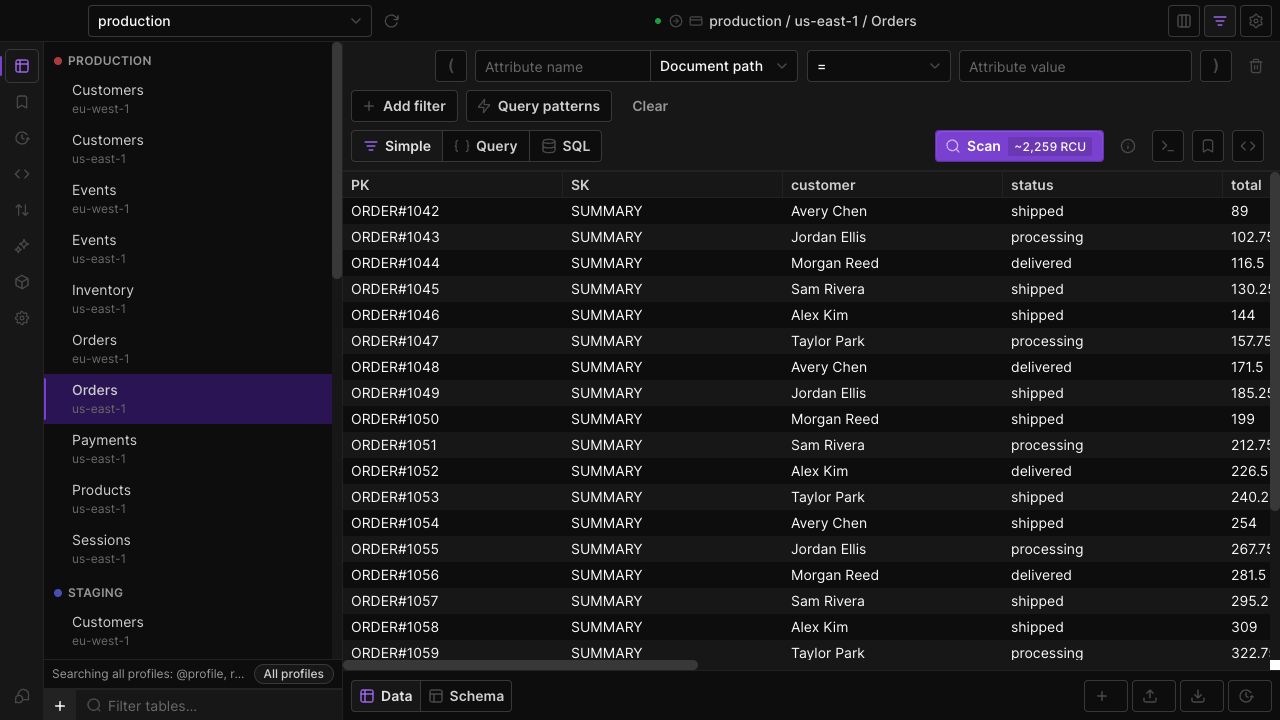
Explore data
Semantic and vector search
Search an existing DynamoDB vector index with text, a pasted embedding, or an item already in your table. Inspect ranked matches without leaving Dynobase.
New in 3.0Visual JSON path filtering
Explore an item's maps and lists, filter by a nested value, and bring the attributes you care about into the data grid as saved columns.
New in 3.0Schema explorer
Discover nested paths, missing attributes and mixed types from the items in your table. Explore loaded results or request a bounded sample explicitly.
New in 3.0Visual item diff
Compare two DynamoDB items side by side, follow changes into nested attributes, or review a saved before-and-after snapshot from item history.
New in 3.0Global table search
Find tables across AWS profiles and regions from one command palette. Narrow by profile or region, then open the result in the current tab or a new one.
Query and edit
Advanced filters and favorites
Combine visual filter groups, choose operators for real-world data, and save parameterized favorites that prompt for values when you run them.
New in 3.0Scan estimates and controls
Review a scan's estimated read usage, set practical limits, and resume incomplete work from a compact status line beside your results.
New in 3.0Bulk editing and item history
Apply attribute changes to selected DynamoDB items or matching results, review the scope before writing, and inspect recorded item changes afterward.
New in 3.0Copy items between tables
Copy selected items to another DynamoDB table, map their keys to the destination, and choose whether existing items should be skipped or overwritten.
New in 3.0PartiQL writes and transactions
Run PartiQL INSERT, UPDATE and DELETE statements in Dynobase. Review writes before execution and choose a batch or a supported transaction when working with multiple statements.
Manage tables
On-demand backup manager
List, create, restore and delete DynamoDB on-demand backups from the table's context menu. Keep recovery preparation close to your everyday data work.
New in 3.0Indexes, replicas and table settings
Create and remove global secondary indexes, follow backfill progress, and manage replicas, tags and resource policies from Dynobase's table settings.
New in 3.0Metrics, streams and live refresh
Inspect CloudWatch metrics, tail DynamoDB Streams, or refresh your data grid automatically. Choose the view that matches the question you are investigating.
Automate work
MCP server for AI tools
Connect compatible MCP clients to the running Dynobase app. Let them inspect tables and query data through your existing AWS profiles, with writes disabled by default.
New in 3.0Scheduled local exports
Schedule DynamoDB exports to local JSON or CSV files. Choose an interval, destination and retention count, then inspect the most recent run in Dynobase.
New in 3.0S3 import and format detection
Prepare an S3 import with format detection and support for converting Dynobase exports into a compatible import format. Review the destination before starting the import.
New in 3.0Infrastructure and operation code
Generate CDK, CloudFormation or Terraform for a table, and carry supported data operations into application code or runnable scripts.
Workspace and design
Explore it in your own workspace.
Use your existing AWS profiles to get started.
Product Features
- New in Dynobase 3.0
- Semantic and Vector Search
- Schema Explorer
- Visual JSON Path Filtering
- Visual Item Diff
- MCP Server for AI Tools
- Use SQL with DynamoDB
- Import CSV To DynamoDB
- Import JSON To DynamoDB
- Export DynamoDB To JSON
- Export DynamoDB To S3
- Export DynamoDB To CSV
- DynamoDB Update Item
- DynamoDB Delete All Items
- DynamoDB Delete Item
- DynamoDB Create Table
- DynamoDB Delete Table
- DynamoDB Conditional Update