
Query and edit / NEW IN 3.0
Write SQL-style changes with context.
Run PartiQL INSERT, UPDATE and DELETE statements in Dynobase. Review writes before execution and choose a batch or a supported transaction when working with multiple statements.
Read and write in one workspace
Use SQL-style statements alongside the visual data grid. PartiQL writes extend the editor beyond SELECT queries.
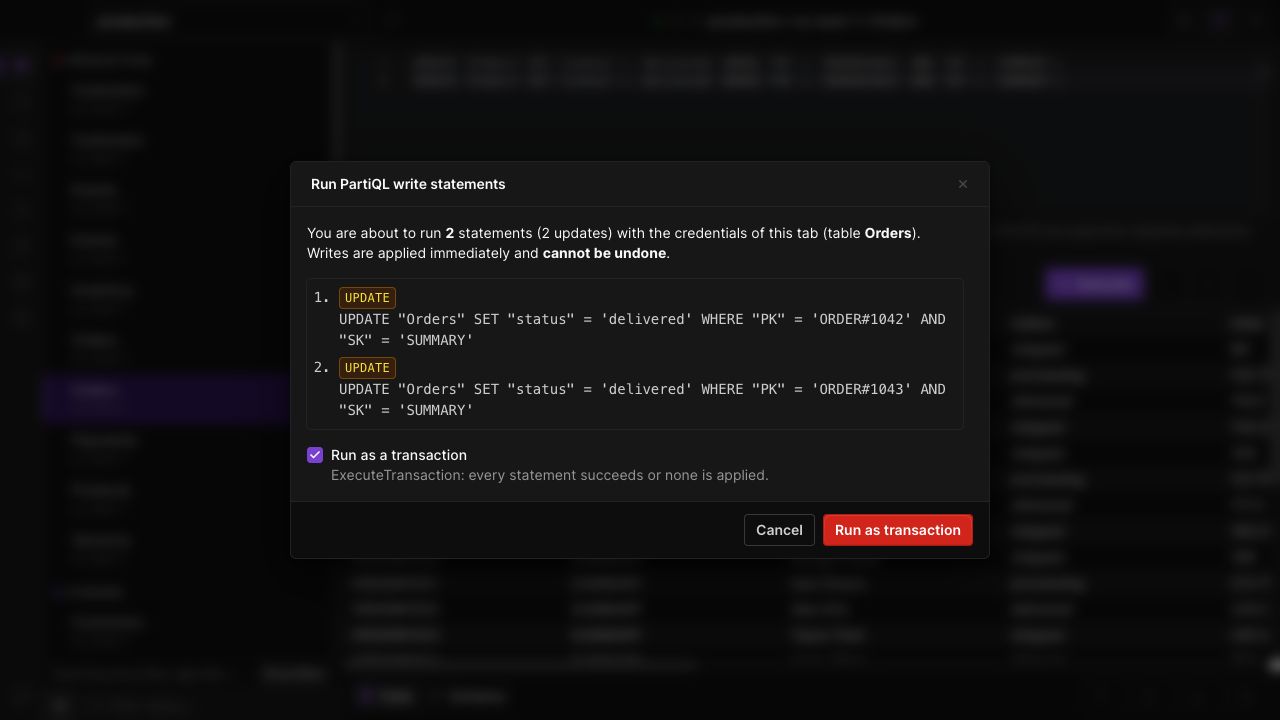
Review before writing
The confirmation step surfaces the statements and write behavior before execution. Keep your selected table, profile and region in view.
Choose execution behavior
Run supported statements as a batch or a transaction. Use a transaction when the writes must succeed together, subject to DynamoDB's transaction rules.
IN THE APP
How it works
Open Dynobase and follow these steps to use partiql writes and transactions.
- 01
Open PartiQL mode
Open a table and switch the query editor to PartiQL.
- 02
Write the statements
Enter INSERT, UPDATE or DELETE statements with the keys and values required for the intended change.
- 03
Review and execute
Choose the supported execution mode, review the write confirmation, then check the returned result or error.