
DynamoDB Streams: How They Work, With Lambda Examples

Written by Rafal Wilinski
Last updated: October 23rd, 2026
DynamoDB Streams is the change data capture feature of Amazon DynamoDB. Once you turn it on for a table, every insert, update and delete writes a stream record, and DynamoDB keeps those records for 24 hours. Each change appears in the stream exactly once, and the records for any one item come out in the order the item was changed. You read a stream with an AWS Lambda trigger (Lambda's reads are free) or with the Kinesis Client Library, and turning a stream on has no performance impact on the table.
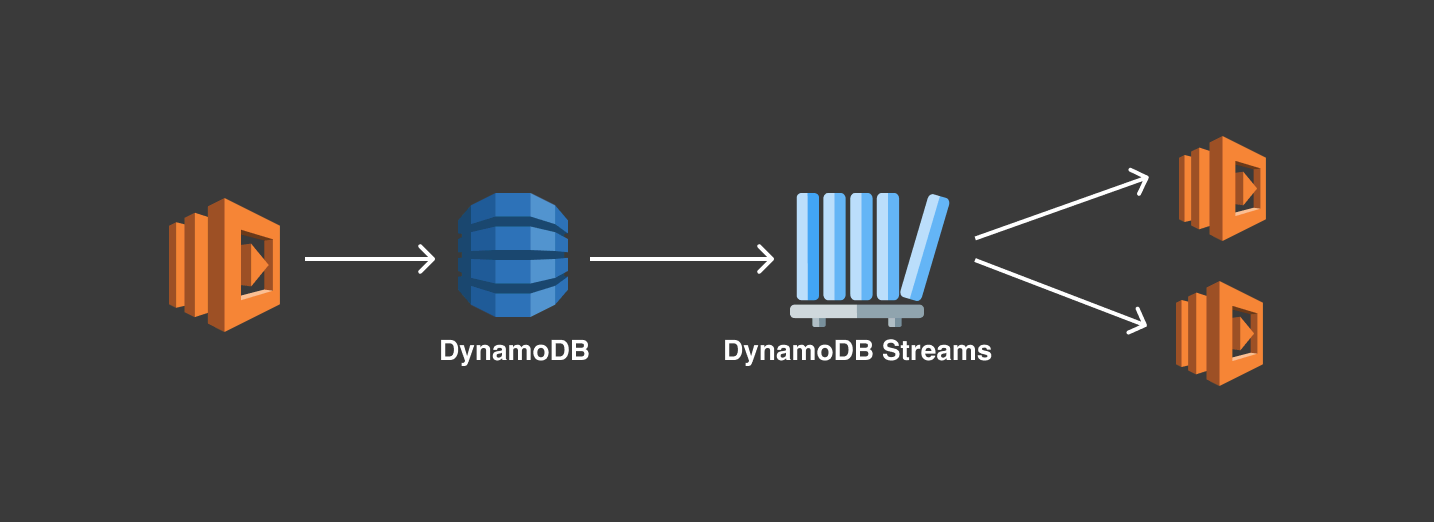
DynamoDB Streams at a glance
| Property | DynamoDB Streams |
|---|---|
| What it captures | Every item-level insert, update and delete. Writes that change nothing produce no record. |
| Retention | 24 hours |
| Order | Per item, in the order the item was modified. No order across items. |
| Duplicates in the stream | None. Each change is written once. |
| Delivery to your code | At least once with Lambda, so consumers must be idempotent |
| Latency | Near-real time |
| Record contents | Keys only, new image, old image, or both (StreamViewType) |
| Readers per shard | Up to 2 at a time (1 recommended on a global table) |
| Consumers | AWS Lambda, the DynamoDB Streams Kinesis Adapter for KCL, Amazon EventBridge Pipes, the Streams API |
| Cost | Per GetRecords call. Reads by Lambda triggers and by global tables replication are free. |
| Effect on the table | None. Records are written asynchronously, and stream reads are billed separately from table reads. |
How a DynamoDB stream works
A stream belongs to one table and has its own ARN, such as arn:aws:dynamodb:us-east-1:123456789012:table/Orders/stream/2026-10-20T08:00:00.000. The last part is a label DynamoDB assigns when the stream is created. DescribeTable returns the current stream as LatestStreamArn.
Every write that changes an item produces one stream record with a sequence number. A PutItem or UpdateItem that leaves the item exactly as it was produces no record, so rewriting an unchanged item won't fire a trigger.
Records are grouped into shards. Each open shard holds the records of exactly one table partition, so as DynamoDB adds partitions it adds shards, and the stream scales with the table. Shards are created, split and closed automatically, and a child shard has to be read after its parent to keep per-item order. Lambda and the Kinesis adapter track that lineage for you. If you call the API yourself, DescribeStream with a ShardFilter returns the children of a closed shard.
Streams have their own endpoint (streams.dynamodb.<region>.amazonaws.com, or the dual-stack streams-dynamodb.<region>.api.aws) and their own SDK client: @aws-sdk/client-dynamodb-streams in JavaScript, boto3.client("dynamodbstreams") in Python. For private access from a VPC, DynamoDB Streams supports interface endpoints (AWS PrivateLink) only, not gateway endpoints.
Turning a stream off closes its shards. Existing records remain readable until their individual 24-hour retention periods end; disabling a stream does not restart that clock. Turning the stream on again creates a new stream with a new ARN. Anything still pointing at the old ARN, such as a Lambda event source mapping, silently stops receiving records, so recreate those mappings afterwards.
Stream view types: what goes into each record
You choose the view type when you turn the stream on. It decides how much of the item each record carries:
StreamViewType | Each record contains | Choose it when |
|---|---|---|
KEYS_ONLY | The key attributes of the changed item | The consumer only needs to know which item changed, or reads the current item itself |
NEW_IMAGE | The whole item after the change | You copy or index the latest state somewhere else |
OLD_IMAGE | The whole item before the change | You archive or audit what was overwritten or deleted |
NEW_AND_OLD_IMAGES | Both versions of the item | You react to what changed, such as a status transition, or you aren't sure yet |
An INSERT record never has an old image and a REMOVE record never has a new image, whatever the view type. The view type of an existing stream can't be edited. To change it, turn the stream off and on again with the new type, which creates a new stream ARN.
How to enable a stream
In the console
Open the table, choose the Exports and streams tab, and under DynamoDB stream details choose Turn on. Pick a view type and choose Turn on stream.
With the AWS CLI
create-table accepts the same --stream-specification. Turning on a stream for a table that already has one returns a ValidationException.
With CloudFormation
Reference the stream elsewhere in the template with !GetAtt OrdersTable.StreamArn. A CDK version with a Lambda consumer attached is further down.
What a stream record looks like
This is one record as a Lambda function receives it. An order's status changed from PENDING to SHIPPED on a table whose stream uses NEW_AND_OLD_IMAGES:
eventNameisINSERT,MODIFYorREMOVE.dynamodb.Keysalways holds the primary key.OldImageandNewImageare present according to the view type.- Values are in DynamoDB JSON: every attribute is wrapped in a type descriptor (
S,N,L,M,SSand so on), and numbers arrive as strings. Convert them withunmarshall()from@aws-sdk/util-dynamodbor with boto3'sTypeDeserializer, as the handlers below do. To see a record as plain JSON, paste it into the DynamoDB JSON converter. ApproximateCreationDateTimeis Unix epoch time in seconds, rounded down. Don't use it to order changes, because two changes in the same second share a value.SequenceNumberorders records within a shard. It is also the identifier you return to Lambda to report a failed record.- Deletes made by Time to Live carry an extra
userIdentityfield, covered in the TTL section below.
To look at real records from your own table before you write a consumer, the Stream tab in Dynobase tails a table's stream, filters by event type and shows each record's old and new images. It reads the stream with GetRecords like any other consumer, so it counts as one of the shard's readers while it runs.
Ordering, duplicates and delivery guarantees
Inside the stream, DynamoDB guarantees two things:
- Each change is written to the stream exactly once.
- Records for one item (one primary key: the partition key, plus the sort key if the table has one) appear in the order the item was modified.
Nothing is guaranteed across items. Items that share a partition key can sit on different partitions, and so on different shards that are read in parallel.
Exactly once in the stream doesn't mean exactly once in your code. Lambda processes stream records at least once, and when it retries a batch, records that already succeeded can be delivered again. Make consumers idempotent: store the item version you last applied and write with a condition expression so a repeated or older change is ignored, or record an idempotency key with a TTL. The idempotency utility in Powertools for AWS Lambda does that bookkeeping for you.
Streams on global tables
Global tables in multi-Region eventual consistency (MREC) mode replicate through DynamoDB Streams, so every replica has a stream that is on and can't be turned off. Each replica's stream contains the changes applied in that Region, including replicated ones. Replication can merge several quick changes to an item into one write, so the streams in different Regions can differ slightly, although per-item order holds everywhere. To process only the changes written in one Region, store the writing Region in an attribute and filter on it.
Global tables in multi-Region strong consistency (MRSC) mode don't replicate through streams. You can turn a stream on for an MRSC replica, and every replica's stream is identical, including the order of records. The global tables guide covers both modes.
Processing a stream with AWS Lambda
Lambda is the usual consumer. You connect a function to the stream with an event source mapping (the trigger). Lambda polls each shard about four times a second, gathers records into batches and, by default, invokes the function with one batch per shard at a time. Lambda's reads from the stream aren't billed; you pay for the invocations. The step-by-step setup is in DynamoDB triggers with Lambda.
The function's execution role needs dynamodb:DescribeStream, dynamodb:GetRecords, dynamodb:GetShardIterator and dynamodb:ListStreams on the stream. The AWS managed policy AWSLambdaDynamoDBExecutionRole grants those plus CloudWatch Logs access, on every stream in the account; for least privilege, write your own policy scoped to the stream ARN.
A handler in Node.js
This handler runs on the nodejs24.x runtime as an ES module (index.mjs). It converts the images to plain objects, acts on status changes, and reports the first record it couldn't process, so Lambda retries from that record instead of the whole batch:
The return value only counts if the event source mapping has ReportBatchItemFailures turned on, as in the CLI command below. Bundle @aws-sdk/util-dynamodb with your function instead of relying on the SDK copy in the runtime, so its version doesn't change under you.
The same handler in Python
On the python3.13 runtime, boto3's TypeDeserializer does the conversion. Numbers come back as Decimal.
Connect the function to the stream
The execution role also needs sqs:SendMessage on the failure queue.
The same setup with the AWS CDK
DynamoEventSource grants the function read access to the stream, and SqsDlq grants it permission to send to the queue.
Event source mapping settings
| Setting | Default | Allowed values | What it does |
|---|---|---|---|
BatchSize | 100 | Up to 10,000 | Records per invocation. A batch is also capped at 6 MB. |
MaximumBatchingWindowInSeconds | 0 | 0 to 300 | How long Lambda waits to fill a batch before invoking. |
ParallelizationFactor | 1 | 1 to 10 | Concurrent batches per shard. Records with the same partition key stay in one batch, in order. |
StartingPosition | Required | TRIM_HORIZON or LATEST | Where a new mapping starts reading. |
FunctionResponseTypes | None | ReportBatchItemFailures | Lets the function return the first failed record instead of failing the whole batch. |
BisectBatchOnFunctionError | false | true or false | Splits a failing batch in two and retries each half. |
MaximumRetryAttempts | -1 (until the record expires) | 0 to 10,000 | Retries for a failing batch. |
MaximumRecordAgeInSeconds | -1 (until the record expires) | Up to 604,800 | Skips records older than this. |
DestinationConfig | None | SQS queue, SNS topic or S3 bucket | Where Lambda sends details of a batch it gives up on. |
FilterCriteria | None | Up to 5 filters (10 on request) | Drops records before they reach the function. |
TumblingWindowInSeconds | None | 0 to 900 | Carries state between invocations for windowed aggregates. |
Handle failures without blocking the shard
With the default settings, a record your function can't process is retried until it expires from the stream, and nothing behind it on that shard is processed in the meantime. One bad record can stall a shard for up to a day. Configure all four of these on every stream mapping:
- Report partial failures. Turn on
ReportBatchItemFailuresand return the sequence number of the first record that failed. If you return several, Lambda restarts from the lowest one, so stop at the first failure. - Bisect on error. With
BisectBatchOnFunctionError, a batch whose invocation fails is split in half until the bad record is isolated. Splitting doesn't use up retry attempts. - Cap retries and age. Set
MaximumRetryAttemptsandMaximumRecordAgeInSecondsto values your use case can live with. - Add an on-failure destination. When Lambda gives up on a batch, it sends a record of the failure to an SQS queue, SNS topic or S3 bucket. SQS and SNS receive only metadata (the shard ID and the first and last sequence numbers), so something has to read the actual records from the stream before they expire. An S3 destination also receives the full batch.
Use TRIM_HORIZON as the starting position for new mappings unless skipping the backlog is the point. A new mapping can take several minutes to start polling, and with LATEST it misses whatever is written in that window.
Watch the Lambda IteratorAge metric. It measures how long records wait in the stream before Lambda sends them to your function, and a steady climb means the function is failing or can't keep up with the write rate.
Filter events before they reach the function
The event source mapping evaluates filters before invoking anything, so records that don't match never reach the function and cost no invocation. A record that doesn't match is skipped for good; it isn't held back for later. Filters use EventBridge pattern syntax and match the structure of the stream record. Fields inside one pattern must all match, and separate patterns are combined with OR (up to five per mapping by default).
Only new items:
Only changes that leave an order SHIPPED:
Only deletes made by TTL:
In FilterCriteria, each pattern goes in as an escaped string, as in the CLI command above. Two catches: numeric operators such as "numeric": [">", 100] don't work on DynamoDB records, because numbers arrive as strings, and exists only matches leaf values, so test { "status": { "S": [{ "exists": true }] } } rather than the attribute itself.
Processing a stream without Lambda
- Kinesis Client Library (KCL). The DynamoDB Streams Kinesis Adapter lets a KCL application read a stream as if it were a Kinesis data stream, with shard lineage, load balancing and checkpointing handled for you. AWS recommends KCL 3.5 or later with the AWS SDK for Java 2.x; KCL 1.x reached end of support on January 30, 2026. KCL keeps its leases and checkpoints in a DynamoDB table of its own, and its
GetRecordscalls are billed. - Starting from a point in time. Since October 15, 2026, a KCL application on adapter version 2.5.0 or later can start reading at a timestamp (
AT_TIMESTAMP) instead of only the oldest retained record (TRIM_HORIZON) or the newest (LATEST). That helps when resuming after an outage, replaying a window for debugging, or catching up after a restore. Records older than 24 hours are still gone. - Amazon EventBridge Pipes. To send changes to a target other than Lambda, such as an SQS queue, a Step Functions state machine or an event bus, or to enrich them on the way, a pipe can read the stream without custom polling code.
- The Streams API.
ListStreams,DescribeStream,GetShardIteratorandGetRecords. EachGetRecordscall returns at most 1,000 records or 1 MB, and a shard iterator expires 15 minutes after you get it. You also have to follow shard lineage yourself, which is why AWS recommends the Kinesis adapter instead.
Limits to design around
- Two readers per shard. Up to two processes can read the same shard at the same time; more cause throttling. Every Lambda function with a trigger on the stream counts, as does a KCL application or a pipe. On a global table, AWS recommends a single reader. To fan out to more consumers, have one function publish to SNS or EventBridge, or use Kinesis Data Streams for DynamoDB.
- 24 hours of retention. A consumer that falls more than a day behind loses records. Kinesis Data Streams for DynamoDB keeps records for up to a year.
- Same Region only. A Lambda trigger can't read a stream in another Region. Another account can read it through a resource-based policy, covered next.
Who can read a stream: IAM and resource-based policies
Stream access uses the same dynamodb: actions as table access, scoped to the stream ARN, for example arn:aws:dynamodb:us-east-1:123456789012:table/Orders/stream/*. Since March 2024 you can also attach a resource-based policy to a stream, and since January 2026 a Lambda function in one account can have an event source mapping on a stream in another account when the stream's policy allows the function's execution role:
A stream policy can only be attached to a stream that already exists, and a recreated stream is a new resource that needs it again. In CloudFormation, StreamSpecification has a ResourcePolicy property that keeps the two together. AWS walks through the cross-account setup in Share access with cross-account Lambda functions.
Since August 2026, streams can also carry their own tags, separate from the table's, for tag-based (ABAC) IAM conditions. Stream records are encrypted at rest with the same key as the table.
How much DynamoDB Streams cost
Turning a stream on is free, and an idle stream costs nothing. You pay for reads: each GetRecords call is one streams read request unit, whether it returns 1,000 records or none, and it is billed separately from table reads in both capacity modes. GetRecords calls made by Lambda triggers and by global tables replication are free, so a stream consumed only by Lambda costs nothing beyond the Lambda invocations. KCL applications and other custom readers pay per call after a monthly free tier. Rates per Region are on the DynamoDB pricing page.
TTL deletes in the stream
When Time to Live deletes an expired item, the stream gets a normal REMOVE record with an extra field:
Deletes made by your own code don't carry it, which is how a consumer tells an expiry from a deletion. Filter on it (the pattern is above) to archive expired items to S3 or clean up related data. In a global table, only the Region where TTL deleted the item marks the record this way; the replicated deletes in other Regions look like ordinary deletes. Setup and timing are in the DynamoDB TTL guide.
DynamoDB Streams vs Kinesis Data Streams for DynamoDB
DynamoDB can also send item changes to a Kinesis data stream in your account. You can turn on both for the same table.
| DynamoDB Streams | Kinesis Data Streams for DynamoDB | |
|---|---|---|
| Retention | 24 hours | Up to 1 year |
| Readers | Up to 2 per shard | Up to 5 per shard, or 20 with enhanced fan-out |
| Order | Guaranteed per item | Not guaranteed; reorder with the record timestamp |
| Duplicates | None | Occasional |
| Consumers | Lambda, KCL adapter, EventBridge Pipes | Lambda, KCL, Amazon Managed Service for Apache Flink, Amazon Data Firehose, AWS Glue streaming ETL |
| Pricing | Per GetRecords call, free for Lambda | One change data capture unit per write (per 1 KB), plus the Kinesis stream's own charges |
DynamoDB Streams is the simpler choice for Lambda triggers and most event-driven work. Kinesis Data Streams fits when you need more than two consumers, more than 24 hours of retention, or delivery through Firehose or Flink. The details are in DynamoDB Streams vs Kinesis Data Streams.
What DynamoDB Streams are used for
Streams keep the code that writes an item small while other functions react to the change afterwards, each with its own permissions and failure handling.
Replicating data
Copy changes to another DynamoDB table in the same Region, a relational database or S3. For copies in other Regions, global tables replicate for you.

Search and analytics
A function can index each change into an OpenSearch or Elasticsearch cluster. For Amazon OpenSearch Service there is a managed alternative, the zero-ETL integration: it runs on OpenSearch Ingestion, loads a first snapshot through an export to S3 (which needs point-in-time recovery) and then follows the table's stream. The zero-ETL integrations with Amazon Redshift and SageMaker Lakehouse are not real time; they typically refresh every 15 to 30 minutes.

Content moderation
When a user uploads a message or an image, a function picks up the new item, checks it with Amazon Rekognition or Amazon Textract, and writes the verdict back or deletes the item.

Notifications
Send a welcome email when a user signs up, or a push message when an order ships, through Amazon SES or Amazon SNS.
Aggregates and read models
Keep counters, totals or a denormalized view up to date as items change. Tumbling windows of up to 15 minutes let a function carry state across invocations for the same shard.
Auditing and archiving
Write every change, or only the TTL deletes, to S3 as an audit trail or a cold archive.
Best practices
- Make every consumer idempotent. Lambda delivers stream records at least once.
- Configure partial batch responses, bisecting, retry and age limits, and an on-failure destination on every mapping.
- Filter in the event source mapping rather than in code, so records you don't need cost no invocation.
- Keep one or two consumers per stream and fan out from there.
- Use
NEW_AND_OLD_IMAGESunless record size matters to you. It is the only view type that shows what changed. - Start new mappings at
TRIM_HORIZON, and alarm onIteratorAge. - Remember that turning a stream off and on creates a new ARN, and update every trigger that used the old one.
Frequently Asked Questions
What is a DynamoDB stream?
How long does a DynamoDB stream keep records?
Do DynamoDB Streams guarantee exactly-once delivery?
How much do DynamoDB Streams cost?
GetRecords call, except calls made by Lambda triggers and by global tables replication, which are free. Rates are on the DynamoDB pricing page.Can I filter DynamoDB stream events sent to Lambda?
{ "eventName": ["INSERT"] } or a pattern on dynamodb.NewImage. Records that don't match never invoke the function. Numeric operators don't work because DynamoDB numbers arrive as strings.How many consumers can read a DynamoDB stream?
Dynobase is a Professional GUI Client for DynamoDB
Start your 7-day free trial today