
Manage tables / NEW IN 3.0
Back up before the big change.
List, create, restore and delete DynamoDB on-demand backups from the table's context menu. Keep recovery preparation close to your everyday data work.
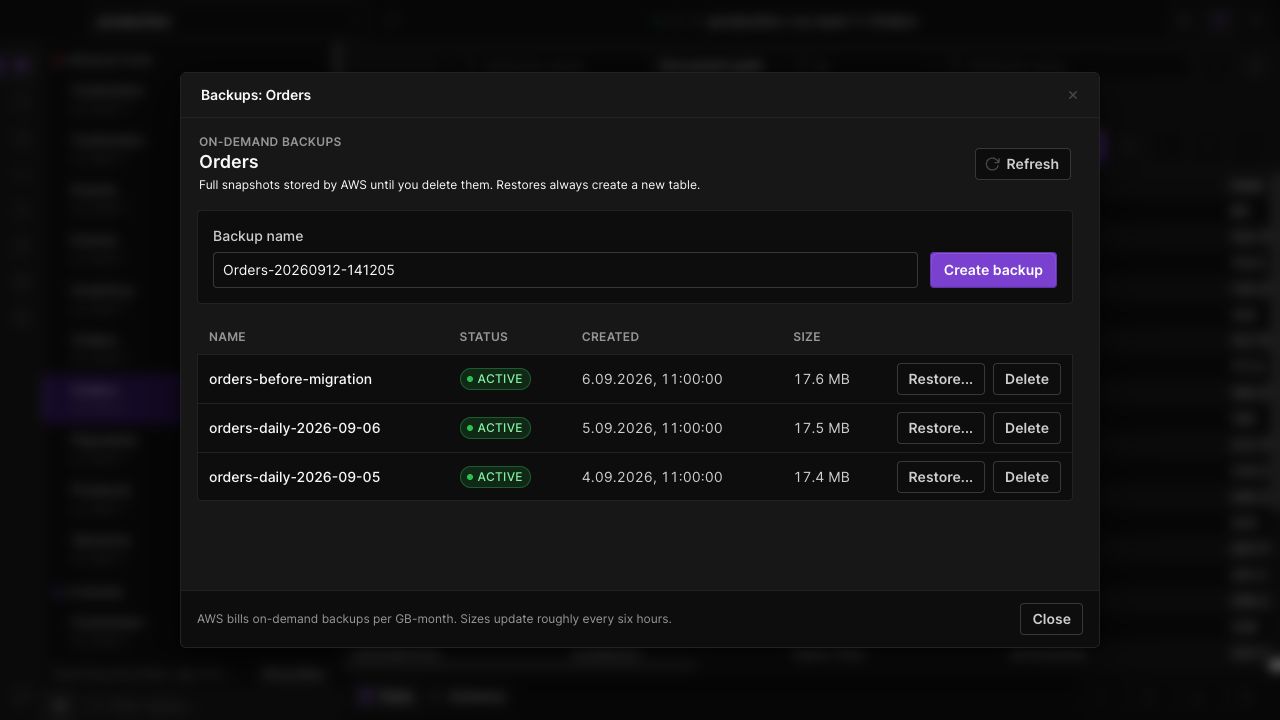
See available backups
Review names, creation times, sizes and statuses in a single list for the selected table.
Create a recovery point
Name an on-demand backup before a migration or a broad edit. Check its status before relying on it for recovery.
Restore deliberately
Restore a selected backup to a new table. Review the destination and monitor the operation rather than replacing the source table in place.
IN THE APP
How it works
Open Dynobase and follow these steps to use on-demand backup manager.
- 01
Open Backups
Right-click the table in the sidebar and choose its backups action.
- 02
Create or select a backup
Create a named backup, or select an existing backup whose status is ready for the intended action.
- 03
Restore when needed
Open Restore, enter the destination table details and confirm the request. Deletion is a separate, explicit action.