
Query and edit / NEW IN 3.0
Know when a scan is unfinished.
Review a scan's estimated read usage, set practical limits, and resume incomplete work from a compact status line beside your results.
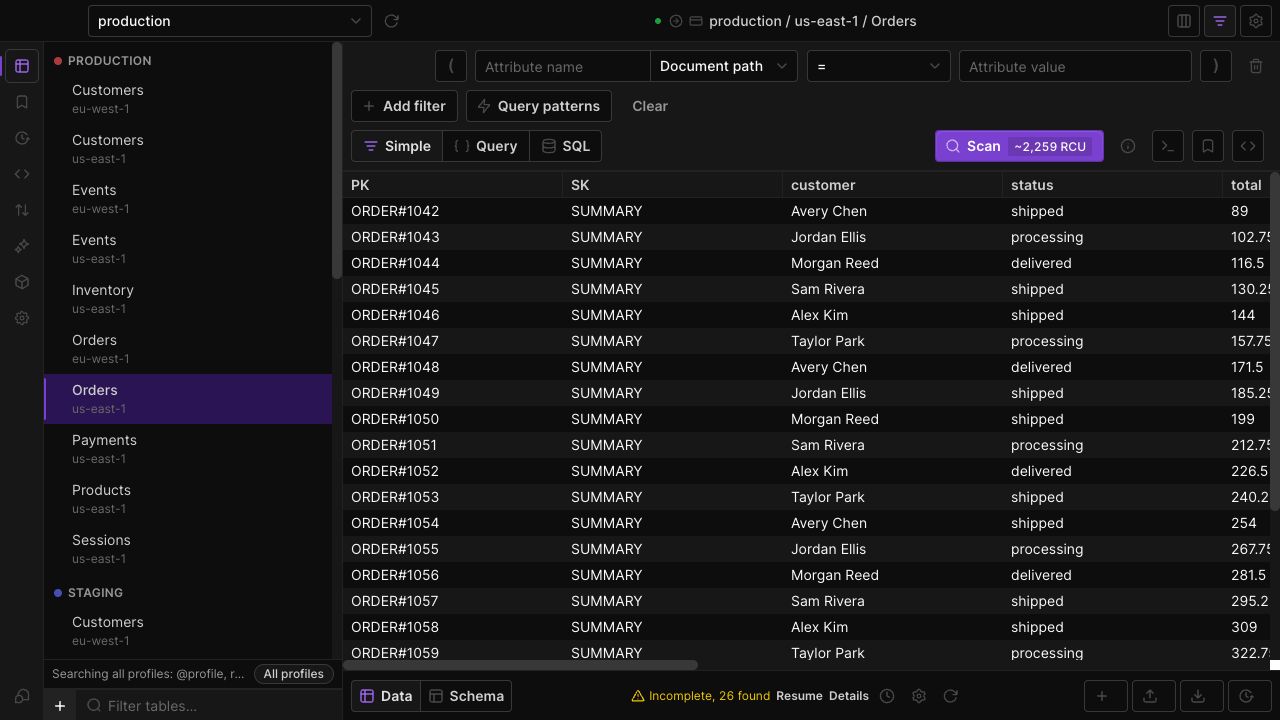
Estimate before you run
The Scan action includes a read-capacity estimate when available, keeping cost context near the action that starts the work.
Set a stopping point
Use match, evaluated-item, page, time and read-capacity limits to bound a scan. A stopped scan retains its continuation state where available.
Keep results in view
Fetched items and consumed capacity live in the footer. An incomplete state shows Resume and details, including why the scan stopped.
IN THE APP
How it works
Open Dynobase and follow these steps to use scan estimates and controls.
- 01
Review the estimate
Open the table and check the estimate next to Scan. Adjust filters and scan limits for the work you intend to do.
- 02
Run and watch the footer
Start the scan and inspect the fetched count and consumed capacity as results arrive.
- 03
Continue deliberately
If the scan is incomplete, open details to see the stopping reason, then use Resume when you want to continue.