
Explore data / NEW IN 3.0
See the shape of your real data.
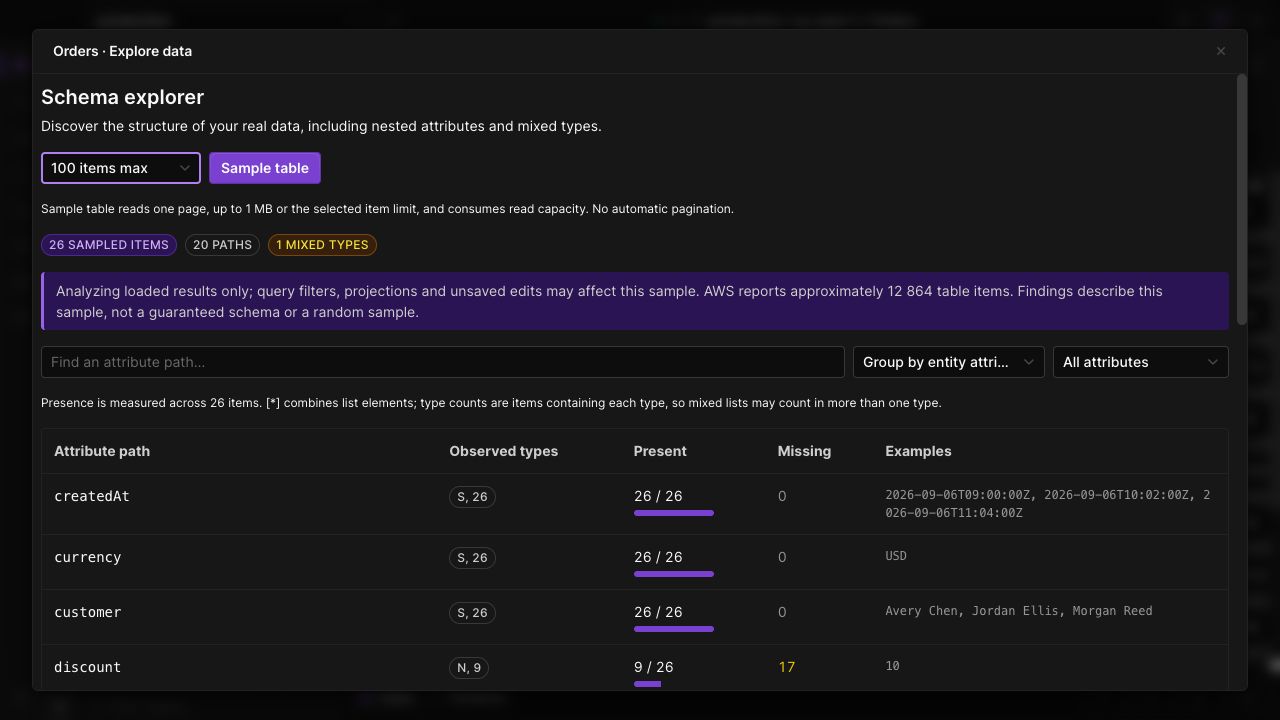
Discover nested paths, missing attributes and mixed types in your table. Explore loaded results or request a bounded sample.
Beyond the key schema
See the attributes actually present in your results, including nested maps and lists. Find fields that have different types across items.
Make coverage visible
Review how often a path is present, how often it is missing, and example values. Coverage describes the inspected items, with sample size kept visible.
Explore entity groups
Group the inspected data by an entity attribute to understand multiple record shapes in a single-table design. Search paths to focus on the fields you need.
IN THE APP
How it works
Open Dynobase and follow these steps to use schema explorer.
- 01
Open Explore data
Select your table, open Schema, and choose Explore data. The explorer starts with the items already loaded for that tab.
- 02
Inspect paths and types
Search for an attribute, inspect nested paths, and compare presence, missing values, types and examples.
- 03
Sample when needed
Explicitly request a bounded sample if loaded results are not enough. Review the sample coverage and reported read capacity.