
Explore data / NEW IN 3.0
The right table, a few keys away.
Find tables across AWS profiles and regions from one command palette. Narrow by profile or region, then open the result in the current tab or a new one.
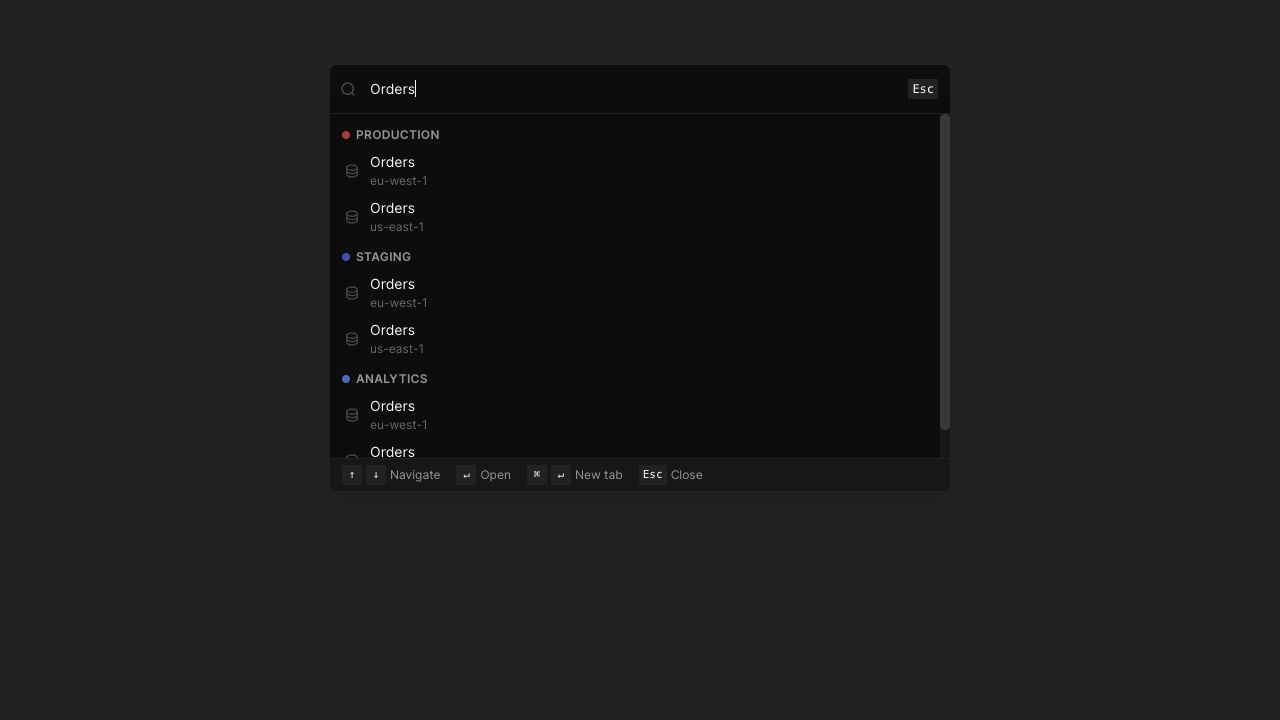
Search across profiles
All profiles is enabled by default. Use profile names and colors to distinguish matching table names across environments.
Narrow the results
Use @profile and region: qualifiers when you know the environment. Sidebar @ search is another route to the same cross-profile workflow.
Load regions as needed
Cached table lists appear immediately. Default and recent regions load in the background, with other regions loaded when expanded or through Load all regions.
IN THE APP
How it works
Open Dynobase and follow these steps to use global table search.
- 01
Open the palette
Press Cmd+K on macOS or Ctrl+K on Windows and Linux to open global table search.
- 02
Find your table
Type part of a table name. Add a profile or region qualifier to narrow the matches.
- 03
Choose where to open it
Open the selected result normally, or use Cmd/Ctrl+Enter to open it in a new tab.