
Query and edit / NEW IN 3.0
Move test data without a script.
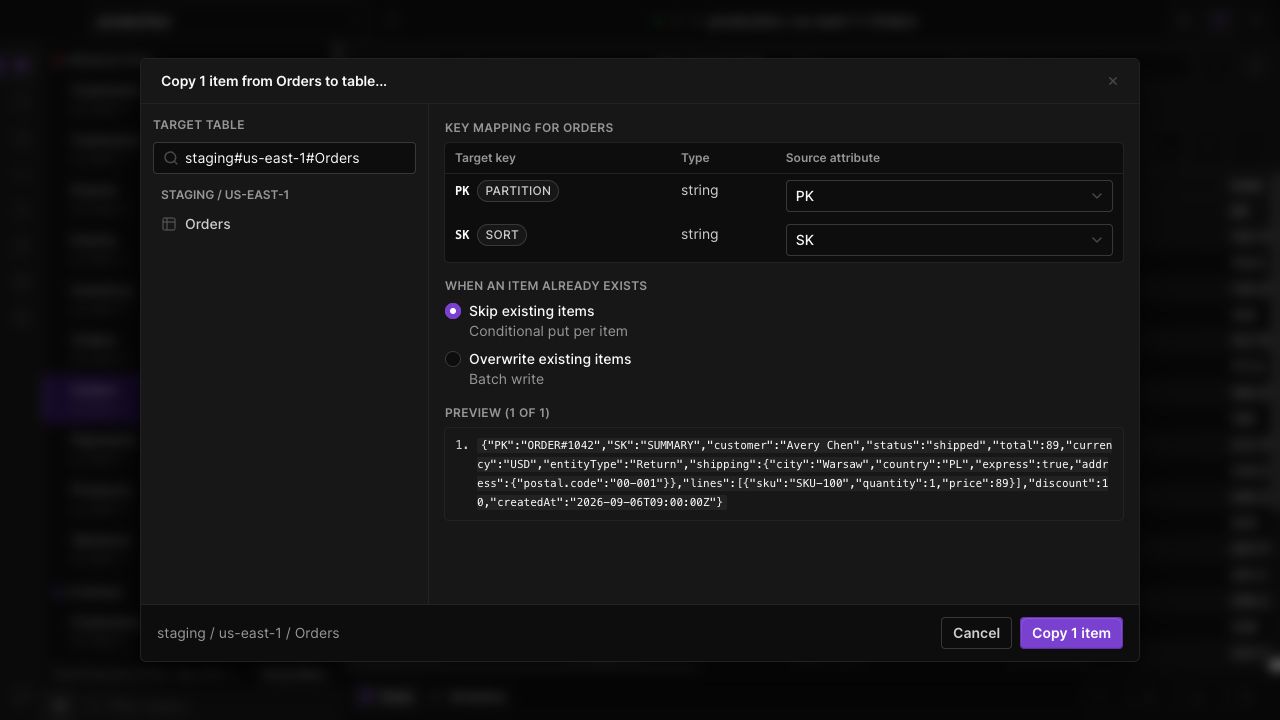
Copy selected items to another DynamoDB table, map their keys to the destination, and choose whether existing items should be skipped or overwritten.
Pick the destination
Choose a target from loaded profiles and regions. Keep the source and destination visible while preparing the copy.
Map different keys
Match source attributes to the destination's partition and sort keys. Review the mapping and preview before sending any items.
Handle existing records
Choose skip-existing or overwrite behavior explicitly. Review progress and failures instead of assuming every selected item was copied.
IN THE APP
How it works
Open Dynobase and follow these steps to use copy items between tables.
- 01
Choose source items
Select the rows you want to copy in the source table and open Copy to table.
- 02
Map the target keys
Select a destination table, review its key schema, and map suitable source attributes.
- 03
Choose conflict behavior
Select skip-existing or overwrite, review the preview, then start the copy and inspect its result.