dynobase-icon
Dynobase

Explore data / NEW IN 3.0

Find items by meaning.

Search an existing DynamoDB vector index with text, a pasted embedding, or an item already in your table. Inspect ranked matches without leaving Dynobase.

See how it works
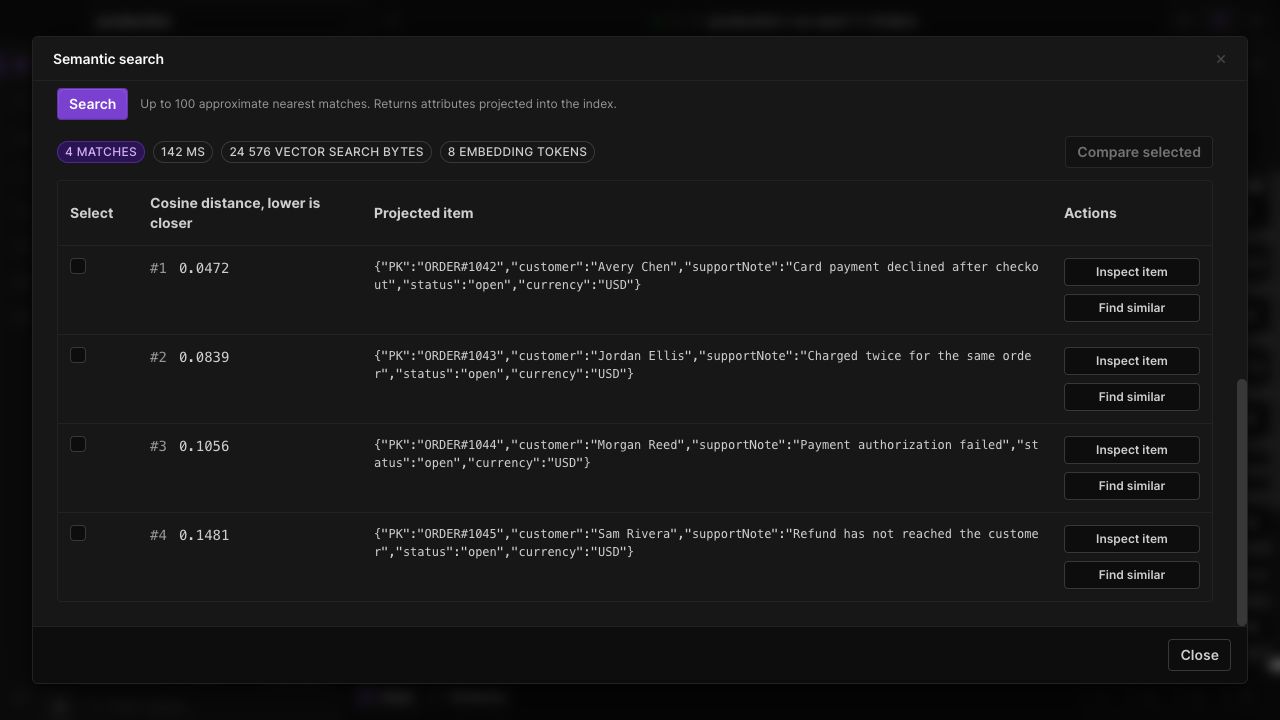
Semantic search results with distance scores, usage and item inspection controls.
Semantic search results with distance scores, usage and item inspection controls. Dynobase 3.0 with demo data.

Three ways to search

Generate a query embedding with Amazon Bedrock Titan, paste a compatible vector from another model, or choose Find similar on an item that already has an embedding.

Understand each match

See the index's distance score, inspect projected attributes, and select two results for a visual diff. Query usage and elapsed time appear alongside the results.

Keep the right scope

Select the index and its required partition value. Add exact-match filters for supported attributes in the index's search schema before running the search.

IN THE APP

How it works

Open Dynobase and follow these steps to use semantic and vector search.

  1. 01

    Choose an index

    Open a table, select Schema, then Semantic search. Choose an active vector index and review its dimensions and distance function.

  2. 02

    Prepare your query

    Enter text and choose the same embedding model and settings used by your indexed data, or paste a vector with matching dimensions.

  3. 03

    Search and inspect

    Set the number of matches, add any required partition value, and click Search. Inspect a result or compare two matches.

Questions, answered.

Does this search any table using natural language?

It searches compatible vector indexes. It does not translate arbitrary questions into DynamoDB queries or scan a table as a fallback. Text search embeds your query; it does not send table items to Bedrock.

What happens if my IAM role does not have access?

Dynobase identifies the failed operation and offers a copyable access request for your administrator. Pasting a compatible embedding avoids a Bedrock call, but every mode still requires DynamoDB access.

Are the scores confidence percentages?

No. They are distance-function scores. Smaller cosine or Euclidean distances rank first; larger dot-product scores rank first. Matching embedding dimensions alone does not guarantee that two models are compatible.

Your DynamoDB workflow, in one app.

Explore the tools in Dynobase 3.0.

Product Features

Download
/
Pricing
/
Member Portal
/
Privacy
/
EULA
/
Twitter
© 2026 Dynobase