
DynamoDB Hot Partitions: How to Find and Fix Them

Written by Rafal Wilinski
Published: October 23rd, 2026
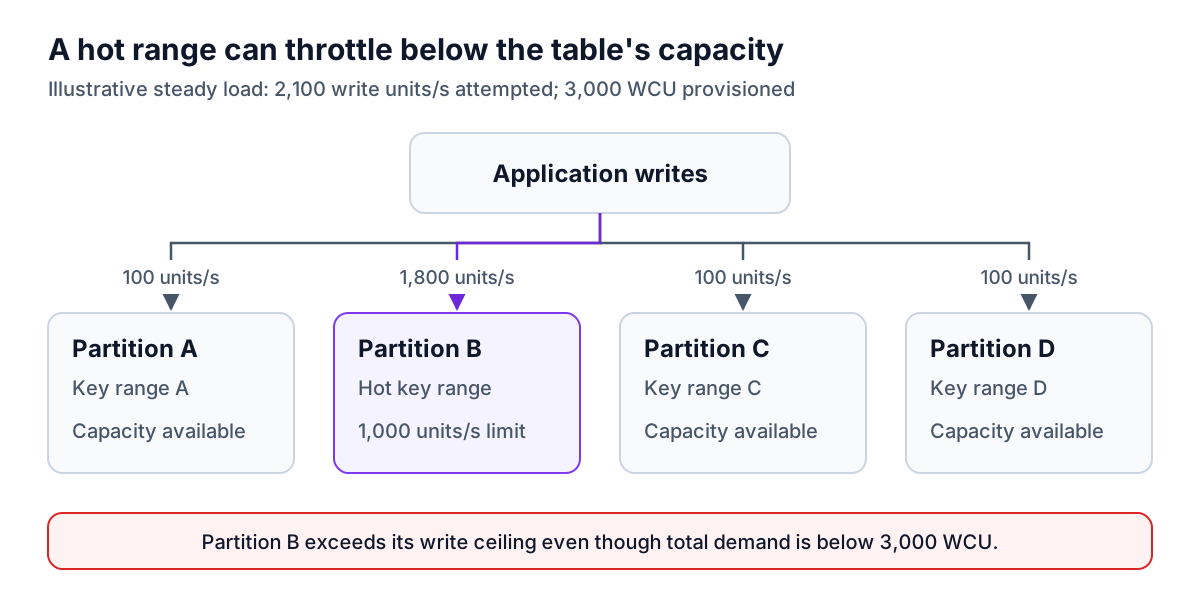
A DynamoDB hot partition receives more concentrated traffic than it can serve, causing throttling even when the table has spare capacity. Each physical partition is designed for 3,000 read units and 1,000 write units per second, in both on-demand and provisioned mode. Find the affected table or index through the error's throttling reason and resource ARN, identify the hot keys with Contributor Insights, then redistribute writes or reduce repeated reads.
What is a hot partition, and what are its limits?
A partition key is an application attribute; a physical partition is storage managed by DynamoDB. Several partition-key values can share a physical partition. Conversely, an item collection, all items sharing a partition key, can span physical partitions when the table has no local secondary index. A hot key is a heavily accessed key; a hot partition is the overloaded physical partition serving that traffic.
AWS's partition-key design documentation defines the following capacity envelope. These are capacity units, not an unconditional number of API calls:
| Operation on one partition | Units per operation | Rate at the documented ceiling |
|---|---|---|
| Ordinary write, item up to 1 KB | 1 write unit | 1,000 writes/s |
| Ordinary write, item over 1 KB and up to 2 KB | 2 write units | 500 writes/s |
| Strongly consistent read, item up to 4 KB | 1 read unit | 3,000 reads/s |
| Eventually consistent read, item up to 4 KB | 0.5 read unit | 6,000 reads/s in capacity-unit terms |
| Strongly consistent read, 20 KB item | 5 read units | 600 reads/s |
Transactional operations consume twice the units of ordinary writes or strongly consistent reads. Reads and writes have independent ceilings; read throttling does not imply that writes are also throttled. Lower table or index capacity can constrain throughput before a partition reaches its ceiling. See the DynamoDB limits reference for the separate API constraints and adjustable quotas.
Why do DynamoDB hot keys happen?
| Access pattern | How it concentrates traffic | Useful redesign |
|---|---|---|
Low-cardinality key such as ACTIVE or US | A few values receive most requests | Add a meaningful tenant, entity or shard dimension |
| Today's date as the partition key | Every new event targets today's collection | Combine the time bucket with a distributed key or shard suffix |
| One large tenant or celebrity item | Many distinct users request the same record | Cache reads; split write-heavy aggregates if semantics allow |
| One tenant with increasing timestamp sort keys | Every new write reaches the newest end of its key range | Write to multiple shard keys within the active time bucket |
| A GSI partitioned only by status | Distributed base-table writes converge on one index key | Redesign or shard the GSI key independently |
Count active keys and their traffic, not just the number of distinct keys stored. A table with millions of historical dates can still send nearly all writes to one date today. Smaller time buckets limit collection size but do not distribute simultaneous writes within the current bucket. This matters particularly for DynamoDB logging workloads.
Do adaptive capacity and split for heat fix hot partitions?
DynamoDB applies several different mechanisms automatically:
| Mechanism | What it does | What it cannot promise |
|---|---|---|
| Burst capacity | Uses accumulated unused capacity for temporary demand; AWS currently describes up to 300 seconds of unused capacity | A reserved burst budget: background work can consume it |
| Adaptive capacity | Directs more of the available capacity toward busy partitions; enabled automatically at no extra cost | Capacity beyond the table's limits or a physical partition's maximum |
| Split for heat | Divides a busy partition into smaller key ranges when that helps distribute sustained traffic | An immediate split, a specific completion time, or splitting one item |
Burst and adaptive capacity can absorb an uneven workload without an application change. Adaptive capacity can even isolate a hot item onto its own partition, but that item still has only one partition's capacity.
Splits follow key ranges. Without an LSI, DynamoDB can split an item collection at a sort-key boundary. With an LSI, it can split only between item collections, as described in partitions and data distribution. A logical partition key is therefore not always permanently limited to one physical partition, but one indivisible item is.
An increasing timestamp sort key creates another limit. After a split, all new writes would still hit the newest range. AWS's split-for-heat explanation says DynamoDB can detect this pattern and avoid an unhelpful split. Its summary of partition behavior describes adaptation taking several minutes, without a split notification. That is an observation, not a recovery-time guarantee.
If throttling stops as DynamoDB adapts, confirm that latency and retries recover. If it persists, diagnose the limiting resource before adding capacity.
How do you find a hot partition?
1. Read the throttling reason and resource ARN
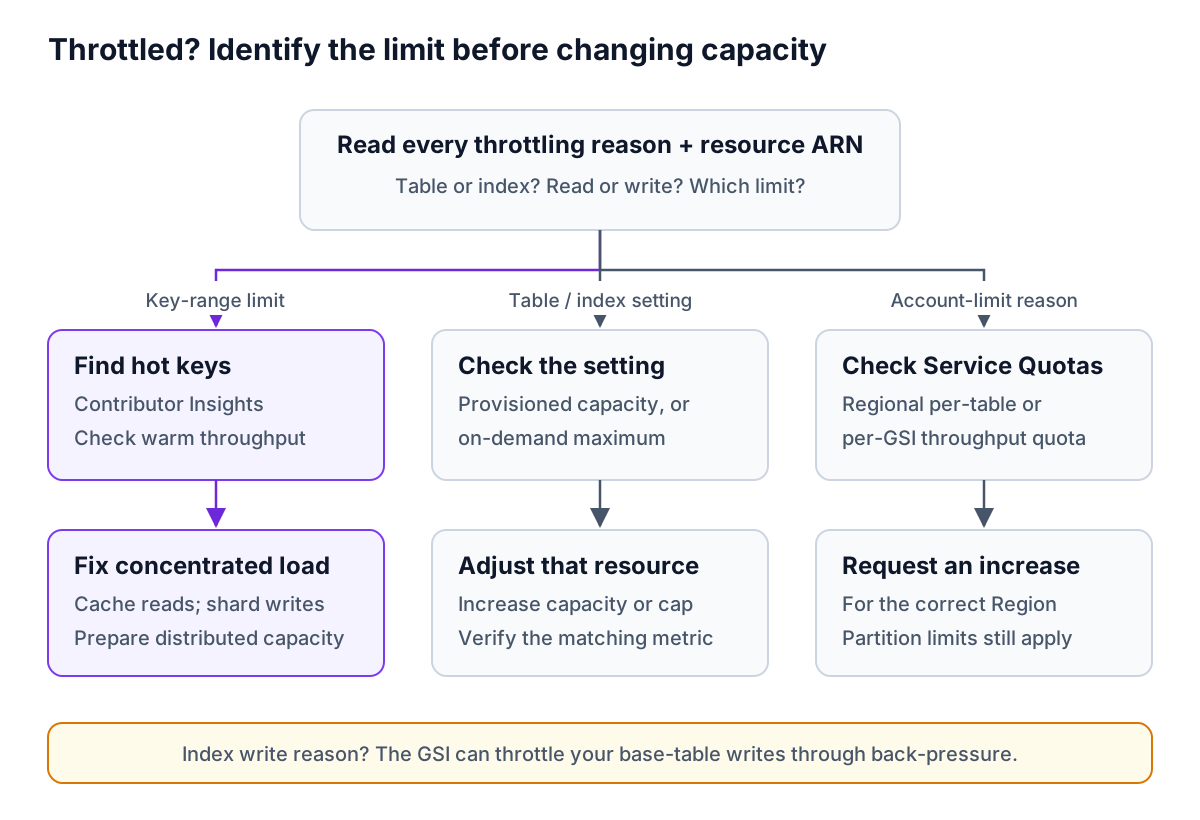
The throttling diagnostics introduced in August 2025 distinguish the resource, operation and limiting capacity. A reason combines Table or Index, Read or Write, and one of four suffixes. Each entry also contains resource, the affected table or index ARN. Inspect every entry.
| Reason suffix | Example | What to investigate |
|---|---|---|
KeyRangeThroughputExceeded | TableWriteKeyRangeThroughputExceeded | Hot key range or insufficiently prepared partition capacity |
ProvisionedThroughputExceeded | IndexWriteProvisionedThroughputExceeded | Provisioned capacity on the named table or GSI |
MaxOnDemandThroughputExceeded | TableReadMaxOnDemandThroughputExceeded | Your configured on-demand maximum |
AccountLimitExceeded | IndexWriteAccountLimitExceeded | The account's regional per-table or per-GSI throughput quota |
The four hot-partition codes are TableReadKeyRangeThroughputExceeded, TableWriteKeyRangeThroughputExceeded, IndexReadKeyRangeThroughputExceeded and IndexWriteKeyRangeThroughputExceeded. The API reference is authoritative for spelling, including MaxOnDemandThroughputExceeded.
Despite its name, AccountLimitExceeded here refers to an on-demand table or index reaching an account-configured regional throughput quota. It does not mean all on-demand tables share one aggregate throughput allowance. Raising that quota does not change partition limits.
SDK casing matters. Current JavaScript v3 typings and the botocore model expose ThrottlingReasons on ProvisionedThroughputExceededException and RequestLimitExceeded, but throttlingReasons on ThrottlingException. The entries use lowercase reason and resource. Check both list spellings, and update an older SDK if it omits diagnostic fields. These helpers were checked against the JavaScript error models and botocore service model.
Save this SDK v3 helper as throttling.mjs. It logs errors after the SDK's own retries and preserves the failure for its caller:
Save the boto3 equivalent as throttling.py. Diagnostic fields are at the top of ClientError.response, alongside Error, not inside it:
These helpers also work when the reason list is absent. They do not replace handling for partial batch successes: BatchWriteItem can return UnprocessedItems without throwing. Transactions can fail with TransactionCanceledException; inspect their cancellation details too. The general throttling guide and ProvisionedThroughputExceededException troubleshooting page cover retry handling.
2. Match the reason to a CloudWatch metric
Use namespace AWS/DynamoDB, statistic Sum, and a one-minute period for the per-reason throttle-event metrics. Select TableName for a table; add GlobalSecondaryIndexName for an index.
| Cause | Read metric | Write metric |
|---|---|---|
| Partition key range | ReadKeyRangeThroughputThrottleEvents | WriteKeyRangeThroughputThrottleEvents |
| Provisioned capacity | ReadProvisionedThroughputThrottleEvents | WriteProvisionedThroughputThrottleEvents |
| Configured on-demand maximum | ReadMaxOnDemandThroughputThrottleEvents | WriteMaxOnDemandThroughputThrottleEvents |
| Service quota | ReadAccountLimitThrottleEvents | WriteAccountLimitThrottleEvents |
Compare the incident window with consumed capacity, retries and latency. Consumed-capacity metrics omit rejected demand, so low utilization is not proof that the attempted workload is small. If comparing a one-minute capacity Sum with units per second, divide by 60. Table averages also hide short bursts and uneven key traffic.
The CloudWatch metrics view in Dynobase monitoring helps inspect a table's capacity and throttling history alongside its data. Use CloudWatch's per-reason metrics and Contributor Insights for the diagnosis above.
3. Find the keys with Contributor Insights
Enable Contributor Insights on the resource named in the error. UpdateContributorInsights accepts ContributorInsightsAction: "ENABLE" and ContributorInsightsMode: "THROTTLED_KEYS"; add IndexName when targeting a GSI. The API reference lists these fields.
THROTTLED_KEYS tracks throttled requests only. ACCESSED_AND_THROTTLED_KEYS, the default mode, also tracks successful access. Choose the latter when you need the busiest keys before throttling occurs. The Contributor Insights documentation distinguishes billable events from rule charges; throttled-only mode reduces event processing rather than making all monitoring universally free.
Compare the partition-key graph with the partition-plus-sort-key graph: one dominant item suggests caching or an aggregate redesign; many items under one dominant key suggest sharding. For GSI write throttling caused by insufficient write capacity, AWS documents that the most-throttled-items graph does not measure those writes. Use the GSI's most-accessed graph, which requires accessed-and-throttled mode, together with its throttle metrics. No bars in a throttled-only report are not conclusive evidence that a GSI is healthy.
How do you fix DynamoDB hot partitions?
Start with the smallest change that addresses the measured cause:
| Evidence | Action |
|---|---|
| A few repeatedly read items | Cache eligible reads or use eventual consistency if the application permits it |
| Sustained writes to one logical collection | Redesign the partition key or introduce write shards |
| Many keys become busy during a planned step increase | Check warm throughput and prepare table and GSI capacity |
IndexWrite... reason while writing the base table | Fix the named GSI's key distribution or capacity |
| Provisioned, maximum-throughput or quota reason | Adjust that limit; sharding alone cannot raise it |
For a new model, first see whether the query can target a naturally distributed entity, such as an order ID or customer plus time bucket. The partition-key guide covers that decision. In single-table design, evaluate every access pattern and GSI separately; a well-distributed primary key does not guarantee balanced indexes.
Write sharding: random versus calculated suffixes
Write sharding turns one logical key into several partition-key values, for example DAY#2026-10-23#00 through DAY#2026-10-23#11. It gives DynamoDB more key values to distribute. Twelve shard keys do not guarantee twelve physical partitions; DynamoDB controls placement and splitting.
| Method | Where an event goes | Reading one event |
|---|---|---|
| Random suffix | Choose a random shard for each new event | Retain the assigned shard or search all shards |
| Calculated suffix | Hash a stable event ID, then take modulo shard count | Recompute the shard from the event ID |
Both methods require querying every shard to read the complete logical collection, then merging results. AWS describes this tradeoff in its write-sharding pattern. Choose a hash of a well-distributed immutable identifier; hashing one celebrity customer ID still sends all that customer's events to one shard.
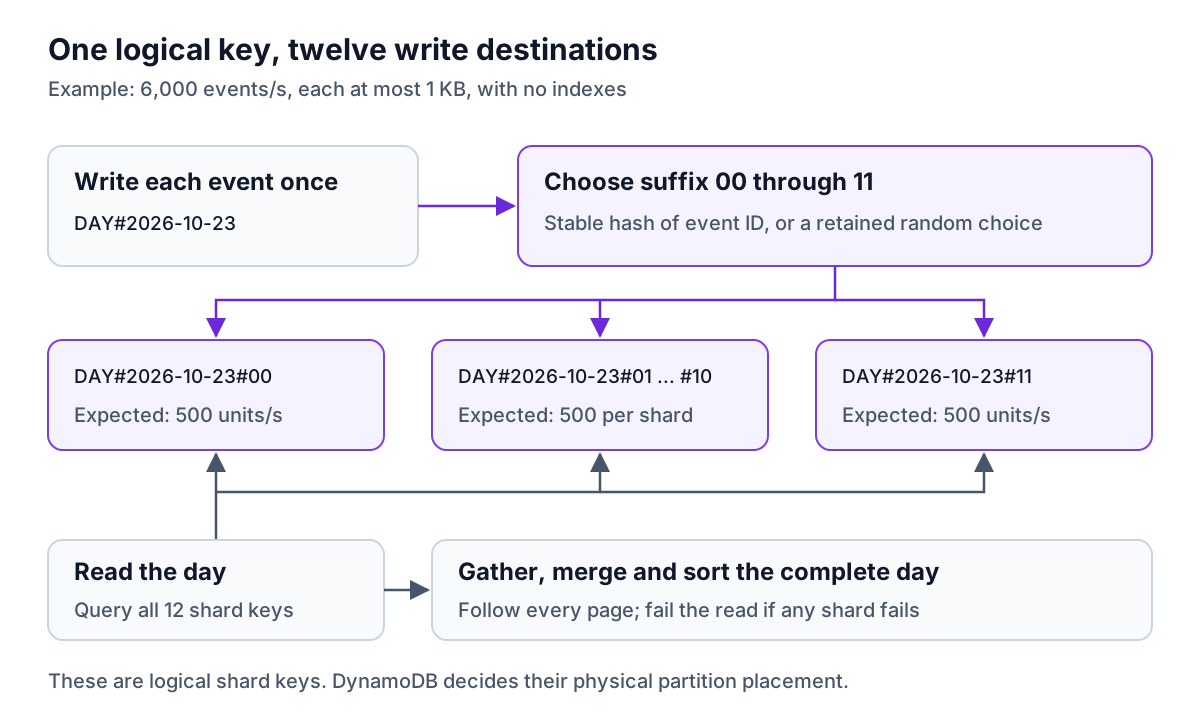
For random sharding, choose the shard once and retain the complete item across retries. Re-randomizing on retry can create another copy under a different partition key. Calculated sharding makes routing repeatable, but it does not make an increment or other non-idempotent operation safe to repeat.
Worked example: 6,000 events per second
Assume immutable, nontransactional event items of at most 1 KB including keys and attribute names, no indexes, and 6,000 writes/s to the current day. One unsplittable hot range cannot handle the required 6,000 write units/s. The arithmetic minimum is ceil(6000 / 1000) = 6 independently served ranges, but that leaves no allowance for skew or bursts.
Choose 12 application shards as a starting design target: uniform hashing gives an expected 500 write units/s per shard. That is headroom relative to the partition ceiling, not a measured performance guarantee. The table still needs capacity for all 6,000 write units/s, prepared ahead of the load; shards can initially share physical partitions. If item size grows above 1 KB, recalculate because ordinary write cost rounds up to the next KB. Any GSI adds its own write demand.
Runnable SDK v3 and boto3 write-sharding examples
These examples use table HotPartitionEvents, String keys pk and sk, and 12 shards. They demonstrate both suffix methods and complete scatter-gather reads. Each run uses a fresh demo namespace so you can run both languages repeatedly without mixing results. In an application, use a stable tenant/day namespace instead of that run ID, and retain the shard assignment across application-level retries.
Start an isolated DynamoDB Local instance and create the table with AWS CLI v2:
Install the dependencies in your example directory with npm install @aws-sdk/client-dynamodb @aws-sdk/lib-dynamodb and, for Python, python3 -m venv venv followed by venv/bin/pip install boto3. Save the diagnostic helpers above in that same directory.
Save as sharding.mjs and run node sharding.mjs on Node.js 22 or 24:
Save as sharding.py and run venv/bin/python sharding.py. It uses a low-level boto3 client shared by four query workers; boto3 resource objects should not be shared between threads. Both implementations hash the first four SHA-256 bytes as an unsigned big-endian integer, so their calculated shards agree.
Actual output from each implementation against DynamoDB Local on port 8000:
The writes are sequential to keep the correctness test readable. The read path uses bounded concurrency and follows every LastEvaluatedKey, as required by DynamoDB query pagination. A failed shard read fails the whole operation; silently returning only successful shards would give an incomplete result.
For a large collection, replace the in-memory merge with a bounded merge of sorted pages. Each shard needs its own continuation position, and prefetched but unreturned items must be retained or represented in the cursor. A single shard's LastEvaluatedKey is not a cursor for the whole logical collection. Strongly consistent shard reads also do not give a transactionally consistent snapshot across all shards while writes continue.
Version the routing scheme when changing the shard count. Moving from modulo 12 to modulo 24 changes where some existing IDs would be looked up. Keep the old layout readable during migration, backfill deliberately, and deduplicate by a stable event ID if both layouts can contain the same event.
Cache hot reads with DAX or ElastiCache
DAX can serve repeated eventually consistent reads from its cache. It passes strongly consistent and transactional reads to DynamoDB without caching those results, so it cannot remove their partition load. Its consistency model also distinguishes the item cache from the query cache; writes do not immediately invalidate cached query results.
Use an application cache such as ElastiCache when you need explicit control over cached objects, expiration and invalidation. A cache-aside strategy reads DynamoDB on a miss and caches the result. Coalesce concurrent misses for the same key and consider staggered expiration so a popular key's expiry does not send every reader to DynamoDB at once.
For an illustrative 10,000 reads/s workload, a 95% hit rate leaves 10000 × 0.05 = 500 reads/s reaching DynamoDB, before refreshes or other traffic. This is arithmetic, not a promised hit rate. Caching does not fix a write-heavy item, and the application's freshness requirements decide which reads are eligible.
Buffer and aggregate write bursts
A durable queue before DynamoDB lets consumers limit concurrency and smooth a temporary spike. It changes when writes become visible, so monitor backlog age and define acceptable delay. Sustained arrivals above the drain rate keep growing the backlog; a queue alone cannot repair that capacity mismatch.
For metrics or counters, combine several events into one update when the application can accept delayed aggregation. Retain durable source events and make aggregation replay-safe, using event IDs or checkpoints so retries do not double-count. Sharded counters are another option: update several counter items and sum them on read, accepting that an ordinary multi-item read is not an atomic total. A larger BatchWriteItem request still spends units per item and can still target the same hot key range.
Prepare warm throughput for a planned spike
Warm throughput describes how much throughput a table or GSI can support immediately. Inspect WarmThroughput in DescribeTable. To prepare a higher level, UpdateTable accepts WarmThroughput.ReadUnitsPerSecond and WriteUnitsPerSecond; a GSI has its own warm-throughput setting under GlobalSecondaryIndexUpdates. Pre-warming is billed, and requested increases cannot later be decreased.
Complete the increase before the event and confirm WarmThroughput.Status is ACTIVE. In provisioned mode, you must also allocate enough provisioned capacity. In on-demand mode, check configured maximums and service quotas. AWS's warm-throughput scenarios explicitly show that uneven traffic can throttle below the warm-throughput total. Pre-warming prepares distributed capacity; it does not raise one item's partition ceiling.
Why can an on-demand DynamoDB table still throttle?
On-demand changes capacity management and billing, not key distribution. It still has physical partition limits, regional per-table and per-GSI service quotas, and any maximum throughput you configure.
AWS documents new on-demand tables with initial support for 12,000 read units/s and 4,000 write units/s, with instant accommodation up to twice the previous peak. Going beyond twice the previous peak within 30 minutes can throttle; on-demand scaling guidance recommends pre-warming for planned jumps. For a workload whose keys are already balanced, this is a different fix from write sharding. See on-demand versus provisioned scaling for choosing a mode.
Can a hot GSI throttle writes to the base table?
Yes. A GSI has its own partitions and key distribution. If it cannot keep up with index updates, DynamoDB applies back-pressure to base-table writes, even when the base table has spare capacity. The throttling reason and resource ARN identify the index that needs attention. AWS documents this in GSI write throttling and back-pressure.
Consider base-table keys spread across order IDs, with a GSI using status = ACTIVE and an increasing creation timestamp. New orders can all converge on the newest range of the same index key. Adding random suffixes only to the base-table key does not fix this GSI.
If consumers query by customer, an index key such as ACTIVE#customer123 can distribute traffic while preserving that query. If consumers need all active orders, a calculated index key such as ACTIVE#07 requires scatter-gather queries across its shard suffixes. Store the sharded GSI key on each base-table item so index updates distribute accordingly. GSI queries are eventually consistent and cannot use ConsistentRead: true; adapt the local example's read settings when applying the pattern to an index. The GSI guide covers projections and query constraints.
Common mistakes that leave the partition hot
- Increasing total capacity without checking
KeyRangeThroughputExceededand the resource ARN. - Treating a date bucket or a large stored-key count as proof of evenly distributed current traffic.
- Adding randomness to the sort key when the immediate write-distribution problem needs more partition-key values.
- Expecting split for heat to divide one item or help an always-increasing write frontier under one partition key.
- Fixing the base key while keeping a low-cardinality GSI key.
- Reading only the first page of each shard, retrying with a new random shard, or changing the shard count without migration.
- Increasing retry concurrency until the same hot key receives even more traffic. Use bounded retries with backoff and address sustained demand.
What did DynamoDB Local verify?
Both language examples wrote and retrieved all 36 events for each sharding method, replayed an identical write without adding a duplicate, and retrieved a calculated-shard item directly. The two-item page limit forced pagination. The printed totals are actual local results, not a throughput benchmark.
DynamoDB Local ignores provisioned throughput, so it cannot reproduce managed-service partition throttling, split for heat, warm-throughput preparation or CloudWatch reporting. Error handlers were exercised with modeled and stubbed throttling errors, including both list spellings; no genuine throttling was induced locally. Validate production capacity with a representative key distribution and item sizes on the managed service.
After running the examples, stop the disposable instance with docker stop dynamodb-local.
Frequently Asked Questions
What is a DynamoDB hot partition?
How do I identify a DynamoDB hot key?
Does on-demand mode prevent hot partitions?
Does adaptive capacity fix every hot partition?
What is DynamoDB write sharding?
Can a hot GSI slow down writes to my table?
Dynobase is a Professional GUI Client for DynamoDB
Start your 7-day free trial today