
DynamoDB single-table design: a practical guide for 2026

Written by Rafal Wilinski
Published: October 23rd, 2026
DynamoDB single-table design stores several entity types in one table and groups related items so one Query can retrieve them together. You design the keys around application access patterns, such as loading a project with its members and tasks, rather than creating a table for each entity. It fits predictable operational queries; changing reports and ad hoc joins often need a different design. Since November 2025, GSIs can also use multiple native attributes as their keys, reducing the need for concatenated index-key strings.
The worked model below has ten access patterns, twelve seed items, complete AWS SDK for JavaScript v3 code, and Python equivalents for three queries. All ten patterns, including native multi-attribute GSIs and an index added after loading data, were run against DynamoDB Local 3.3.2 on October 23, 2026.
What does single-table design actually buy you?
A relational project screen might join projects, memberships, and tasks. DynamoDB does not execute that join. Instead, put the records needed together under the same partition-key value and distinguish them with sort keys. A query returns heterogeneous items; your application separates them by an entity attribute. AWS's single-table walkthrough describes this access-pattern-first approach.
This reduces application requests for that screen. It does not make arbitrary relationships queryable, enforce foreign keys, or turn a query into an atomic snapshot. A large collection requires pagination. The DynamoDB joins guide explains alternatives when related data cannot be colocated.
"Single table" is normally a design choice within a service or bounded business domain. It need not mean putting billing, telemetry, authentication, and every other service into one company-wide table.
Single-table design vs. multiple tables: when should you use each?
Use the following as a decision framework, then test the actual requests your application makes.
| Your workload | Starting choice | Reason |
|---|---|---|
| Stable screens repeatedly load several related entity types | Single table | An item collection can answer the screen's request directly |
| Entities are mostly fetched independently | Multiple tables, or a simple shared table | Complex overloading adds little benefit |
| GraphQL uses independent resolvers per entity | Often multiple tables | Colocation helps only if resolvers actually share or batch the read |
| Different services own different entities and deployments | Separate service tables | Clear ownership and independent operational settings |
| Rapidly changing filters, joins, and reporting requirements | Relational or analytical store | More DynamoDB tables do not create ad hoc query capability |
| Predictable operational reads plus occasional analytics | DynamoDB plus an analytical copy | Keep reporting work outside the application's request path |
| Team is learning DynamoDB | Start with a small model | Prove key queries and write consistency before adding indexes |
| Different backup, encryption, or replication requirements | Usually multiple tables | These boundaries are not defined by entity prefixes |
GraphQL itself is not an argument against single-table design. A resolver that loads a whole project view can benefit; unrelated field resolvers that each issue their own request will not automatically do so. Similarly, using multiple tables is not a failure to understand DynamoDB. Choose fewer requests only when the maintenance cost is justified.
How to design a DynamoDB data model
- List entities and access patterns. For each request, write its input keys, output fields, order, page size, consistency requirement, and expected traffic. Include writes, deletes, and uniqueness rules. "Search projects" is too vague; "list projects for tenant t1 in project-ID order" is implementable.
- Choose the base primary key. A base table has one partition-key attribute and optionally one sort-key attribute. A composite primary key identifies an item by the pair, not by the partition key alone. Prefixes such as
PROJECT#are application conventions, not DynamoDB operators. - Build item collections. Group items that are read together under one partition-key value. Separate large independent collections: our tenant's project directory comes from an index, while each project's tasks live under its own key. An item collection is a logical group, not a promise that every item stays on one physical partition.
- Add only the indexes the remaining patterns require. An overloaded GSI serves more than one entity type; an inverted index reverses a relationship's lookup direction. Record its projection, consistency, and write cost. The GSI guide and index comparison cover the operational choices.
- Validate with data and executable queries. Include empty results, multiple members, several statuses, tied timestamps, and enough items to exercise pagination. Verify every required field is available without an unplanned follow-up request. DynamoDB key terminology is useful when reviewing the resulting model with the team.
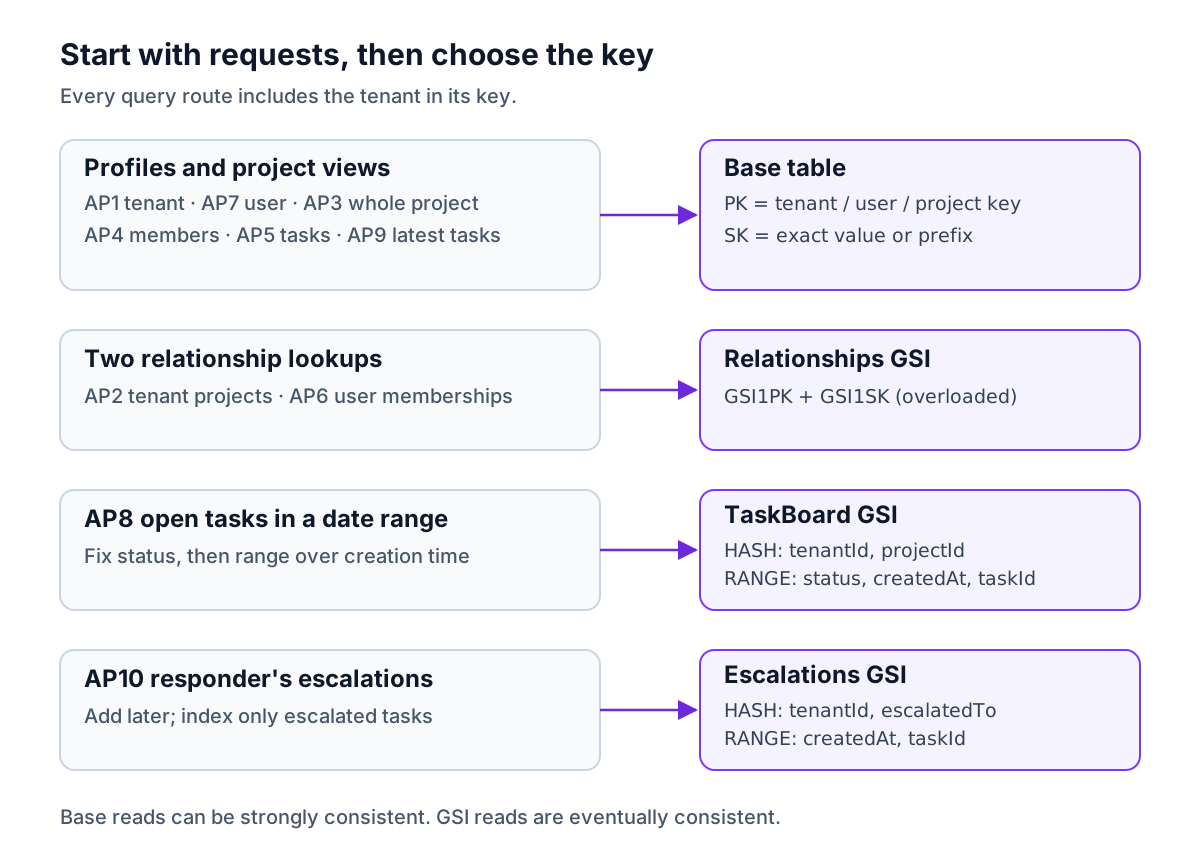
Worked example: a project-management SaaS
A tenant has projects and users. A user can belong to several projects, and a project can have several users. Each project has tasks. Membership stores a role; it does not duplicate the user's profile. An escalation assigns a task to a responder.
Every example belongs to tenant t1. Tenant-aware keys prevent accidental identifier collisions, but the application must still authorize tenant and project access. Never accept a client-supplied tenant key as proof of permission.
Ten access patterns before writing keys
The base-table reads below request strong consistency. GSI reads are eventually consistent. Each list needs a cursor in a production API; "all" means following every page, not an unbounded HTTP response.
| ID | Request and known input | Key or index | Result order |
|---|---|---|---|
| AP1 | Tenant profile by tenant ID | Base: tenant PK, SK = META | One item |
| AP2 | Projects belonging to a tenant | Relationships: tenant GSI1PK, PROJECT# prefix | Project ID |
| AP3 | Project details, memberships, and tasks | Base: project PK | SK, with entity prefixes |
| AP4 | Members of a project | Base: project PK, MEMBER# prefix | User ID |
| AP5 | Tasks in a project | Base: project PK, TASK# prefix | Creation time, then task ID |
| AP6 | Projects a user belongs to | Relationships: user GSI1PK, PROJECT# prefix | Project ID; membership records |
| AP7 | User profile by tenant and user ID | Base: user PK, SK = META | One item |
| AP8 | Open tasks in a project within a date range | TaskBoard: tenant + project, status + creation range | Creation time, then task ID |
| AP9 | Latest two tasks in a project, any status | Base: project PK, TASK# prefix, reverse | Newest first |
| AP10 | Escalations assigned to a tenant's responder | Escalations: tenant + responder | Creation time, then task ID |
AP4 and AP6 return relationship records with IDs and roles. If a screen also needs current user names or project names, fetch the corresponding metadata items, or deliberately duplicate those display fields and define how updates propagate. The access pattern must specify which contract it needs.
Full seed-item layout
These abbreviations keep the table readable: T = TENANT#t1, P1 = TENANT#t1#PROJECT#p1, P2 = TENANT#t1#PROJECT#p2, U1 = TENANT#t1#USER#u1, and U2 = TENANT#t1#USER#u2. D20 through D23 mean 2026-10-20T09:00:00Z through 2026-10-23T09:00:00Z. A dash means the attribute is absent, never an empty key string.
Every row also has tenantId = t1, its shown entity, and an id equal to the identifier in the first column. Task rows additionally carry taskId equal to id. The setup code expands every abbreviation into the actual stored value.
| Entity and id | PK | SK | GSI1PK | GSI1SK | Other attributes |
|---|---|---|---|---|---|
Tenant t1 | T | META | - | - | name: Acme |
User u1 | U1 | META | - | - | name: Ada |
User u2 | U2 | META | - | - | name: Ben |
Project p1 | P1 | META | T | PROJECT#p1 | projectId: p1, name: Launch |
Project p2 | P2 | META | T | PROJECT#p2 | projectId: p2, name: Docs |
Member p1/u1 | P1 | MEMBER#u1 | U1 | PROJECT#p1 | projectId: p1, userId: u1, role: owner |
Member p1/u2 | P1 | MEMBER#u2 | U2 | PROJECT#p1 | projectId: p1, userId: u2, role: editor |
Member p2/u1 | P2 | MEMBER#u1 | U1 | PROJECT#p2 | projectId: p2, userId: u1, role: owner |
Task a1 | P1 | TASK#D20#a1 | - | - | projectId: p1, status: OPEN, createdAt: D20, title: Write copy |
Task a2 | P1 | TASK#D21#a2 | - | - | projectId: p1, status: DONE, createdAt: D21, title: Choose logo |
Task a3 | P1 | TASK#D22#a3 | - | - | projectId: p1, status: OPEN, createdAt: D22, title: Fix billing, escalatedTo: u2 |
Task a4 | P2 | TASK#D23#a4 | - | - | projectId: p2, status: OPEN, createdAt: D23, title: API docs |
The native indexes use these existing attributes, with no GSI2PK or GSI3PK strings:
| Index | Partition-key attributes | Sort-key attributes, in order | Seed items indexed |
|---|---|---|---|
| Relationships | GSI1PK | GSI1SK | Two projects and three memberships |
| TaskBoard | tenantId, projectId | status, createdAt, taskId | a1, a2, a3, a4 |
| Escalations, added later | tenantId, escalatedTo | createdAt, taskId | a3 only |
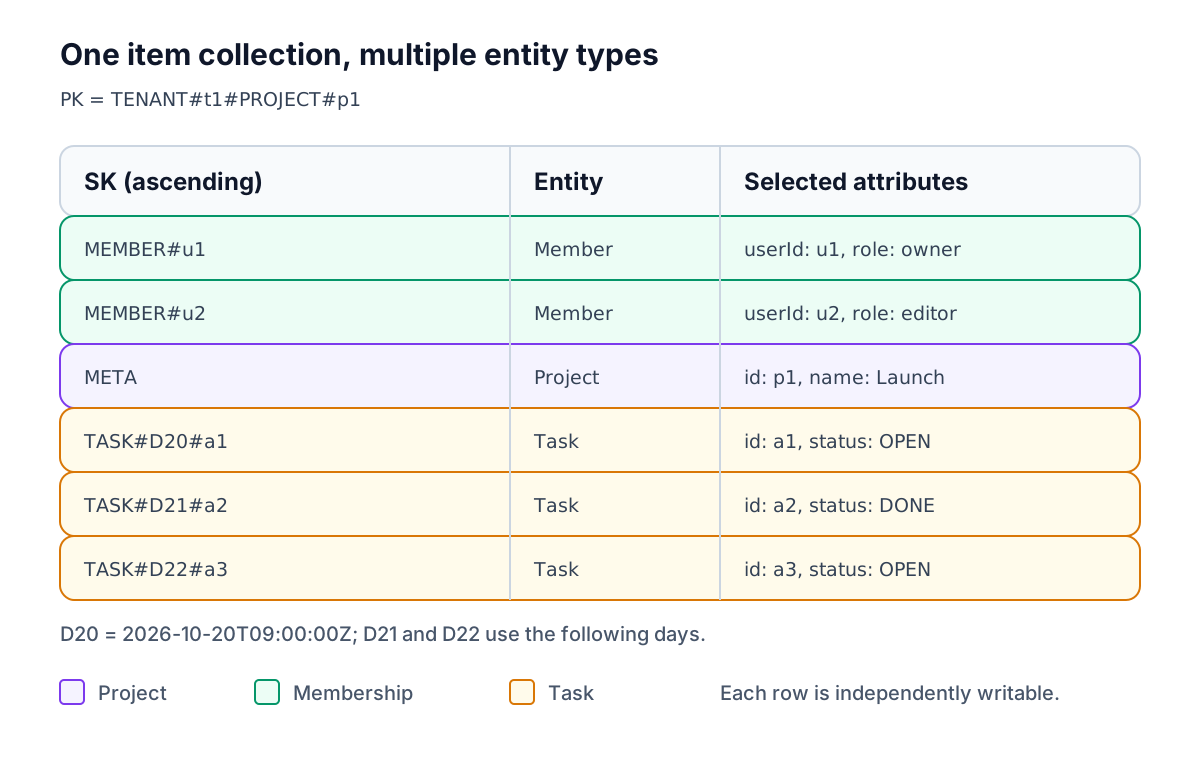
Multi-attribute GSI keys: what changed in 2025?
AWS introduced multi-attribute GSI keys on November 19, 2025. A GSI can have up to four partition-key attributes and four sort-key attributes. The base-table key schema is unchanged.
Previously, TaskBoard would commonly need synthetic fields such as GSI2PK = TENANT#t1#PROJECT#p1 and GSI2SK = OPEN#2026-10-20T09:00:00Z#a1. The native version indexes tenantId, projectId, status, createdAt, and taskId directly. Updating status changes the index placement without application code rebuilding GSI2SK.
The query rules still constrain access: specify equality for every partition component, then sort components from left to right. A range or begins_with condition must be last. AP8 fixes status before ranging over createdAt; you cannot skip status to get all tasks by time. AP9 therefore uses the base table's chronological task keys.
Native keys remove string-encoding work for suitable indexes. They do not remove access-pattern design, eventual consistency, or index writes. Synthetic keys remain useful for overloaded indexes like Relationships, where a common key attribute deliberately represents different entity relationships.
Run the complete model with SDK v3
Use Node.js 22 or 24, Docker, and curl. Run this in a new scratch directory, then save the following files there. DynamoDB Local added multi-attribute keys in 3.3.0; the tested image was 3.3.2. The examples explicitly use dummy credentials and localhost.
Shared client and pagination: client.mjs
queryAll follows LastEvaluatedKey even if a page is empty. The optional result cap is used for AP9, which has no filter. Production endpoints should usually return a page and a continuation cursor instead of accumulating an entire collection. DynamoDB evaluates up to 1 MB per query page before filtering; see the Query API.
Create the table and seed twelve items: setup.mjs
The two initial GSIs use ALL projections so every demonstrated response is self-contained. Production projections should include only what their access patterns need. AttributeDefinitions declares key attributes, not every attribute that items may contain.
Run node setup.mjs once on a fresh instance. It prints Seeded 12 items. Recreating the in-memory container resets the exercise; rerunning setup against the existing table correctly fails with a table-already-exists error.
Query access patterns AP1 through AP9: queries.mjs
Every call below sends QueryCommand through the shared helper. Exact-key profile requests AP1 and AP7 could instead use GetCommand; they use queries here to keep the mapping explicit. The output formatter shows only entity type and identifier, while the returned items contain the attributes listed above.
Run node queries.mjs. Actual local output:
The project query returns members before metadata because MEMBER# sorts before META. Sort order is a property of your keys, not of entity priority. No access pattern uses a Scan or a FilterExpression to find its records.
Evolve the model: add AP10 and let DynamoDB backfill
Suppose a responder dashboard arrives later. The tasks already have creation times, task IDs, and an optional escalatedTo; add Escalations on those native fields. DynamoDB builds index entries for qualifying existing items. It does not invent missing attributes or derive a responder from application history.
Save this as add-index.mjs and run node add-index.mjs after setup:
Actual local output:
This demonstrates backfill on previously written data. For a production rollout:
- Deploy writers that populate the new attributes correctly. If older items lack required values, migrate those items with concurrency checks so newer changes are not overwritten.
- Add the GSI and keep readers on the old route while it builds. Check
IndexStatusandBackfillingwithDescribeTable. - Monitor
OnlineIndexPercentageProgressand table write throttling. A poorly distributed index can affect table writes. Follow AWS's online index guidance. - Wait for
ACTIVE, check representative results and missing-key cases, then enable the new reader. The sample's short polling deadline is for Local; a real build may take much longer. - Retain the old access path until the new one is verified, then retire unused index fields or indexes separately.
Using existing native attributes avoids an application migration whose only purpose is constructing synthetic keys. It does not eliminate DynamoDB's index backfill. Changing a base-table primary key is a different migration: existing items must be written under new keys and old keys retired safely.
Python equivalents for three access patterns
Install boto3 in a virtual environment and save the code as queries.py. It uses the client interface and its paginator, including the same multi-attribute TaskBoard condition.
Actual local output:
DynamoDB design patterns used by this model
One-to-many: item collections or deliberate duplication
Project-to-task is one-to-many. Each task is a separate item under the project key, so tasks can be updated independently. Putting every task into a list on the project item would create a growing item and a shared write target. DynamoDB's item limit is 400 KB, including attribute names and values.
Denormalize small, frequently read display fields when avoiding another request matters. Record whether a duplicated project name is a historical snapshot or a copy that must follow renames. "Eventually updated" without an update mechanism is a data defect, not a design.
Many-to-many: adjacency list plus an inverted GSI
Each membership is an edge from a project to a user. AP4 traverses project to users in the base table. The same edge sets GSI1PK to the user key and GSI1SK to the project, so AP6 traverses user to projects. This is the adjacency-list pattern, with a selective inverted index rather than blindly swapping every item's PK and SK.
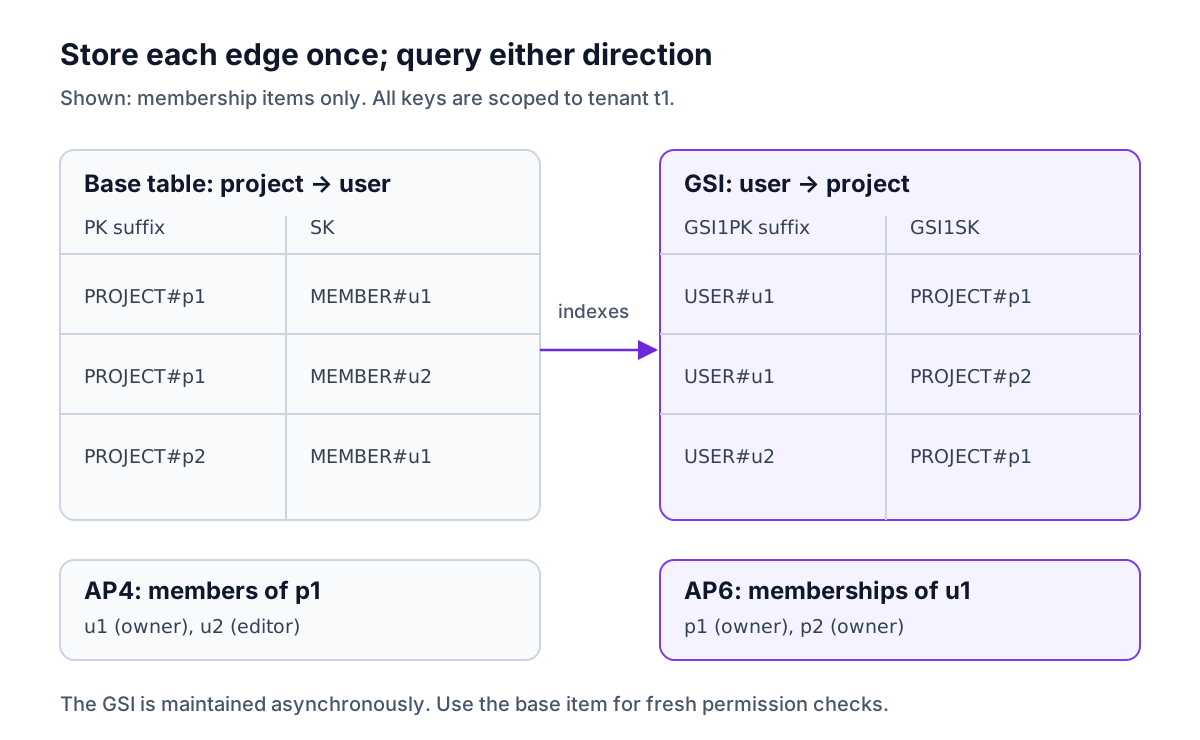
Relationships is also overloaded: project metadata uses that same index for the tenant's project directory. Different GSI1PK prefixes keep the two request families separate. Store a new membership once, and DynamoDB maintains its index entry. Revoking membership deletes the edge; the GSI can briefly lag, so check the authoritative base item when making a fresh authorization decision.
Hierarchical and time-ordered sort keys
TASK#<createdAt>#<taskId> lets AP5 select tasks using begins_with(SK, "TASK#"), while AP9 reverses the order for recent tasks. Keep timestamps in UTC with consistent precision; mixed offsets or fractional formats can break chronological string ordering. The final task ID breaks timestamp ties.
A deeper hierarchy could use TASK#<taskId>#COMMENT#<createdAt>#<commentId> to group one task's comments. That order favors querying comments for a known task, not all comments by time. Put the field used to narrow the query first. AWS calls this the composite-sort-key building block.
Sparse indexes
Only a3 carries every key attribute required by Escalations. Other tasks retain their business data but have no escalation index entry. Remove escalatedTo when the escalation ends; an empty string or null is not a substitute for an absent key attribute. Status changes alone do not remove an escalation unless your write also removes that attribute.
TaskBoard is sparse too: projects and memberships have tenantId and projectId, but lack its remaining keys. A missing key component excludes the item, which makes write validation essential. The GSI documentation describes index membership and projections.
Uniqueness requires a transaction, not a GSI lookup
A GSI does not enforce uniqueness. To reserve a tenant's project slug, write a claim item at PK = TENANT#t1#SLUG#roadmap, SK = META together with the project. Both puts require that their target item does not exist. Competing requests cannot both acquire the same claim.
Save this optional extension as unique.mjs and run node unique.mjs after the ten read examples. It adds project p3 and its claim, then proves that a conflicting p4 is not partially created:
Actual local output:
Normalize slugs before constructing claim keys, and restrict or encode delimiter characters in identifiers. Renaming a slug requires a transaction that acquires the new claim, updates the project, and deletes the old claim with an ownership condition. Preserve a request's idempotency identity across retries so a lost success response is distinguishable from a genuine collision. See DynamoDB transactions and AWS's unique-constraint pattern.
Counters and aggregates with Streams
A dashboard count of open tasks can be a separate summary item. With NEW_AND_OLD_IMAGES, a DynamoDB Streams consumer computes the change in the open-task contribution: insert-open adds one, open-to-done subtracts one, and deleting an open task subtracts one.
An atomic ADD prevents lost concurrent increments, but replaying it increments twice. Lambda delivers stream events at least once. Deduplicate each event and update the counter in the same transaction, or maintain versioned per-task contributions. Exclude summary and deduplication items from the consumer's input logic to avoid feedback loops. Include an initial rebuild and reconciliation path; a consumer starting today does not count old tasks automatically.
This produces an eventually consistent aggregate. If a limit must be enforced immediately, update the authoritative counter and task in the same application transaction with a condition. A hot shared counter may need sharding, which changes how reads combine totals. The sample above tests the data model and transactions; it does not deploy a Streams consumer.
Pitfalls: capacity, cost, consistency, and debugging
Hot keys. A shared table does not require a single partition-key value. Our base keys distribute work by project, but one busy project or responder can still concentrate load. Low-cardinality index keys such as OPEN alone are especially risky. Diagnose the specific table or index, then apply the strategies in DynamoDB hot partitions.
Item size and unbounded collections. Split large documents into independently addressable items or store payloads in S3. Paginate growing histories. Strongly consistent queries see committed items, but a multi-page query is not an atomic snapshot of a changing project. Use the transactional read API when you need an atomic view of a known set of items.
GSI write amplification. Index storage and writes are additional work. A small nontransactional task insert that creates one entry in TaskBoard and one in Escalations consumes one base-table write plus two index-entry writes, assuming each is at most 1 KB. Changing an indexed key can require deleting the old index entry and writing a new one. An update that changes no indexed keys or projected attributes need not update that index. Narrow projections and sparse membership reduce this overhead; ALL is chosen here for clarity, not as a universal default.
For one million inserts with that three-write shape, us-east-1 Standard on-demand consumes three million WRUs. At $0.625 per million WRUs, that is $1.875 in write charges, compared with $0.625 for base-table writes alone, before storage and other usage. This is calculated from the stated item-size assumptions and AWS pricing, not measured billing from Local.
Accidental read amplification. Index queries return projected attributes, not arbitrary base-table fields. Inspect every response contract before using KEYS_ONLY. A filter discards already-read data; it does not repair a missing key-based access pattern or reduce the capacity consumed by those reads.
Unreadable data and key drift. Keep entity, domain IDs, and the key-construction functions together. Validate required index attributes on every write, and make deletion rules explicit for project children and membership edges. A DynamoDB modeling library can centralize this contract; it cannot invent missing access patterns. The wider best-practices checklist covers operational checks beyond the model.
In Dynobase's Single-Table Designer, lay out the entity rows and access patterns, then inspect the key and GSI columns as you test each query. The data-modeling feature page describes that workflow. The existing screenshot below shows a banking example, not the SaaS fixture or a verification run.
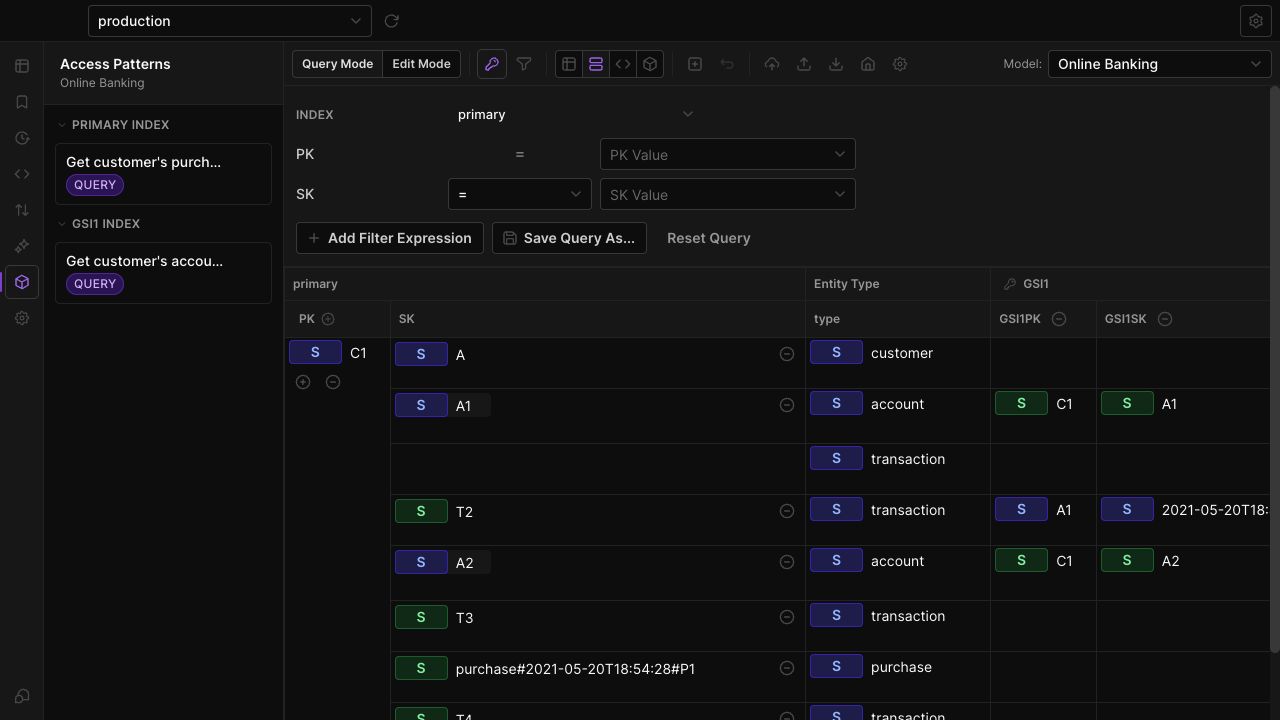
After loading sample data, Dynobase's schema explorer helps inspect the actual item shapes. Compare them with the written model so an omitted index attribute is visible during debugging. The single-table example models provide other domains to practice with.
DynamoDB Local verifies request syntax and returned data, but it does not reproduce production throughput limits, index propagation delays, or transaction contention. Those limits are documented in AWS's Local usage notes. Once finished with this in-memory exercise, stop its container:
Frequently Asked Questions
What is single-table design in DynamoDB?
When should I avoid DynamoDB single-table design?
How do you model many-to-many relationships in DynamoDB?
Do multi-attribute GSI keys replace concatenated keys?
Can I add a new access pattern after creating a single table?
Does a single-table query return everything in one request?
Dynobase is a Professional GUI Client for DynamoDB
Start your 7-day free trial today