
DynamoDB ORMs compared: ElectroDB, Toolbox, Dynamoose, OneTable

Written by Rafal Wilinski
Published: October 23rd, 2026
A DynamoDB ORM is usually a data mapper or query builder that adds schemas, validation and typed operations to DynamoDB. For a new Node.js or TypeScript application, start with ElectroDB for access patterns and composite keys, DynamoDB Toolbox for explicit, typed request building, or Dynamoose for a model-oriented API. OneTable is now archived and no longer maintained, so treat it as an existing-application or migration choice, not a default for new development.
This comparison was checked on October 23, 2026. Each library below implements the same Customer and Order model, including a GSI query and an update that changes the index key. All four examples ran against DynamoDB Local; the output is included.
Do you need a DynamoDB ORM?
DynamoDB does not become a relational database when you add a modeling library. You still choose partition keys, sort keys and indexes around access patterns. A relationship between Customer and Order does not create a server-side join or a foreign-key constraint. Start with the single-table design guide if those choices are still unsettled.
The official SDK's DynamoDBDocumentClient already accepts ordinary JavaScript objects and converts them to DynamoDB's attribute-value representation. It does not define your application's Customer schema, derive an order's index keys or infer a domain-specific response type from a model. See AWS's JavaScript examples and our Node.js guide for that baseline.
Use a library when several parts of your application repeat the same key templates, validation rules and update expressions. Keep the SDK alone when you have a few straightforward operations, an established validation layer, or need direct access to a new API before a wrapper exposes it. A small repository module around SDK commands can be enough.
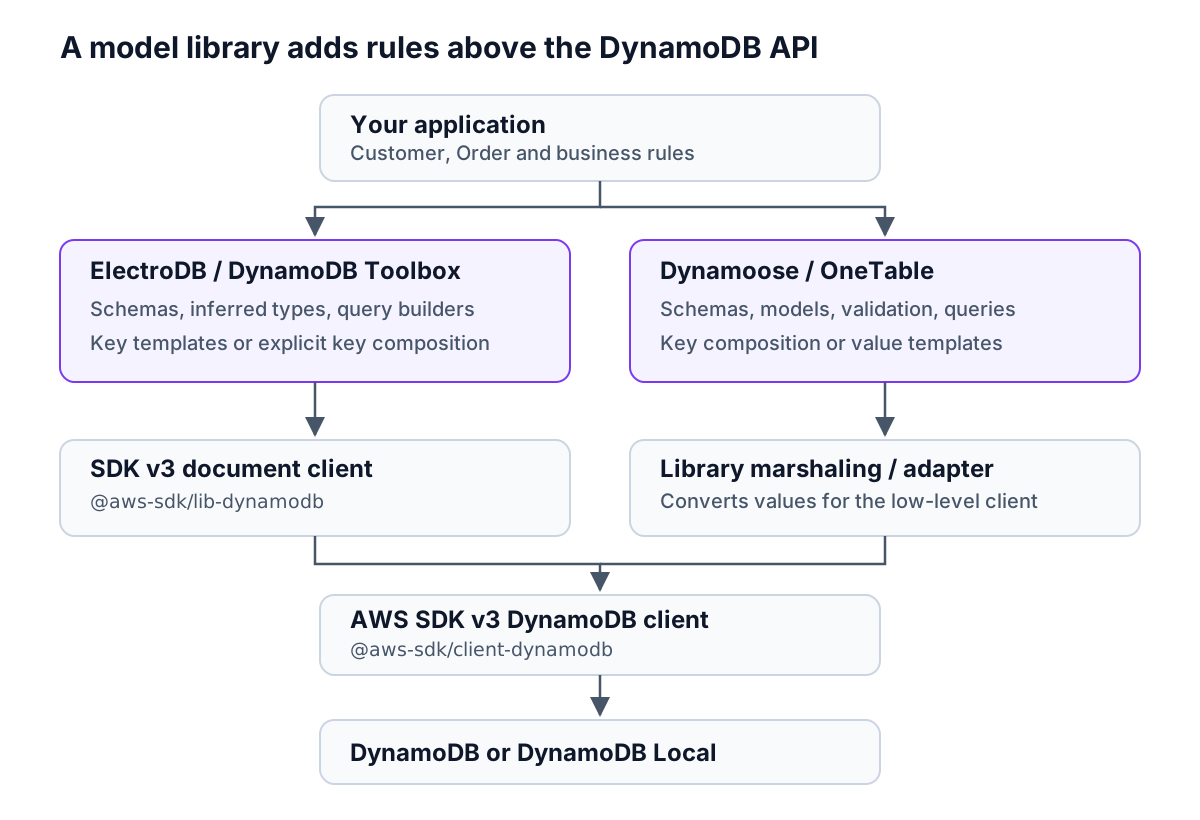
The SDK layer differs: ElectroDB and Toolbox accept the v3 document client used here; Dynamoose and OneTable use their own conversion paths over the low-level v3 client. Schema validation runs in application code. Another writer using the SDK or console can still store items that violate that schema.
Current versions, licenses and maintenance
These are the npm latest versions, not prereleases or unreleased repository code. Publication dates are UTC. The package links expose npm's version and publication metadata; repository status was checked separately on the same day.
| Library and npm package | Current major / tested version | Latest publication | License | Maintenance evidence on October 23, 2026 |
|---|---|---|---|---|
| ElectroDB | 3 / 3.9.3 | 2026-08-09 | ISC | Repository is not archived; latest default-branch commit August 9, 2026 |
| DynamoDB Toolbox | 2 / 2.11.1 | 2026-10-22 | MIT | Repository is not archived; latest default-branch commit October 22, 2026 |
| Dynamoose | 4 / 4.2.0 | 2026-05-05 | Unlicense | Repository is not archived; latest default-branch commit October 11, 2026 |
| OneTable | 2 / 2.7.7 | 2025-02-25 | MIT | Repository is archived; README explicitly says it is no longer maintained |
A release date is evidence of publication, not a support guarantee. OneTable's archive notice is more decisive than its release gap: its old feature set remains useful to understand, but a successful local run does not establish future SDK compatibility or security maintenance.
ElectroDB vs DynamoDB Toolbox vs Dynamoose vs OneTable
All four support single-table layouts, SDK v3, batch operations and transactions. The practical difference is how much of the key design and model behavior they represent in the schema.
| Capability | ElectroDB 3 | Toolbox 2 | Dynamoose 4 | OneTable 2 |
|---|---|---|---|---|
| Single-table modeling | Entities, Services and cross-entity collections | Multiple Entities attached to a Table | Multiple models attached to a Table | Multiple models in one table schema |
| TypeScript inference | Infers item and operation types from entity definitions | Infers item, key and command types from schemas | Typings plus an explicit Item subclass for domain fields | Infers model types from a literal schema |
| Runtime validation | Attribute types, required fields, enums and custom validators | Schema parsing, formatting and custom validators | Schema types, required fields, enums and validators | Types, required fields, enums and validators |
| Key composition | Composite attribute lists and templates | computeKey, transforms and linked attributes | Explicit keys or schema conversion logic | Schema value templates |
| Query builder | Named access patterns, sort-key conditions and filters | QueryCommand with explicit partition, index and range | Model.query() chain | Model.find() with properties and index options |
| Read/write transactions | Service transaction builders | Transaction actions and execute helpers | dynamoose.transaction() | table.transact() |
| Batch operations | Batch get, put and delete | Batch get/write commands and requests | batchGet, batchPut, batchDelete | table.batchGet, table.batchWrite |
| Pagination | Opaque cursor, page controls | LastEvaluatedKey, exclusiveStartKey, async paginate() | lastKey, startAt(), all() | Result next/prev keys, page controls |
| SDK v3 | Yes, document client | Yes, document client | Yes, low-level client | Yes, built-in adapter |
The API references document ElectroDB's keys, Toolbox entities, Dynamoose models and OneTable's schema and operations. Dynamoose's TypeScript documentation still labels its typings beta; its domain class and runtime schema must be kept in agreement. OneTable's TypeScript guide explains schema-derived models.
Transaction support is documented for ElectroDB, Toolbox, Dynamoose and OneTable. These wrappers do not change DynamoDB's limits: a write transaction supports up to 100 distinct items and 4 MB, while a batch write is not atomic. Use the transaction guide when Customer and Order must be committed together. The examples below deliberately perform independent writes.
Which DynamoDB library should you choose?
| Your situation | Starting choice | Reason |
|---|---|---|
| A TypeScript service with several entities and derived keys | ElectroDB | Access patterns live beside attributes, and updates can maintain derived index keys |
| You want explicit commands and control over an existing key layout | DynamoDB Toolbox | Schema validation and inferred types without requiring a particular key naming convention |
| Your team prefers models with create/get/update/query methods | Dynamoose | A familiar model-oriented API with runtime schemas |
| You already run OneTable | Evaluate a maintained replacement or an owned fork | Its repository is archived; preserve key templates and stored metadata during migration |
| A small service with a handful of known requests | SDK v3 document client | Less abstraction to learn and maintain |
ElectroDB vs DynamoDB Toolbox
Choose based on where you want access-pattern knowledge to live. In the ElectroDB example, byStatus is a named query derived from attributes. In Toolbox, the table query names the index and supplies the partition value explicitly. Toolbox can also derive attributes through defaults and links; it is not limited to hand-built keys.
ElectroDB's conventions become helpful when they eliminate repeated key logic across many entities. Toolbox is a good fit when you want to see individual commands and adapt them to an existing schema. Both can generate request parameters for inspection. Neither choice removes the need to inspect the resulting key condition and distinguish it from a filter.
Dynamoose vs ElectroDB
Dynamoose centers the model and its schema. ElectroDB centers the entity's attributes and access patterns. If your main problem is expressing several composite-key queries consistently, start with ElectroDB. If your team wants model methods and accepts maintaining explicit TypeScript classes alongside the schemas, evaluate Dynamoose.
Do not use local request durations to choose a winner. The examples measure correctness, not speed, cold starts, bundle size or production throughput. The broader DynamoDB tools directory covers clients and infrastructure tools outside this comparison.
The same Customer and Order model in every library
Each implementation uses its own table so library-specific entity metadata cannot interfere with another example. The business attributes and physical key values are identical. This is single-table design within each implementation, not four libraries sharing one live data format.
| Item | pk | sk | Business attributes |
|---|---|---|---|
| Customer | CUSTOMER#c1 | PROFILE | customerId=c1, name=Ada |
| Order | CUSTOMER#c1 | ORDER#o1 | customerId=c1, orderId=o1, status=PAID, totalCents=4200 |
The byStatus GSI has partition key gsi1pk and sort key gsi1sk, with an ALL projection. The order starts with gsi1pk=CUSTOMER#c1#STATUS#PAID and gsi1sk=ORDER#o1. Customer items omit both GSI keys, so they do not appear in that index.
The access patterns are: retrieve a customer, retrieve an order by customer and order IDs, and list one customer's orders with a given status. Including the customer ID in the GSI partition avoids putting every customer's paid orders under one global PAID key. It does not eliminate the possibility of a particularly busy customer becoming a hot key.
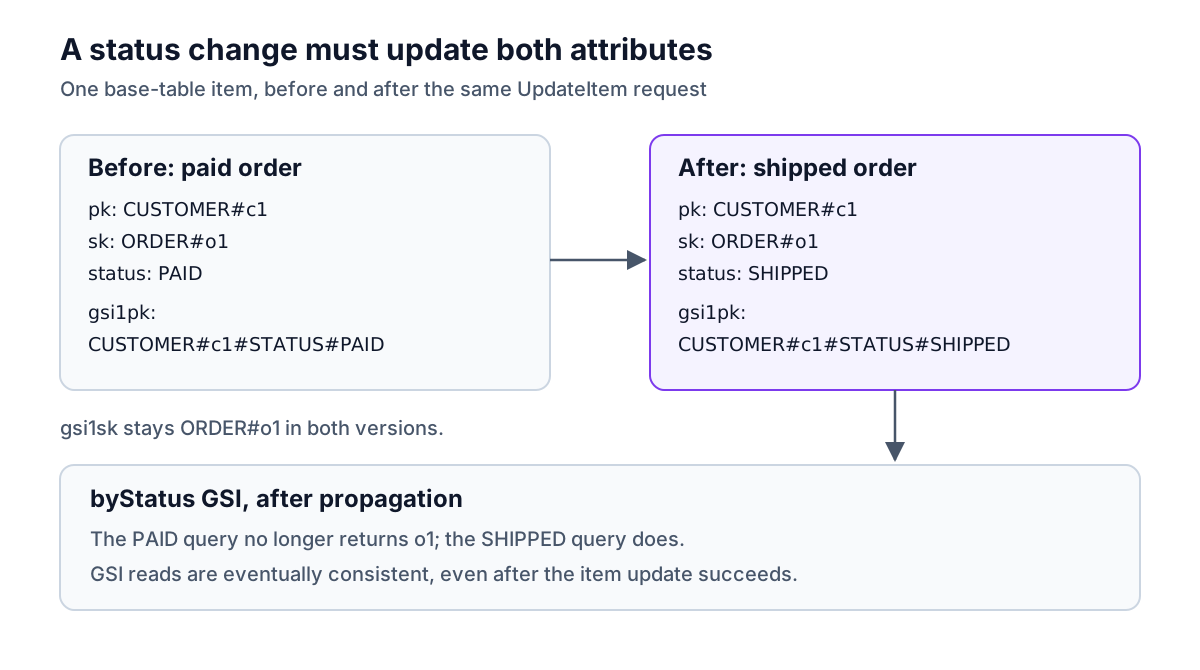
Each program writes both items, reads them, queries paid orders, updates the order to shipped, and queries both statuses again. ElectroDB and OneTable derive the changed index key from templates. The Toolbox and Dynamoose examples update it explicitly in the same item request. Updating only status in those explicit implementations would leave the index entry under the old key.
Run the examples against DynamoDB Local
Use an empty working directory and Node.js 24. The tested environment was Node.js 24.18.1, TypeScript 7.0.2, tsx 4.23.15, AWS SDK packages 3.1156.0, and DynamoDB Local 3.3.2. The library versions are pinned below.
Wait for the container to start. All clients below use http://localhost:8000 and dummy credentials. Save the following five TypeScript files together. Their .js import specifiers work with tsx and the NodeNext TypeScript configuration shown later.
The immediate GSI assertions are a local correctness check. AWS documents that DynamoDB Local reads often appear strongly consistent, while GSI updates in AWS propagate asynchronously. An application using the managed service must tolerate index lag; a successful write is not a guarantee that the next GSI query sees it.
Shared setup: shared.ts
This creates one table per example and checks the normalized results. totalCents keeps the sample amount as an integer. The scripts expect fresh table names; to repeat the full exercise, stop and restart the in-memory container.
ElectroDB: electro.ts
The explicit templates preserve the common layout. casing: "none" preserves the key text exactly; ElectroDB's default key casing differs. patch() requires an existing item, and changing status causes ElectroDB to calculate the GSI key from the supplied composite attributes.
DynamoDB Toolbox: toolbox.ts
computeKey derives the primary key from the schema's key attributes. Here the GSI attributes are explicit so the update shows exactly what is sent. If you replace this with schema links, configure update-time behavior too: .link() on a non-key attribute is a put-time shorthand, not an automatic update hook. The update also requires the existing order attribute.
Dynamoose: dynamoose.ts
Both models belong to one dynamoose.Table. Its automatic table creation and updates are disabled because the shared setup already created the resources. The two Item subclasses provide domain-field types; the runtime schemas provide validation. See the Dynamoose Table options for deployment settings.
OneTable: onetable.ts
This example is for understanding or maintaining an existing OneTable application. Schema value templates derive all four keys, and as const preserves the schema's literal types. Passing the low-level v3 client lets OneTable wrap it internally. exists: null makes the initial create calls behave as replacement puts; update() requires an existing item by default.
Type-check and execute
Save this as tsconfig.json. It checks application code in strict mode and skips checking dependency declaration files.
Run each implementation once:
Observed output, October 23, 2026:
The report helper throws if any result differs. This verifies the basic writes, reads, index-key update and GSI queries. It does not exercise every batch, transaction, pagination or validation feature in the comparison table.
When finished, remove the in-memory database by stopping its container:
Mistakes a modeling library does not prevent
Confusing a schema with a migration. Changing a key template does not rewrite existing items. When moving between libraries, account for entity discriminator attributes, hidden fields, case conversion and timestamp defaults as well as PK/SK values. Test against representative stored items before changing production readers.
Updating a source attribute without its derived key. Our order needs status and gsi1pk changed together. A plain SDK write bypasses the library's derivation. Check the generated UpdateExpression and ensure every writer follows the same rule.
Treating a query filter as an index. A status filter on the customer partition reads candidate orders before discarding nonmatching ones. The byStatus key condition directly selects the customer's status partition. A convenient query method does not make the two access patterns equivalent.
Ignoring continuation keys. The one-order example fits in a single response. Larger queries need pagination. ElectroDB exposes a cursor; Toolbox exposes page keys and an async iterator; Dynamoose uses lastKey and startAt; OneTable uses next and prev. A filtered page can be empty and still have a continuation key. Follow the pagination rules rather than stopping at an empty array.
Mixing major-version tutorials. The examples use ElectroDB 3, Toolbox 2 and Dynamoose 4. ElectroDB's v3 migration guide documents changed validation and pagination semantics. Copying older imports or relying on old limit behavior can produce code that compiles differently or reads more data than intended.
Treating a model declaration as deployed infrastructure. The runtime table and its indexes must match the schema. Keep that definition in infrastructure code; Dynobase's infrastructure code generation can generate CDK, CloudFormation or Terraform for a table when you need to capture its configuration. It does not replace the application's library schema.
DynamoDB modeling libraries for other languages
Python: PynamoDB. PynamoDB provides model classes and typed attributes, secondary-index queries and batch operations. Use it when you want a Python model API; use the boto3 guide when you want direct SDK operations. The JavaScript examples above are not PynamoDB compatibility tests.
Java: the SDK 2.x Enhanced Client. AWS's DynamoDB Enhanced Client is the successor to the SDK 1.x DynamoDBMapper. It maps Java classes to items and also provides an Enhanced Document API for flexible documents. Our Java guide covers the current mapping approach despite its historical URL.
C# and .NET: the object persistence model. AWS's DynamoDBContext maps classes and properties to DynamoDB items. Use the current SDK v4 conventions, including the context builder, rather than copying an obsolete constructor from a v3 tutorial. See our .NET and C# examples.
Frequently Asked Questions
What is the best DynamoDB ORM for TypeScript?
Does DynamoDB need an ORM?
What is the difference between ElectroDB and DynamoDB Toolbox?
Should I choose Dynamoose or ElectroDB?
Is DynamoDB OneTable still maintained?
Can a DynamoDB ORM perform SQL joins?
Dynobase is a Professional GUI Client for DynamoDB
Start your 7-day free trial today