
DynamoDB update expressions: SET, REMOVE, ADD and DELETE

Written by Rafal Wilinski
Published: October 23rd, 2026
A DynamoDB UpdateExpression changes attributes on one item identified by its complete primary key. Use SET to assign values, REMOVE to delete attributes, ADD to increment numbers or merge sets, and DELETE to subtract set members. You can combine all four clauses in one atomic UpdateItem request, with each clause keyword appearing at most once. If the item does not exist, the update can create it; add a ConditionExpression when creation or an unexpected overwrite must be rejected.
The examples below ran against DynamoDB Local on port 8000. Their outputs show actual item contents, including failed updates that left the item unchanged. Local tests verify expression behavior; billing and service limits are checked against AWS documentation.
DynamoDB update expression syntax
| Clause | What it changes | Example shape |
|---|---|---|
SET | Any supported attribute type; numeric arithmetic; list and map paths | SET #status = :status, #stock = #stock + :delta |
REMOVE | Whole attributes, map members, list elements | REMOVE #obsolete, #items[1] |
ADD | Numbers or sets at the top level | ADD #stock :delta, #tags :newTags |
DELETE | Members of a top-level set | DELETE #tags :oldTags |
Separate actions inside a clause with commas. Separate different clauses with spaces. Clause order in the string is flexible. SET a = :a SET b = :b is invalid; use one SET containing both assignments. DELETE here removes set members; deleting an entire item uses the separate DeleteItem API.
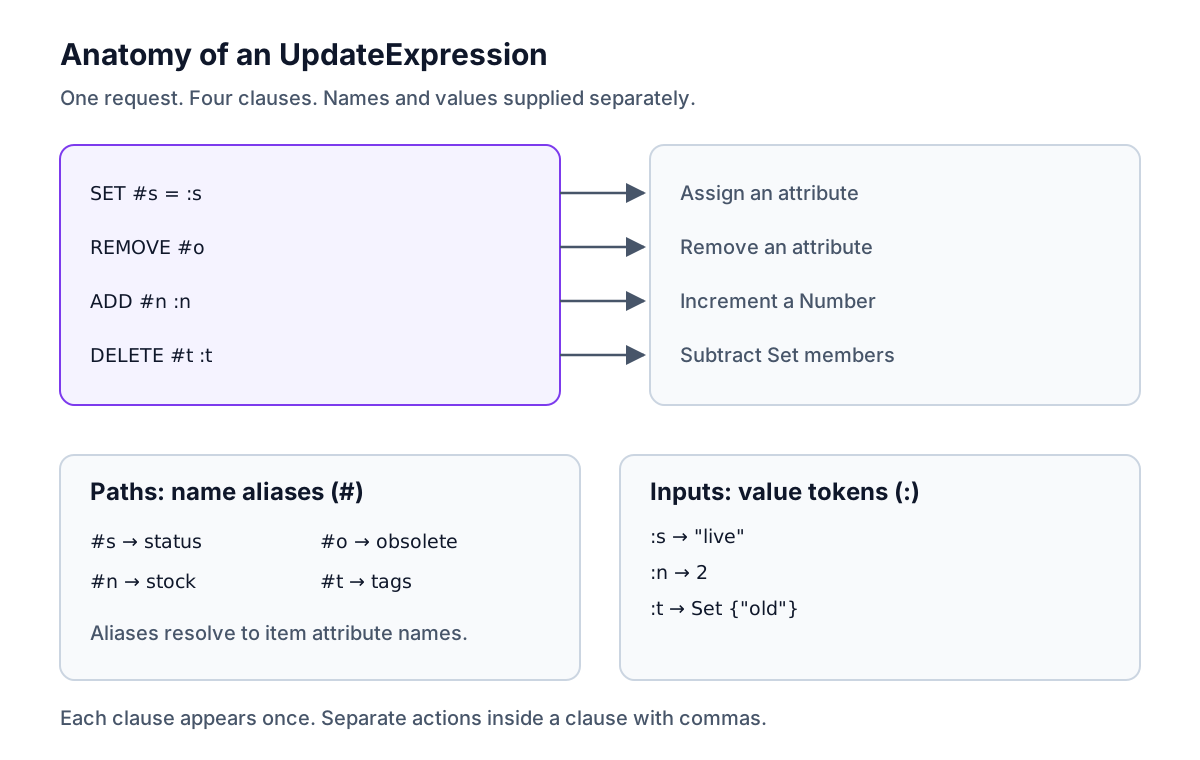
A name beginning with # belongs in ExpressionAttributeNames. A value beginning with : belongs in ExpressionAttributeValues. They are separate maps, and their entries must match the tokens actually used in the update or condition. Alias reserved words such as status, and names containing punctuation. Alias each segment of a nested path separately: #profile.#city. Mapping one alias to profile.city addresses a literal attribute with a dot in its name.
The AWS update-expression reference defines the grammar. Unlike PutItem, an update preserves attributes it does not target. Replacing a whole map with SET, however, replaces that map's contents, including members omitted from the new value.
Run the examples locally
Use Node.js 20 or later, a disposable directory and a fresh local container. These commands install dependencies there, with no AWS account required:
Save this shared fixture as setup.mjs. It creates UpdateExpressionDemo, whose only key is the String attribute pk. On a table with a sort key, supply both key attributes in every request.
Every JavaScript example imports that file. Save each block under its stated filename and run node filename.mjs. The fixture replaces item-1 before each case, then reads it before and after the update. Those reads are test instrumentation; an application can normally use the update's ReturnValues without extra reads.
Output keys are sorted for reproducibility. A displayed {"$set":[...]} represents an SDK Set, with sorted members for display only; DynamoDB sets have no order. before: null means the item was absent. This display convention is not a DynamoDB storage format.
Combine SET, REMOVE, ADD and DELETE in one update
Save as clauses.mjs. This publishes an item, removes a temporary flag, adds stock and removes an old tag in one request:
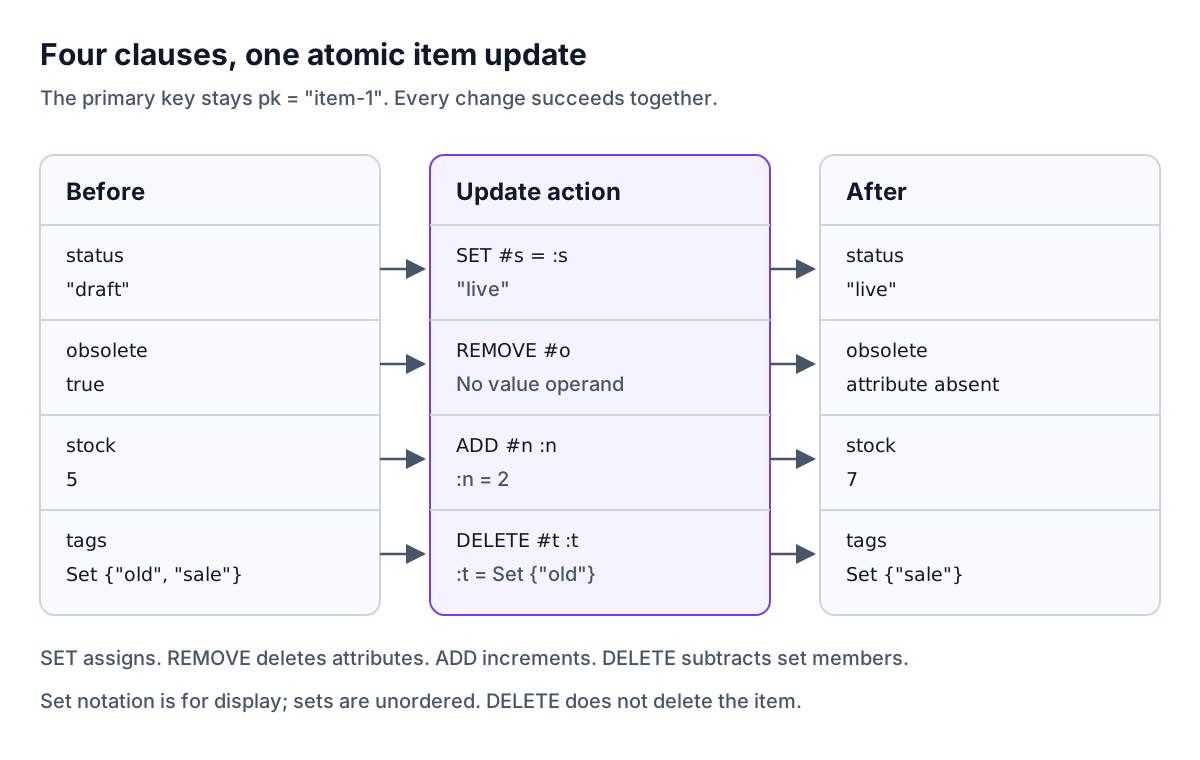
The four changes succeed together. A malformed action or a failed condition prevents the whole update.
SET: assignments, arithmetic and if_not_exists
SET overwrites an existing value or creates an attribute. Arithmetic supports addition and subtraction on Numbers. if_not_exists(path, fallback) supplies a default when that attribute is absent; an existing NULL attribute still exists and does not select the fallback.
Save as set.mjs. Both cases subtract stock, but only the first writes created:
if_not_exists is a function inside SET, not a substitute for an update condition. Other actions in the expression still run when the attribute exists. Function names are case-sensitive.
Append or prepend a DynamoDB list
list_append(left, right) concatenates two Lists. Put the existing list on the left to append, or on the right to prepend. An Array in the JavaScript document client is a List; new Set(...) is a different DynamoDB data type.
Save as lists.mjs. The first loop handles both an absent list and an existing list. The last case replaces index zero and writes beyond the list's end:
Indexes start at zero. Writing a nonexistent index appends the element; it does not create empty slots up to that index. Use list_append when appending is the intent. Concurrent position-based edits can target a different logical element after another writer changes the list; protect such edits with a version condition when identity matters.
Update a nested map attribute
Save as nested.mjs:
The sibling tier survives. The parent profile must already be a Map; DynamoDB does not construct intermediate maps for profile.city. if_not_exists(profile.city, :city) cannot repair a missing parent. The troubleshooting section shows the error and a separate initialization step.
REMOVE: delete attributes and list elements
REMOVE takes paths without values. Removing a missing top-level attribute is a no-op. Save as remove.mjs:
Both list indexes refer to the original list: book and bag disappear, then the remaining elements shift together. No need to reverse the indexes within one expression. Across separate requests, indexes can shift between calls. Removing a nested member also requires a valid parent path.
ADD: increment a counter or add to a set
A Number operand increments the existing Number. A negative operand decrements it. If the attribute is absent, DynamoDB starts from zero. A Set operand unions its members with the stored set, without duplicates; an absent set is created. Both sets must have the same member type: String, Number or Binary.
Save as add.mjs. The final case uses SET arithmetic for a nested counter because ADD only accepts top-level paths:
The counter operation is atomic, so it avoids a read-then-write lost increment. It is not idempotent: retrying a successful increment increments again. The same applies to SET #n = #n + :n and to list appends. A clause named SET does not itself make an operation safe to replay. Use a conditional version or an application idempotency design when a timeout leaves success uncertain. See atomic counter troubleshooting for missing attributes and type mismatches.
DELETE: remove members from a set
Save as delete.mjs:
The first case keeps sale; the second removes the tags attribute because no members remain. You cannot pass an empty set as the operand. Use REMOVE #tags to remove the whole attribute, and a List plus SET/REMOVE when order or duplicate entries matter.
How are multiple actions evaluated?
Right-hand attribute references use the item's values before the update, even if another action changes or removes the referenced attribute. The expression is not a sequence of JavaScript assignments.
Save as evaluation.mjs:
previousStock becomes 5, not 7. Referencing a path is allowed; assigning overlapping target paths is not. For example, trying to set both profile and profile.city in one expression is rejected. Reordering clauses cannot resolve that overlap.
UpdateItem upserts unless a condition prevents it
Save as upsert.mjs. Both cases start with no item. The second adds an existence condition:
The first creates the key and the assigned attributes. The second fails without creating anything. An upsert still needs a valid expression: arithmetic on an absent Number without a default, or an update through a missing map, can fail.
Conditional updates and optimistic locking
A condition is tested atomically with the write. The conditional update guide covers existence and value checks. For optimistic locking, compare the version you read and increment it in the same update.
Save as conditional.mjs. These independent cases start at version 3; one caller expects that version and the other expects an older version:
The failed request leaves stock and version unchanged. ReturnValuesOnConditionCheckFailure: "ALL_OLD" returns the item that failed the condition in the exception's Item field. In the tested JavaScript SDK, that exception field is low-level DynamoDB JSON, so the fixture calls unmarshall(error.Item). It can be absent when the item does not exist. Handle the conflict in application logic rather than blindly repeating the same condition.
Keeping historical versions is a separate requirement from rejecting stale writes; see DynamoDB data versioning for that model.
ReturnValues: what does UpdateItem return?
ReturnValues controls a successful response's Attributes field. Returned attributes are strongly consistent and do not consume read capacity. ReturnValuesOnConditionCheckFailure is separate and accepts only ALL_OLD or NONE. These behaviors are specified in the UpdateItem API reference.
ReturnValues | Returned attributes |
|---|---|
NONE (default) | No Attributes field |
ALL_OLD | Entire item before the update |
UPDATED_OLD | Previous values of affected attributes |
ALL_NEW | Entire item after the update |
UPDATED_NEW | New values of affected attributes that remain present |
Save as returns.mjs. Every iteration resets the same starting item:
The fixture prints returned: null for an absent Attributes field. Notice that UPDATED_OLD includes the removed obsolete attribute, while UPDATED_NEW omits it and the untouched stock attribute. Neither option is a general-purpose record of deletions and additions; use both images in your own audit workflow if needed.
SDK v3 document client versus low-level DynamoDB JSON
Use UpdateCommand from @aws-sdk/lib-dynamodb with ordinary JavaScript values, or UpdateItemCommand from @aws-sdk/client-dynamodb with explicit type descriptors. Do not feed { N: "2" } to a document-client numeric operand: it represents a Map there. The AWS JavaScript programming guide explains the two layers and marshall/unmarshall.
Save as low-level.mjs:
Numbers on the low-level wire are strings under N. The command still increments a Number, not a String.
AWS CLI v2 example
After running setup.mjs, save this as cli.sh and run bash cli.sh. The first printed item is the strongly consistent read before the update; the second is ALL_NEW afterwards. Every call targets the local endpoint with dummy credentials.
Build an UpdateExpression dynamically from a partial object
A patch builder needs explicit meanings for omission, null and removal. These helpers treat each object key as a literal top-level attribute name. They alias every name, generate one clause per action type, reject primary-key changes, and omit ExpressionAttributeValues for remove-only patches.
| Patch input | Meaning |
|---|---|
Missing property; JavaScript undefined | Leave it unchanged |
JavaScript null; Python None | Store DynamoDB NULL |
REMOVE sentinel | Delete the attribute |
| Map/object or List/Array | Replace that whole value |
Name containing . | Literal name, not a nested path |
These are expression builders, not schema validators. Validate types, permitted fields and expression size at your application's boundary. Pass both key names if your table has a sort key. For a nested patch, build separate aliases for explicit path segments and reject ancestor/descendant target collisions; do not split arbitrary user-supplied names on dots.
TypeScript builder
Save as builder.ts:
Save this as builder-demo.ts and run npx tsx builder-demo.ts:
The output demonstrates the literal audit.label name, stored null, an omitted undefined value, a remove-only update, and rejection of an empty patch and a primary-key change. To modify a sibling inside a Map, use a nested path as shown earlier; passing a partial Map to this helper replaces the existing Map.
Python builder with boto3 Table.update_item
Save as builder.py and run venv/bin/python builder.py after creating the table with setup.mjs. This uses boto3's resource Table.update_item, so values are native Python values. Use Decimal for non-integer numbers instead of Python float; the JSON formatter below renders non-integral Decimals as strings to avoid display precision loss.
Python has no JavaScript-style undefined; omit a dictionary key to leave the attribute unchanged. None writes NULL, and only the sentinel requests removal.
Common UpdateExpression errors and their fixes
The following messages were reproduced from DynamoDB Local. Each failing request below started and ended with exactly {"pk":"item-1"}; no requested change was applied. The ValidationException prefix is the exception name. SDK wrappers may format their surrounding message differently.
Two document paths overlap
The failing expression was SET #p = :p, #p.#c = :c, with #p mapped to profile and #c to city. Set the whole Map once, or update only its children when the Map already exists. Parent initialization and child updates must be separate requests.
The document path is invalid for update
SET #p.#c = :c failed because profile was absent. Initialize the Map separately as shown below. An existing parent of the wrong type also needs correction.
Invalid UpdateExpression: Syntax error
The incomplete expression SET #s = has no operand. Supply a value token and its mapping, as in the upsert example. Also check commas and parentheses.
Attribute name is a reserved keyword
The failing expression used SET status = :s. Change it to SET #s = :s with ExpressionAttributeNames mapping #s to status.
The SET section can only be used once
SET #s = :s SET #n = :n repeats the clause keyword. Use SET #s = :s, #n = :n instead.
An expression attribute value is not defined
SET #s = :missing used an unmapped token. Add :missing to ExpressionAttributeValues, or correct the expression to use the token you actually supplied.
The expression refers to an attribute that does not exist
SET #l = list_append(#l, :new) failed with no items attribute. Use if_not_exists(#l, :empty) with an empty List, as in lists.mjs. An existing non-List value needs a type correction instead.
Cannot update a primary-key attribute
SET #pk = :pk tried to change pk. The key belongs in Key, not among the update targets. Moving an item to another key requires creating the new item and deleting the old one, with a transaction if they must succeed together.
An empty set is invalid
This exact message came from a low-level ADD #t :empty request with :empty set to SS: []. An empty JavaScript Set can instead fail earlier during marshalling. Omit an empty union/subtraction operation, or use REMOVE to delete the entire stored Set. Do not convert an empty Set to NULL unless that type change is intended.
Fix a missing parent map
Create the parent as part of the original item whenever possible. For existing data with an optional parent, initialize it with if_not_exists in one request, then update the child in another. Save as fix-parent.mjs; the fixture shows the state transition for each request:
Those are two operations, not one atomic unit. A concurrent writer can change or remove the map between them; add an appropriate condition and handle failure, or enforce the map's presence in your item schema. Trying to combine parent initialization and child assignment in one expression still produces the overlap error. If replacing the whole Map is intended, assign the complete Map once.
How update writes are billed
Updating one small attribute does not mean paying only for that attribute. DynamoDB uses the larger item size before or after an UpdateItem, rounded up in 1 KB units. A change from a 2.2 KB item to a 2.3 KB item therefore uses three ordinary write units; deleting attributes from 2.3 KB down to 0.8 KB still uses three for that operation. A transactional write uses twice the ordinary units. Index maintenance can add write consumption.
Failed conditions can also consume write capacity. Returning attributes does not add a read-capacity charge. AWS documents this in read and write operation accounting. Use ReturnConsumedCapacity: "INDEXES" to observe table and index consumption on service requests; DynamoDB Local is not a production billing benchmark.
Expression and item limits
| Constraint | Limit |
|---|---|
| Each expression string | 4 KB |
Each substitution token, such as #name or :value | 255 bytes |
| Total expression substitution variables | 2 MB |
| Operators and functions per expression | 300 |
| Document-path dereferences | 32 |
| Item size after the update | 400 KB, including names and values |
These are fixed constraints in the AWS constraints reference and document-path rules. The token limit does not cap a stored String value at 255 bytes. The operator limit covers condition, filter and update expressions; assignment = inside SET does not count, while arithmetic, functions and condition comparisons do. A generated patch must fit all applicable limits.
Can DynamoDB update many items with one expression?
An UpdateExpression addresses one item. DynamoDB has no arbitrary multi-item UPDATE ... WHERE operation. Even PartiQL UPDATE must resolve to one primary key.
| Need | Approach |
|---|---|
| Change independent known keys | Issue individual UpdateItem requests with bounded parallelism and per-item error handling |
| Find matching items first | Query a suitable key/index, paginate the result, then update each full key; recheck mutable predicates with a condition |
| Send several PartiQL updates together | BatchExecuteStatement, up to 25 write statements; inspect each result for errors |
| Make several updates succeed together | TransactWriteItems, up to 100 distinct items and 4 MB, within one account and Region |
BatchWriteItem supports puts and deletes, not updates. The batch write and update guide covers those differences. Use transactions when partial completion would break an invariant; do not include two actions for the same item in one transaction. The batch statement API and transaction API specify these boundaries.
For an occasional manual correction, Dynobase bulk editing provides bulk edits, undo and item history without writing a custom patch script.
When finished with the examples, stop the disposable container with docker stop dynamodb-local; its in-memory table disappears.
Frequently Asked Questions
What is a DynamoDB UpdateExpression?
How do I append to a DynamoDB list if it does not exist?
Can DynamoDB update a nested map without replacing it?
Does UpdateItem create an item if it does not exist?
What is the difference between REMOVE and DELETE?
Can I update multiple items with one UpdateExpression?
Dynobase is a Professional GUI Client for DynamoDB
Start your 7-day free trial today