
DynamoDB vector search: indexes, examples, pricing and limits

Written by Rafal Wilinski
Published: October 23rd, 2026
Amazon DynamoDB supports native vector search through vector indexes and the SearchVectors API, generally available since August 5, 2026. Store embeddings alongside your items, create an index on an on-demand table, and retrieve approximate nearest neighbors without copying the data to a separate vector database. Indexes support up to 4,096 dimensions and return up to 100 matches per search; search results are eventually consistent. AWS's launch announcement describes single-digit millisecond latency at 99%+ recall, which is a service performance claim, not a measurement of your application's complete retrieval path.
How does DynamoDB vector search work?
An embedding model converts content into a numerical vector. Related content should occupy nearby positions in that model's vector space. DynamoDB stores the embedding in an item and maintains a separate index for approximate nearest neighbor (ANN) retrieval. Your application embeds the query with the same model, submits the query vector, and receives ranked items.
The word approximate matters: the engine can miss a true nearest neighbor. Recall measures how many relevant nearest neighbors are recovered against an exact-search reference. Retrieval quality also depends on your embedding model, chunk boundaries and filters. Measure relevance on representative queries, including queries with no useful answer; a low distance does not prove that a passage answers a question.
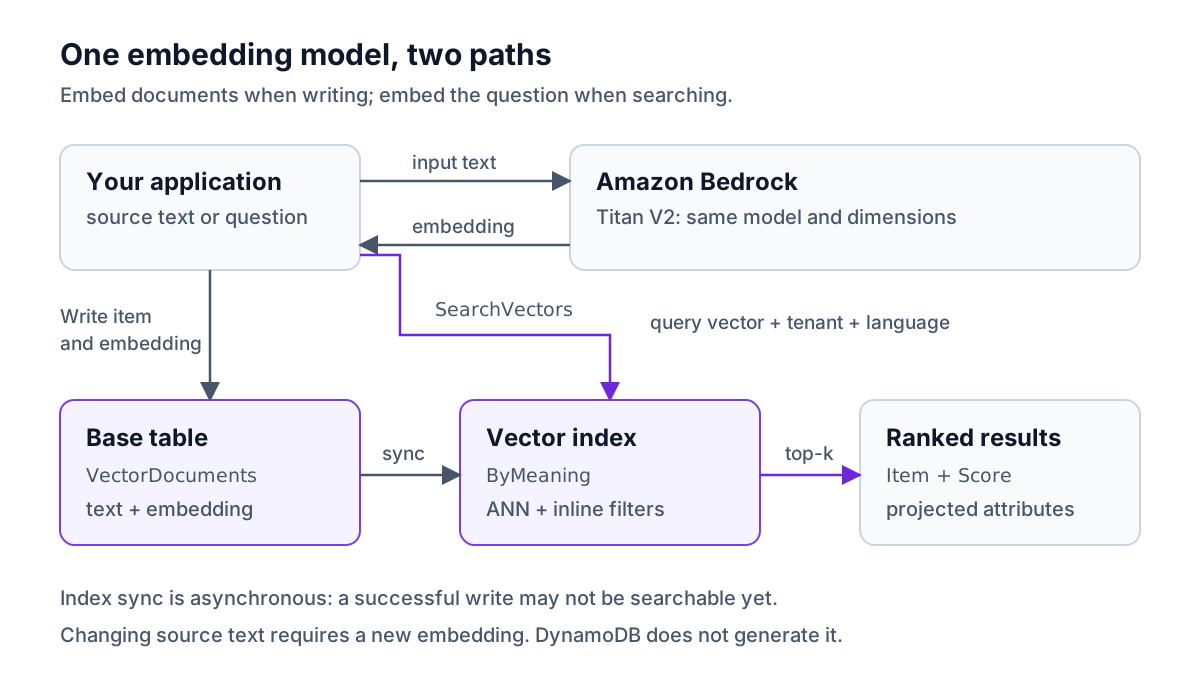
Embedding generation is your application's responsibility. Index synchronization does not regenerate an embedding when its source text changes. Write the new content and its corresponding embedding together, or use a version-checked background workflow. DynamoDB Streams can trigger that workflow, but native index synchronization itself needs no custom stream consumer.
What is a DynamoDB vector index?
A vector index is a distinct index type. A global secondary index supports key-based retrieval; a vector index ranks similarity. Keep ordinary DynamoDB indexes for exact IDs, ordered access patterns and range queries.
The VectorIndex API configuration uses these names:
| Setting | Meaning |
|---|---|
IndexName | Name used in SearchVectors |
VectorAttribute.AttributeName | Top-level item attribute containing the embedding |
Dimensions | Number of elements in every indexed vector |
DistanceFunction | COSINE, EUCLIDEAN or DOT_PRODUCT |
SearchSchema | Optional routing key and inline filter definitions |
Projection | ProjectionType of KEYS_ONLY, INCLUDE or ALL; NonKeyAttributes names the extra fields for INCLUDE |
Store the vector as a DynamoDB List of Numbers, an L containing N values. It is not a Number Set, binary blob or scalar AttributeDefinitions entry. The index converts coordinates to 32-bit floating point; the base table retains the values you wrote. Higher precision in the table does not produce higher precision in search.
Each SearchSchemaElement has AttributeName and SearchSchemaElementType:
HASHroutes a search to one partition-key value, such as a tenant or catalog. It need not be the base table's partition key. If configured, its equality condition is required on every search.INLINE_FILTERpermits additional equality filters within that search. These constraints are optional at query time and are applied during index traversal.
Declare every search-schema attribute in the table's AttributeDefinitions, including inline filters. Declare projected text fields only in the projection, not in AttributeDefinitions. An index without a HASH searches across the index and cannot distribute traffic by independently routed key values.
Projection controls which item attributes are copied into the index. The vector and required index data are retained even with KEYS_ONLY; INCLUDE adds selected fields and ALL copies the full item. SearchVectors cannot fetch an unprojected field from the base table. A smaller projection reduces index storage, replication work and returned data; fetch additional attributes separately when needed. AWS details this in vector storage considerations.
Vector indexes require PAY_PER_REQUEST on the base table. Standard and Standard-IA table classes are supported. If your existing table is provisioned, account for the change to on-demand pricing and scaling before enabling this feature.
Which distance metric should you use?
DistanceFunction | Meaning of Score | Better match |
|---|---|---|
COSINE | One minus cosine similarity; compares direction, ignoring length; scores range from 0 to 2 | Lower |
EUCLIDEAN | Straight-line distance between vectors | Lower |
DOT_PRODUCT | Dot product; sensitive to both direction and magnitude | Higher |
The distance-function documentation recommends matching the metric to the embedding model. Normalized vectors have equivalent cosine and dot-product rankings. Do not sort every metric ascending, and do not label every score a probability.
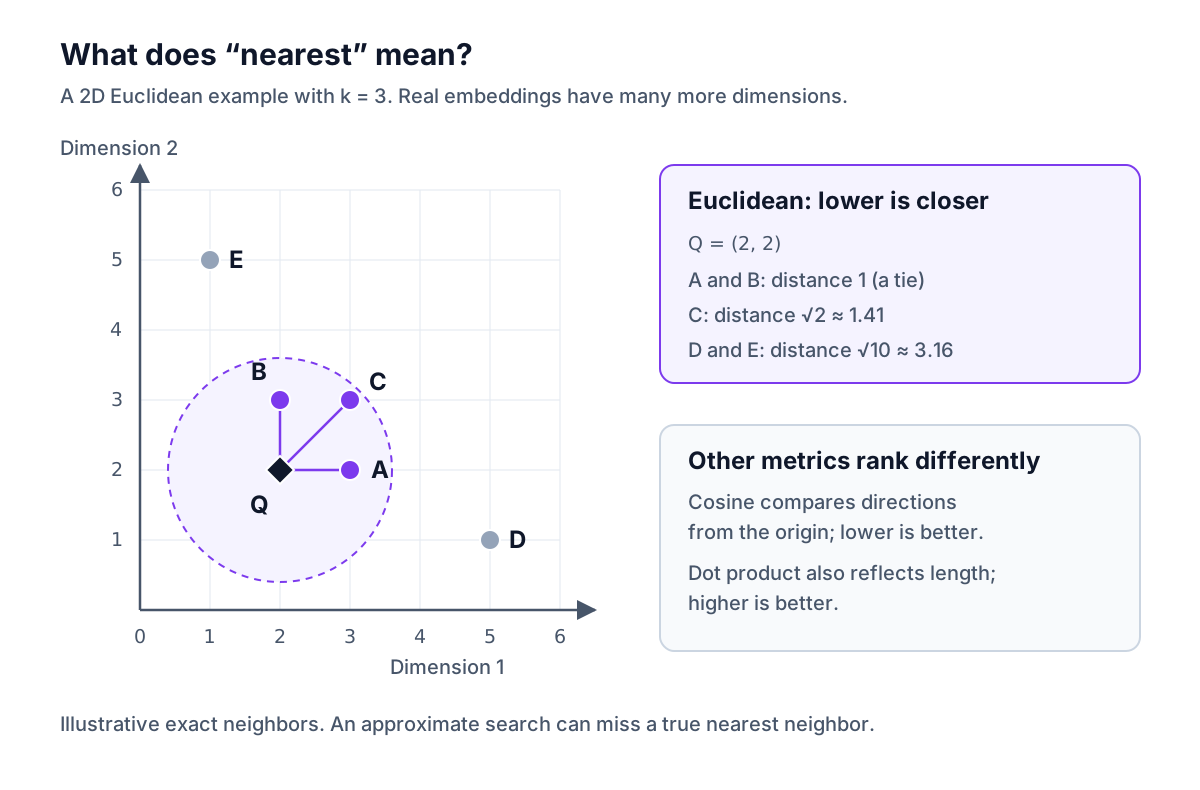
The diagram uses invented coordinates to explain distance, not a projection of real embeddings. Changing dimensions or the distance function requires a new index. For a model migration, populate a different embedding attribute and index, compare relevance, then switch searches. Two models with the same dimension count still occupy different vector spaces.
SearchVectors request and response reference
These are all nine request parameters in the current SearchVectors API:
| Parameter | Required? | Value |
|---|---|---|
TableName | Yes | Table name or ARN |
IndexName | Yes | Active vector index name |
SearchVector | Yes | Array of DynamoDB number values, matching index dimensions |
TopK | Yes | Integer from 1 to 100 |
SearchConditionExpression | When HASH exists | Routing-key equality and optional inline-filter equalities |
ExpressionAttributeNames | As needed | Attribute aliases such as #lang |
ExpressionAttributeValues | As needed | Typed values such as ":lang": { "S": "en" } |
ProjectionExpression | No | Comma-separated attributes already projected into the index |
ReturnConsumedCapacity | No | NONE, TOTAL or INDEXES |
With the low-level SDK, SearchVector is an array such as [{ N: "0.2" }, { N: "0.8" }]. It has no outer L wrapper. The item attribute used in a write does have that wrapper. The full example below generates all required coordinates rather than using an abbreviated vector.
Filtering uses SearchConditionExpression, not FilterExpression. Current API and developer-guide documentation support equality on top-level HASH and INLINE_FILTER attributes. Do not copy range conditions, IN or nested document paths from ordinary Query examples.
The response has SearchResults, an ordered array of SearchResultItem objects. Each contains Item, a DynamoDB attribute map, and numeric Score. When requested, ConsumedCapacity.VectorSearchRequestBytes reports search consumption. There is no LastEvaluatedKey, NextToken or ConsistentRead option.
The working guide says returned items omit the vector attribute by default; request it explicitly in ProjectionExpression if needed. Keep it out of normal RAG results to avoid returning hundreds of coordinates alongside each passage.
Use the dedicated search endpoint
SearchVectors uses a different endpoint from table creation and writes. Current SDKs and AWS CLI v2 route the operation automatically. Custom HTTP clients can use search-dynamodb.<region>.api.aws for dual-stack access or the account-based <account-id>.search-ddb.<region>.amazonaws.com. The endpoint and operation guide documents both. Do not force the regular table endpoint onto a search client.
End-to-end example: Bedrock embeddings, writes and filtered search
This example builds a small tenant-scoped documentation search. It uses table VectorDocuments, index ByMeaning, embedding attribute embedding, routing key tenantId, and inline filter language throughout. The snippets target AWS, require appropriate credentials and incur service charges when run there.
Verification boundary: the TypeScript was type-checked against AWS SDK v3 and the Python requests validated against botocore's service model. Table writes and reads ran on DynamoDB Local with synthetic embedding fixtures. Bedrock inference and real vector search were not executed against AWS. DynamoDB Local does not implement SearchVectors, so no ranking or latency output below is presented as a cloud test.
1. Create the table and vector index
Use a current AWS CLI v2, Node.js 22 or later, and these packages in a new example directory:
Save this as table.json. Amazon Titan Text Embeddings V2 supports 1,024 dimensions by default, or 512 or 256. We explicitly choose 256 for both the index and model requests. AWS recommends splitting documents into logical segments for retrieval rather than embedding an entire long document; see the Titan model documentation.
Create it once, with either the CLI or the SDK alternative:
For SDK v3, save create.mts and run npx tsx create.mts instead of the two CLI commands:
CreateTable accepts VectorIndexes; to add an index later, use UpdateTable.VectorIndexUpdates with a Create action containing the same index configuration. Include attribute definitions for any new search-schema fields. Table existence alone does not establish vector-index readiness.
2. Generate embeddings and write documents
Save shared.mts. The Titan V2 request format uses inputText, dimensions and normalize. Request float embeddings, not binary embeddings.
Save write.mts. The document client marshals the JavaScript number array into a DynamoDB List of Numbers:
Run npx tsx write.mts. Successful table writes do not guarantee that the new vectors are searchable immediately. These sample IDs are deterministic, so rerunning replaces the same three documents. In production, use source-version conditions to prevent an older embedding job from overwriting newer content.
The local test, with synthetic embedding responses, printed Wrote 3 documents. Reading the items back confirmed 256 coordinates and tenant acme for each of acme#ttl, acme#backup and acme#query. This verifies serialization and storage, not semantic ranking.
3. Search with SDK v3 and an inline filter
Save search.mts. It waits for ACTIVE with no backfill, then retries only the documented temporary missing-index error during search-endpoint propagation. The ten-minute deadline is an example application timeout, not an AWS readiness guarantee.
Run npx tsx search.mts. It searches only tenant acme and English documents. To search all languages for that tenant, remove the language clause and its unused name/value aliases; retain the tenant equality. A successful search can still return fewer than TopK matches, including none while recent writes propagate.
4. Run the same filtered search with boto3
After the index is ready, install current boto3 in a Python virtual environment and save this as search.py. Use the low-level client so the typed number values are explicit; there is no need to pass Python floats through boto3's document serializer.
The two search programs use the same model, dimensions, normalization and expression. Compare returned item IDs and scores on your own dataset; avoid hard-coding an assumed score for the TTL passage.
IAM permissions and tenant isolation
A search-only application that generates its query embedding needs dynamodb:SearchVectors on the index ARN and bedrock:InvokeModel on the embedding model. Replace the example account ID in this policy:
The setup scripts additionally need dynamodb:CreateTable and dynamodb:DescribeTable on the table; writing needs dynamodb:PutItem. The readiness loop also needs DescribeTable. Adding or deleting an index on an existing table uses dynamodb:UpdateTable.
A tenant filter is not an authorization boundary. DynamoDB's vector security documentation says fine-grained condition keys such as dynamodb:LeadingKeys, dynamodb:Attributes and dynamodb:Select do not apply to SearchVectors. A principal allowed to search this index can choose another tenant value. Derive the tenant from authenticated server-side context; for IAM-enforced isolation, use separately scoped data resources containing only the authorized tenant's data.
Synchronization, backfill and global tables
Adding an index to existing data starts a backfill. DescribeTable reports IndexStatus: CREATING, with Backfilling: true during population. There is no separate BACKFILLING status. AWS's synchronization guide says new writes are captured during backfill, but searches fail until it completes. Even a small table can take time to build an index.
After activation, inserts, updates and deletes propagate asynchronously. Missing vector attributes are not indexed. If an index defines a partition key and an item lacks it, the base-table write can succeed while the item remains absent from search. Deleting the vector attribute removes the index entry. A table read succeeding is therefore insufficient evidence that an item is searchable.
With global tables, the index definition is replicated automatically to new replica Regions. Check the vector index's readiness in each Region, independently of the replica table's status. Searches run against the local Region's index. AWS documents support for MREC, MRSC and multi-account global tables, subject to their usual configuration restrictions.
MRSC strengthens table replication, not vector-index consistency. Local and cross-Region search can both lag acknowledged writes. ANN results can also differ slightly between Regions even after the underlying vectors agree. Replicated vector writes incur destination-Region vector write charges.
DynamoDB vector search pricing and a monthly example
The following rates are for US East (N. Virginia), checked October 23, 2026. Vector charges are additional to base-table requests and storage.
| Charge | Standard | Standard-IA |
|---|---|---|
| Data written to vector indexes | $0.52 per GB | $0.65 per GB |
| Search data processed and returned | $0.002 per GB | $0.0025 per GB |
| Vector index storage | $0.25 per GB-month | $0.10 per GB-month |
AWS's DynamoDB pricing page specifies per-byte billing with a 1 KB minimum per write or search. Writes include the vector and projected attributes. Initial backfill when adding an index to an existing table is free; subsequent writes and ongoing storage are billed.
AWS's own example on that page uses 1 million items with 768-dimension embeddings, and 10 vector writes and 10 searches per second over a 30-day month: 25.92 million of each. Vector search adds $55.54 a month: $51.42 for writes, $3.17 for searches and $0.95 for index storage. The table itself adds $65.75, for $121.29 in total. Writes dominate because each is billed by size, and a 768-dimension vector alone is 3,072 bytes of coordinates.
To compare table classes, take round metered totals instead: 100 GB of vector writes, 2,000 GB of searches and 20 GB-month of index storage. These are example usage totals, not estimates derived from a document count.
| Component | Standard calculation | Monthly cost |
|---|---|---|
| Vector writes | 100 × $0.52 | $52.00 |
| Vector searches | 2,000 × $0.002 | $4.00 |
| Index storage | 20 × $0.25 | $5.00 |
| Incremental vector total | $52 + $4 + $5 | $61.00 |
The same metered usage on Standard-IA is $65 + $5 + $2 = $72.00. Cheaper storage does not necessarily make an active index cheaper overall. Add base-table requests/storage, embedding generation, backups and any replication or transfer charges separately. The DynamoDB pricing calculator helps estimate the underlying table portion.
Do not estimate search cost as query vector bytes × request count. Search bills for data examined and returned. AWS describes logarithmic growth with index size, but that is not a complete billing formula. Use ConsumedCapacity.VectorSearchRequestBytes and VectorWriteRequestBytes, or their CloudWatch metrics, as described in vector capacity monitoring. Sum metered bytes and divide by 1,073,741,824 to obtain DynamoDB GB; include the per-request minimum before aggregating.
For example, a 256-dimensional f32 vector contains 1,024 bytes of coordinates, but projected text, keys and search traversal add work. Returning fewer attributes reduces returned bytes; choosing a smaller embedding model can reduce storage and processing, subject to relevance testing.
Vector search quotas and limitations
These vector-specific limits are distinct from ordinary GSI limits. The AWS service quotas list:
| Constraint | Default or maximum | Increase path |
|---|---|---|
| Vector indexes per table | 5 | AWS Support |
| Dimensions | 4,096 | Fixed |
TopK | 100 | Fixed |
HASH attributes per vector index | 1 | Fixed |
| Inline filter attributes per index | 18 | Fixed |
| Search throughput per partition-key value | 1 GB/s | AWS Support |
| Index write throughput per partition-key value | 10 MB/s | AWS Support |
| Base-table size for index creation without allowlisting | 600 GB | AWS Support |
| Concurrent vector index creates/deletes per table | 1 | Fixed |
The search throughput quota counts bytes processed, not API calls or returned matches. The 600 GB figure is an index-creation threshold, not an ongoing table-size limit. See the wider DynamoDB limits reference for item and table constraints.
Additional documented restrictions include a 16 MB search-response limit with no pagination, on-demand capacity only, and no vector-index Query, Scan or PartiQL access. A high TopK and large projected items can hit the response limit. DAX does not support SearchVectors.
DynamoDB vs OpenSearch, S3 Vectors and pgvector
Choose based on retrieval requirements and where the source of truth lives. These are workload recommendations based on the documented capabilities, not a cross-service benchmark.
| Option | Choose it when | What you take on |
|---|---|---|
| Native DynamoDB vector index | Operational data already lives in DynamoDB; you need ANN retrieval with tenant/category scoping and equality filters | On-demand tables, eventual search visibility, limited filter operators and no search pagination |
| OpenSearch through DynamoDB zero-ETL | You need lexical plus vector search, richer search queries, relevance tuning or aggregations | An ingestion pipeline and a separately billed search service; monitor synchronization and search capacity |
| Amazon S3 Vectors | A large embedding corpus needs cost-oriented storage and retrieval, without serving general transactional records from the same system | Separate vector storage and source-data lifecycle; evaluate its documented latency for your workload |
| Aurora PostgreSQL with pgvector | Vectors belong beside relational data and retrieval needs SQL joins, transactions or complex predicates | Database capacity, query plans and index tuning; ANN filters can require extra candidates or iterative scans |
OpenSearch zero-ETL loads an initial export, then follows DynamoDB Streams. The snapshot route needs PITR; ongoing replication needs new and old stream images. It avoids a custom synchronization implementation, but does not eliminate ingestion and search-service charges. OpenSearch vector search includes semantic and hybrid retrieval capabilities.
S3 Vectors provides dedicated vector buckets, indexes and metadata filtering. AWS describes subsecond latency for infrequent queries and latency as low as 100 milliseconds for more frequent queries, and documents strongly consistent writes. It is a different storage API, not an index over a DynamoDB table.
Aurora PostgreSQL supports pgvector, including use as a Bedrock Knowledge Base. The pgvector project supports exact search and HNSW/IVFFlat approximate indexes. With approximate indexes, filtering can happen after candidate retrieval, so review iterative scanning and indexing choices instead of assuming a SQL WHERE automatically preserves recall. For broader operational tradeoffs, see DynamoDB alternatives.
Use cases and pitfalls that affect retrieval quality
- Semantic search: match a question to documentation or a description to products. Evaluate synonyms, ambiguous queries and domain terminology.
- RAG: retrieve document chunks and their source identifiers, then give the selected text to a generation model. The example implements retrieval, not automatic answer generation or a managed Bedrock Knowledge Base integration.
- Agent memory: retrieve relevant prior observations within an authorized user's scope. Preserve timestamps and source versions, and enforce retention in the application when physical deletion can lag.
- Recommendations: compare product or content embeddings; select the metric according to whether vector magnitude should affect ranking.
- Near-duplicate detection: retrieve candidate pairs, then verify them with an application-specific threshold or exact comparison. ANN is not a uniqueness constraint.
Common failures include a vector with the wrong dimension count, missing routing attributes, mixing embedding models, interpreting cosine distance backwards, and updating text without its embedding. Narrow equality filters can leave few eligible neighbors. Check index membership and filter values before treating an empty result as poor embedding quality.
For frequent updates, store a source version with the embedding and reject stale background writes. For sensitive or recently deleted content, validate current authorization and availability before returning retrieved text. Eventual search visibility makes this relevant even when the base table has strong reads. AWS's vector best practices also cover partition design, selective projection and model migrations.
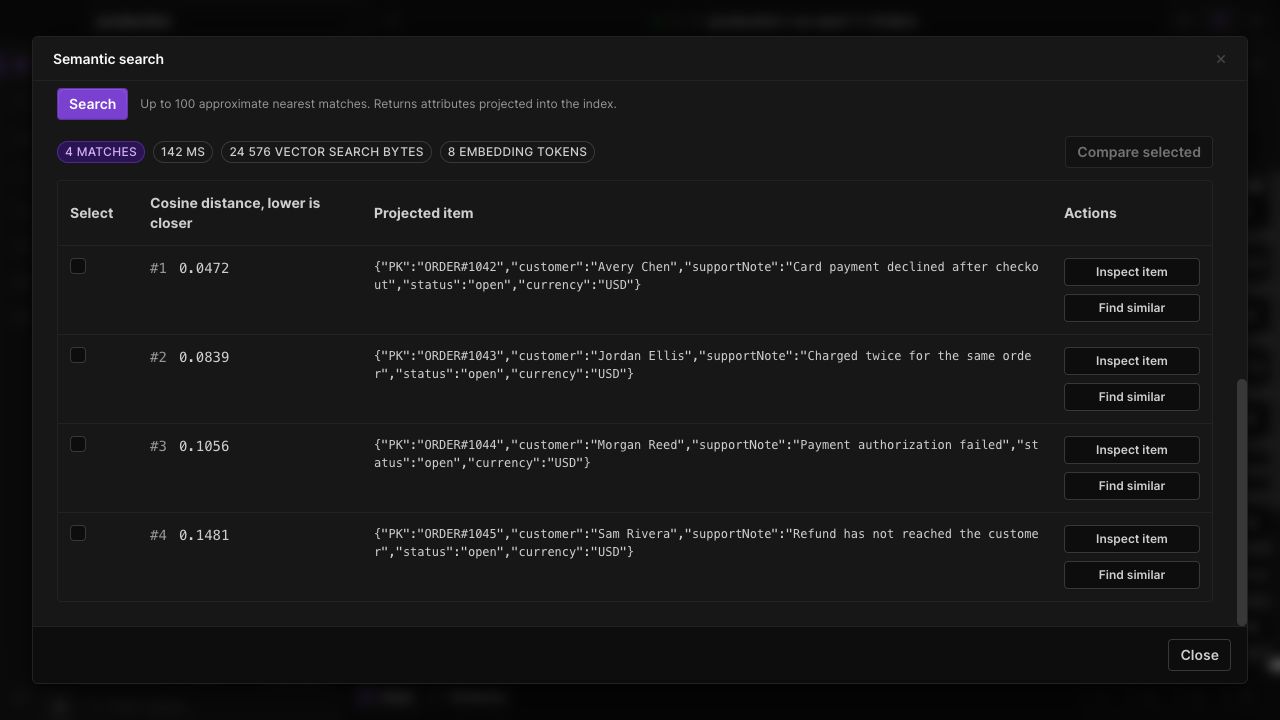
Once a real index is ready, Dynobase's semantic search lets you inspect matches in its desktop interface. Use the same model and dimensions as the stored embeddings when comparing queries.
Frequently Asked Questions
Does DynamoDB support vector search?
Can DynamoDB be a vector database for RAG?
How do I store embeddings in DynamoDB?
Is DynamoDB vector search strongly consistent?
How much does DynamoDB vector search cost?
Can I test vector search with DynamoDB Local?
Dynobase is a Professional GUI Client for DynamoDB
Start your 7-day free trial today