
DynamoDB tutorial for beginners: build an orders table

Written by Rafal Wilinski
Published: October 23rd, 2026
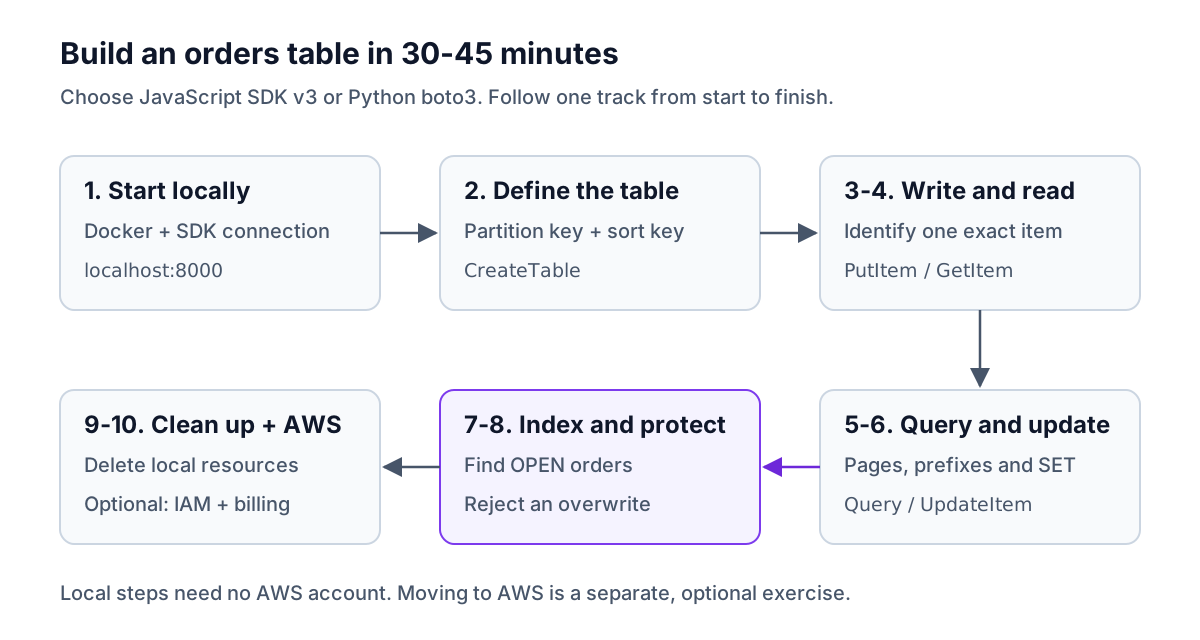
This DynamoDB tutorial builds a customer-orders table in 30-45 minutes using DynamoDB Local, with no AWS account required. You will write, read, query, update and delete orders, add a global secondary index (GSI), and prevent accidental overwrites with a conditional write. Every database step has an AWS SDK for JavaScript v3 example and a Python boto3 equivalent, with outputs from running both against the local database.
What will you build?
A small order-management data layer with three access patterns:
| Application question | DynamoDB operation | Key used |
|---|---|---|
| What is this customer's specific order? | GetItem | Customer ID and order ID |
| Which orders did this customer place in October? | Query on the table | Customer ID, plus an order-ID prefix |
| Which orders still need shipping, across customers? | Query on a GSI | Status, ordered by order ID |
The project is a set of runnable scripts, not a web application. Choose JavaScript or Python and follow that language throughout. The two versions use the same table; to try the other language, finish step 9 first, then start again at step 2 while the container is still running.
Allow about 5 minutes for the concepts, 5-10 for setup, 15-20 for operations, and 5-10 for cleanup and the AWS transition. Installing Docker for the first time can take longer.
DynamoDB concepts in five minutes
A table contains items. An item is a record composed of named attributes, such as customerId, status and totalCents. Items can have different non-key attributes; you do not declare every field when creating a table.
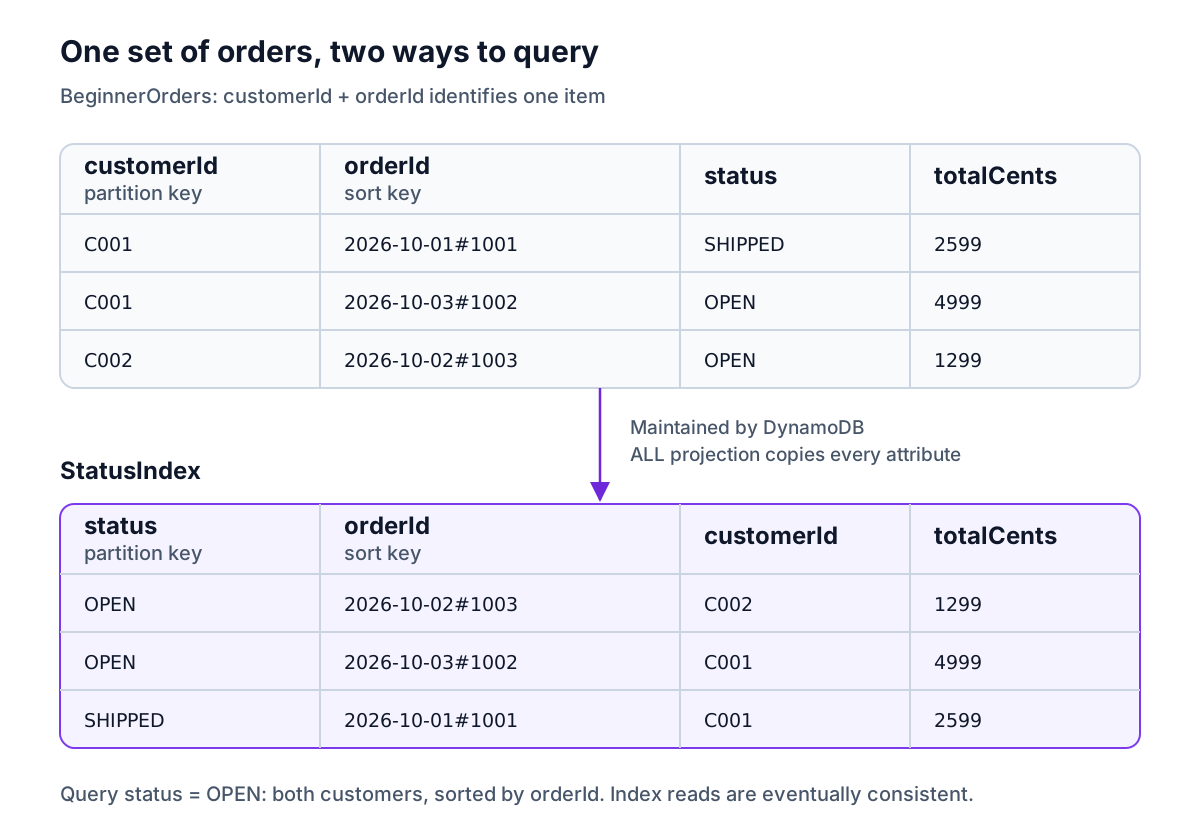
Our table, BeginnerOrders, has a composite primary key:
- Partition key:
customerId. Orders forC001share this value. A table query must name a specific customer. - Sort key:
orderId. A value such as2026-10-01#1001contains a date and an order identifier. Within one customer, results are ordered by this value. - Primary key: both together. Two items cannot have the same customer ID and order ID. A different order for the same customer is a different item.
The date prefix makes October queries possible. DynamoDB sorts String keys by UTF-8 bytes, so consistently formatted YYYY-MM-DD dates sort chronologically. The suffix distinguishes orders on the same day; it does not sort them by time of day. The sample uses fixed dates so its output stays reproducible.
A GSI provides another way to query the same data. We will add StatusIndex, with status as its partition key and orderId as its sort key. DynamoDB maintains the index when table items change. You write to the table, not directly to the index.
Capacity mode controls billing and throughput in AWS. On-demand (PAY_PER_REQUEST) charges for read and write requests without asking you to provision capacity. Provisioned mode reserves read and write capacity units, which you manage directly or with auto scaling. This tutorial uses on-demand; compare the capacity modes before choosing for a sustained workload. DynamoDB Local does not charge for requests or reproduce production capacity behavior.
These are DynamoDB's core components. The diagram shows our records after step 6, when the first order has shipped, and the index we create in step 7.
1. Start DynamoDB Local and connect
You need Docker running and either Node.js 22 or later with npm, or Python 3.10 or later with pip. AWS CLI v2 is optional, for the alternative table-creation command. The terminal commands below use Bash or Zsh; on Windows, use WSL with Docker integration.
Start a disposable database on port 8000:
Docker prints a container ID, which differs each time. 8000:8000 connects port 8000 on your computer to port 8000 inside the container. -inMemory discards the data when the container stops. -sharedDb lets both languages see the same database. For a persistent setup, use the DynamoDB Local setup guide.
Create a working directory:
Save each code block in the filename shown in its first comment, in this directory. Run scripts from this directory too. Each step's JavaScript and Python versions are alternatives, not commands to run one after the other.
JavaScript: install SDK v3 and connect
Run node 01-connect.mjs. The .mjs extension enables ES modules and top-level await. The document client accepts normal JavaScript values for item operations; raw handles table administration.
Python: install boto3 and connect
Run python 01-connect.py. Keep the virtual environment active for subsequent Python commands. The boto3 Table resource accepts Python dictionaries for item operations.
Output from either language on a fresh container:
The dummy credentials are intentional. The local database needs a signed SDK request but does not authenticate an AWS account. If the connection fails immediately after starting Docker, allow the server to finish starting and rerun the connection script. AWS documents the local setup and credentials in its installation guide.
2. Create the orders table
Use one of the three alternatives below. Each creates the same table. HASH means partition key, RANGE means sort key, and S means String. AttributeDefinitions declares only attributes used as keys, not status, totalCents or every possible item field.
JavaScript: CreateTable
Run node 02-create.mjs.
Python: create_table
Run python 02-create.py. Both versions wait for the table to become usable and print:
Optional CLI alternative
If you use this command, skip both SDK creation scripts. The first command prints the table name; the waiter finishes without output.
3. Write three orders with PutItem
Save this shared fixture as orders.json. Amounts are integer cents, so neither language needs a floating-point money value.
JavaScript: PutCommand
Run node 03-put.mjs.
Python: put_item
Run python 03-put.py. Output from either:
PutCommand calls the PutItem API. An unconditional put replaces the entire existing item with the same primary key; it does not merge fields. Rerunning this seed step also resets a shipped order to OPEN. Step 8 adds overwrite protection. See the PutItem behavior.
4. Read one order with GetItem
Provide both key attributes. ConsistentRead: true requests the latest committed version from the base table, useful when checking a write. It is not the default.
JavaScript: GetCommand
Run node 04-get.mjs.
Python: get_item
Run python 04-get.py. Output from either:
These scripts print selected returned fields, not the whole SDK response with request metadata. A missing item produces no Item field, which is why the scripts check it.
5. Query a customer's orders by sort-key prefix
Retrieve C001's October orders with customerId = :customer AND begins_with(orderId, :month). The partition-key equality selects the customer; the sort-key condition selects the month. A key condition cannot use arbitrary non-key attributes such as status on this table.
Set Limit to 1 deliberately to practice pagination with this tiny dataset. Each request evaluates at most one item here; keep passing LastEvaluatedKey back as ExclusiveStartKey until it disappears.
JavaScript: QueryCommand
Run node 05-query.mjs.
Python: query
Run python 05-query.py. Output from either, in ascending sort-key order:
Remove the demonstration Limit for normal use, but retain the loop. Query evaluates at most 1 MB per page even without a limit. Filters run after evaluation and can return an empty page that still has a continuation key. Filtering does not reduce the read capacity already consumed. Set ScanIndexForward to false in JavaScript or False in Python when you want descending sort-key order.
6. Update an order's status
Ship the first order with SET #s = :shipped. #s aliases the attribute name status, avoiding reserved-word conflicts, and :shipped supplies the value. The existence condition prevents UpdateItem from creating a partial new order if you mistype its key.
JavaScript: UpdateCommand
Run node 06-update.mjs.
Python: update_item
Run python 06-update.py. Output from either:
The amount remains unchanged. UpdateItem changes the specified attributes and can return their new values in the same response. See DynamoDB update expressions for counters, nested paths and removing attributes.
7. Add a GSI and query open orders
The table's key cannot answer “all open orders across customers” directly. Add StatusIndex with status as its partition key and orderId as its sort key. ProjectionType: ALL copies all item attributes into the index so the query can return the customer and amount too.
JavaScript: create the index
Run node 07-add-index.mjs once, then save and run node 07-query-index.mjs:
Python: create and query the index
Run python 07-add-index.py once, then save and run python 07-query-index.py:
Combined output from the two scripts, in either language:
The shipped order is absent; the open orders span both customers. Existing items are backfilled when the index is created. The query script checks the index's IndexStatus, not just the table's status, because an index under construction cannot yet be queried. A cloud backfill may take longer than this local waiting loop; rerun the query script later rather than requesting creation again.
GSI reads are eventually consistent: do not add ConsistentRead: true. Recently changed records can take time to appear in the index in AWS, even when the index is already active. Local results do not establish production replication timing.
This low-volume example uses only a few status values. At higher traffic, putting every open order under the same index partition-key value can concentrate writes. Review the GSI design guide before using this exact index for a busy fulfillment system. Index storage and index updates also add AWS cost.
Optional: see the table in a GUI
Connect Dynobase to DynamoDB Local using endpoint http://localhost:8000, region us-east-1 and the dummy credentials fake/fake. Open BeginnerOrders to inspect the items before cleanup. For the index query, choose StatusIndex and status = OPEN.
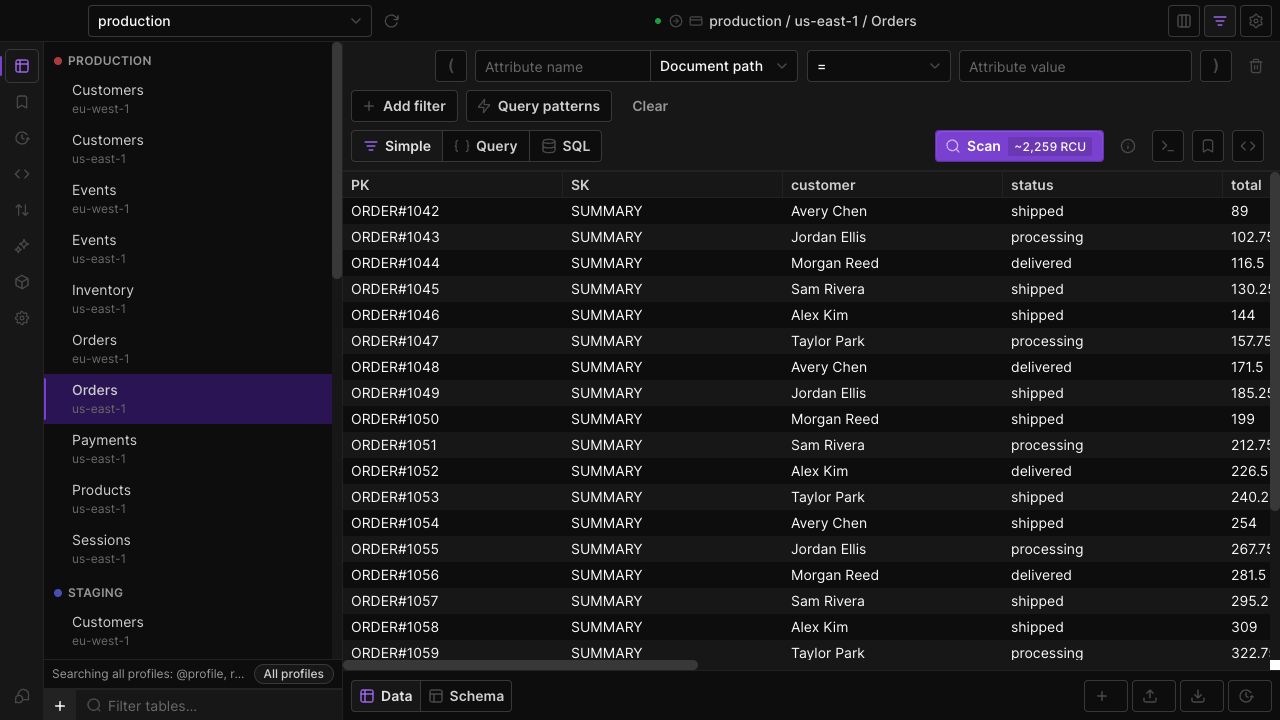
This existing product screenshot shows a different example Orders table; your tutorial table has customerId, orderId, status and totalCents.
8. Prevent overwrites with a conditional write
Try inserting a conflicting order with a total of one cent. attribute_not_exists(customerId) is evaluated against the item identified by the complete primary key, so it prevents replacing that order while still allowing other orders for C001. The condition and write are atomic; checking existence with a separate read would leave a race.
JavaScript: conditional PutCommand
Run node 08-conditional.mjs.
Python: conditional put_item
Run python 08-conditional.py. Output from either:
The error is the expected success case for this test. Only that error is handled; connection failures and other problems still stop the script. In an application, report a duplicate or conflict to the caller. Conditional writes and updates also support rules such as “ship only if the current status is OPEN.”
9. Delete an order and clean up
Delete C002's order, confirm it is gone with a consistent read, and delete the whole tutorial table. Deleting the table also removes its GSI and remaining items.
JavaScript: DeleteCommand and DeleteTable
Run node 09-cleanup.mjs.
Python: delete_item and delete_table
Run python 09-cleanup.py. Output from either:
If you want to try the other language, keep Docker running and return to step 2 after installing that language's dependencies and saving its client file. Otherwise stop the disposable container:
Output:
10. Move from DynamoDB Local to AWS
The local exercise is complete. This optional step requires an AWS account and can incur charges. The local examples above were executed against DynamoDB Local; the AWS configuration below was checked without creating cloud resources.
Choose on-demand and understand the free tier
Keep BillingMode: "PAY_PER_REQUEST" for a first cloud experiment with unpredictable traffic. The DynamoDB free tier includes 25 GB of Standard-class storage and 25 provisioned read capacity units plus 25 provisioned write capacity units, per Region and payer account. The capacity allowance does not cover on-demand read/write requests. The Standard storage allowance does apply to on-demand tables. Check AWS pricing for your Region and include index writes and storage in your estimate.
For eligible new accounts created on or after July 15, 2025, AWS offers $100 in sign-up credits and up to $100 more through qualifying activities. The Free account plan ends after six months or when its credits run out, whichever comes first; its account closes unless upgraded. These credits are separate from DynamoDB's ongoing allowances. See the current AWS account plan rules.
Configure credentials and IAM
- Use an AWS IAM Identity Center profile for development, or an IAM role when running on AWS. Do not replace
fakewith a long-lived key pasted into source code. - Give the application's identity
dynamodb:GetItem,PutItem,UpdateItem,DeleteItemandQueryon the tutorial table ARN. Also allowdynamodb:Queryon itsindex/StatusIndexARN. The AWS table-access policy example shows the resource structure. - The identity running the setup and cleanup scripts additionally needs
CreateTable,DescribeTable,UpdateTableandDeleteTablefor the table. Only the connection-check script needsListTables. Keep these administrative permissions separate from the application's runtime role. - Clear any dummy credential environment variables, select your authenticated development profile, and clear local endpoint overrides such as
AWS_ENDPOINT_URLorAWS_ENDPOINT_URL_DYNAMODB. Both SDKs can then use their default credential chains. Confirm the account and Region before running a write or cleanup script.
DynamoDB Local cannot validate your cloud IAM permissions. Test those in the intended AWS development account.
JavaScript: replace client.mjs
Replace the entire local client file with this version. The SDK selects the AWS endpoint and obtains credentials from the Node.js credential provider chain.
Python: replace client.py
Boto3's credential chain supplies the authenticated profile or role:
Run steps 2-8 again in your chosen language to create the cloud table and seed the three example orders. The AWS CLI alternative would also need its local endpoint and dummy credential assignments removed; changing the SDK client file does not change CLI commands. Switching endpoints does not upload local data. For this small exercise, rerunning the fixture is the migration.
Cloud table creation and index backfill are asynchronous. If the step 2 waiter times out, check the existing table's status before continuing; do not blindly recreate it. For step 7, rerun only the query script while the index finishes. When finished experimenting, run step 9 with the AWS client to remove the cloud table and index too. Stopping Docker affects only the local database.
Common beginner mistakes
| Symptom | Cause and fix |
|---|---|
| Connection refused or endpoint connection error | Start Docker, wait a few seconds, and verify the client uses http://localhost:8000 over plain HTTP, not HTTPS. |
ResourceInUseException during creation | The table already exists. Run only one creation alternative per clean database. |
ResourceNotFoundException | Check the table name and endpoint. In AWS, also check the account, Region and table/index readiness. |
| “The provided key element does not match the schema” | GetItem, UpdateItem and DeleteItem require both String keys for this table. |
Query cannot use status | Query StatusIndex instead of the base table. The key condition must match the chosen table or index. |
| Python rejects a float | Boto3 uses Decimal for non-integer numbers. This fixture uses integer cents. |
| A duplicate put changes data | An unconditional put replaces the entire item. Add the condition from step 8. |
| Local data disappears after stopping Docker | This tutorial deliberately uses -inMemory; restart and seed again, or use persistent local storage. |
Local testing proves that these requests work against the local API. It does not prove AWS throttling, billing, IAM enforcement or propagation timing. AWS lists the differences from the managed service.
What should you learn next?
Use this as the first lab in a DynamoDB course, then extend the same project:
- Read DynamoDB keys and data types. Add a second order on the same date without overwriting the first.
- Compare Scan and Query. Explain why a status filter on a full-table scan is different from querying
StatusIndex. - Work through single-table design. Add customer profile items and decide which access patterns need an index before writing code.
- Apply the DynamoDB best practices to key distribution, item sizes and operational checks.
Keep the Node.js examples or boto3 examples nearby as a reference. For additional projects, browse more tutorials.
Frequently Asked Questions
Can I learn DynamoDB without an AWS account?
How long does this DynamoDB tutorial take?
Is DynamoDB suitable for beginners?
Is an AWS DynamoDB tutorial free to run?
Why use Query instead of Scan when getting started?
Does finishing this tutorial replace a DynamoDB course?
Dynobase is a Professional GUI Client for DynamoDB
Start your 7-day free trial today