
DynamoDB DAX pricing calculator and cost break-even

Written by Rafal Wilinski
Published: October 23rd, 2026
DynamoDB Accelerator (DAX) costs the hourly node price multiplied by the number of nodes and billed hours, starting at $0.04 per node-hour for dax.t3.small in US East (N. Virginia). At 730 hours, that is $29.20 for one node or $87.60 for three, before surplus CPU and data transfer. DAX adds a fixed cluster bill to your DynamoDB bill, so it saves money only when the read charges it avoids exceed that extra cost.
Prices below were checked on October 23, 2026. The calculator covers all 36 Regions and 1,060 node prices in the AWS DAX price-list snapshot, published October 9, 2026. For cache behavior, client integration and consistency details, see how DynamoDB DAX works.
DAX pricing calculator
Select the Region where your DynamoDB table runs, then the node type and total node count. The second panel compares a constant rate of individual item reads with and without DAX, using that Region's current public DynamoDB Standard on-demand read price. It includes the read bill for cache misses.
The defaults use three r7i.large nodes, 730 hours, 1,000 eventually consistent reads per second, 4 KB items and a 90% hit rate. Change the request rate to 10,000 to see a workload where the same cluster can pay for itself. Neither configuration is a claim that a particular node can sustain that traffic; benchmark the workload before selecting hardware.
DAX cluster cost
2 vCPUs; 16 GiB node memory. Listed prices do not guarantee launch availability for older node families.
1 to 11, including the primary. Calculations use whole nodes, rounded down. Use at least 3 across Availability Zones for production.
Default: 730. Range: 0 to 744. Each node's partial hour rounds up; this estimate assumes one continuous run per node.
- 3 nodes × 730 billed hours × $0.255
- $558.45
- Surplus CPU charges
- $0.00
- Monthly DAX cluster estimate (USD)
- $558.45
Nodes cost $0.765 per hour even when idle. Traffic estimates below use 730 running hours. Invalid or negative amounts calculate as zero; node count has a minimum of one.
Is DAX cheaper than reading DynamoDB directly?
Compare individual GetItem reads on a Standard on-demand table in US East (N. Virginia). The read rate is $0.125 per million read request units (RRUs).
Use the average across the running hours above, including quiet periods, not peak traffic. Maximum input: 1 trillion.
Up to 400 KB. Each read rounds up to a 4 KB block, with a minimum of one block. Calculate different item sizes separately.
0.5 RRU per read at this item size.
0 to 100%. Misses still incur DynamoDB read charges.
- DynamoDB reads without DAX / month
- $164.25
- DynamoDB reads still billed with DAX / month
- $16.43
- DAX cluster + remaining reads / month
- $574.88
- Net monthly difference
- $410.63 more with DAX
- Break-even cache hit rate
- 340.00% (above 100%; not possible)
This is a cost comparison, not a node capacity benchmark. Excludes writes, storage, transfer, taxes, discounts, and extra reads from transactional writes. Query and Scan need separate evaluated-data estimates. All compared traffic is assumed to occur while DAX is running.
Prices checked 2026-10-23: 36 Regions in the AWS DAX price list, published 2026-10-09. Selected Region's DynamoDB read prices published 2026-09-11.
The calculation covers traffic during the running hours entered. If an application also reads DynamoDB while the cluster is absent, those direct reads belong in both alternatives and cancel out of the difference. For the rest of the table bill, including writes and storage, use the DynamoDB pricing calculator.
DAX node prices in us-east-1
These are USD prices per individual node, not per cluster. Monthly values use 730 hours and exclude CPU credits and transfer. The source is the regional AmazonDAX offer file. Node types with identical rates are grouped; the calculator lists them separately.
| DAX node type | Per node-hour | One node, 730 hours | Three nodes, 730 hours |
|---|---|---|---|
dax.t3.small, dax.t2.small | $0.040 | $29.20 | $87.60 |
dax.t3.medium, dax.t2.medium | $0.080 | $58.40 | $175.20 |
dax.r7i.large, dax.r5.large | $0.255 | $186.15 | $558.45 |
dax.r7i.xlarge, dax.r5.xlarge | $0.509 | $371.57 | $1,114.71 |
dax.r7i.2xlarge, dax.r5.2xlarge | $1.017 | $742.41 | $2,227.23 |
dax.r7i.4xlarge, dax.r5.4xlarge | $2.034 | $1,484.82 | $4,454.46 |
dax.r7i.8xlarge, dax.r5.8xlarge | $4.069 | $2,970.37 | $8,911.11 |
dax.r7i.12xlarge, dax.r5.12xlarge | $6.117 | $4,465.41 | $13,396.23 |
dax.r7i.16xlarge, dax.r5.16xlarge | $8.137 | $5,940.01 | $17,820.03 |
dax.r7i.24xlarge, dax.r5.24xlarge | $12.234 | $8,930.82 | $26,792.46 |
dax.r4.large, dax.r3.large | $0.269 | $196.37 | $589.11 |
dax.r4.xlarge, dax.r3.xlarge | $0.537 | $392.01 | $1,176.03 |
dax.r4.2xlarge, dax.r3.2xlarge | $1.074 | $784.02 | $2,352.06 |
dax.r4.4xlarge, dax.r3.4xlarge | $2.148 | $1,568.04 | $4,704.12 |
dax.r4.8xlarge, dax.r3.8xlarge | $4.295 | $3,135.35 | $9,406.05 |
dax.r4.16xlarge | $8.590 | $6,270.70 | $18,812.10 |
The catalog includes older T2, R3 and R4 entries. A published price is not a guarantee that you can launch that family in a particular Availability Zone. Check available node types before planning a new deployment. R7i and R5 have matching us-east-1 rates for the sizes listed, but matching prices do not establish matching workload performance.
T-family nodes suit intermittent CPU use. R-family nodes provide fixed performance for sustained workloads. Size for your working set, read rate, writes through DAX and failure headroom. Read replicas hold copies of cached data: six nodes do not give one cache six times the memory of an individual node. AWS's cluster sizing guidance recommends at least three nodes in different Availability Zones for production.
How DAX billing works
Every node is billed, including replicas and idle nodes
A DAX cluster has one primary and up to ten read replicas. You pay for all of them. Three r7i.large nodes at $0.255 each cost $0.765 per hour whether they receive a million requests or none. DAX does not replace the table's storage or write charges, and it does not make cache misses free.
The DAX pricing rules bill partial node-hours as full hours. A three-node r7i.large cluster running for 1.2 hours therefore costs 3 × 2 × $0.255 = $1.53, before any other charges. The calculator rounds one continuous run per node. If you delete and recreate clusters repeatedly, calculate and round each separate run rather than combining all fractional hours first.
730 hours is a budgeting convention, not the length of every month. Use the actual billed hours when reconciling an invoice. Reducing requests does not reduce an existing cluster's node-hour cost; removing unused nodes or deleting the cluster does.
T3 surplus CPU credits can increase the price
DAX T3 runs in unlimited mode. Sustained use above the baseline over a rolling 24-hour period can incur surplus CPU charges. The public pricing page states $0.096 per vCPU-hour, so 100 billable surplus vCPU-hours add $9.60 at that rate.
Enter surplus CPU usage for the whole cluster in the calculator. Do not multiply it by the node count again, and do not enter total CPU consumption. One CPU credit represents one vCPU-minute, so 6,000 charged surplus credits equal 100 vCPU-hours. T2 uses standard mode and falls back toward baseline performance as credits run out; it does not have the same paid unlimited bursting. These behaviors are documented in DAX T3/T2 burstable instances.
There is a source discrepancy: some regional price-list files publish a different CPU rate. For example, the Taipei offer lists $0.0864 per vCPU-hour, while the public page describes $0.096 across Regions. The calculator uses the regional CPU rate when present and the public-page rate otherwise, and flags a difference. Confirm the applicable rate with AWS before budgeting a CPU-heavy T3 workload.
Data transfer is separate
AWS lists no EC2-to-DAX transfer charge within the same Availability Zone. For EC2 and DAX in different Availability Zones of the same Region, normal EC2 transfer pricing applies on the EC2 side; the DAX side has no ingress or egress transfer charge. The calculator excludes transfer because request rate and item size alone do not describe connection placement or actual network bytes. Include your topology's transfer charges when comparing a small expected saving.
Do reserved nodes or Database Savings Plans cover DAX?
The current DAX catalog publishes on-demand terms only, with no reserved-node purchase option. DynamoDB reserved capacity buys eligible table read/write capacity, not DAX node-hours.
AWS describes Database Savings Plans coverage for DynamoDB as on-demand and provisioned throughput in its Savings Plans FAQ. The current us-east-1 Database Savings Plans rate file lists DynamoDB throughput usage types and no AmazonDAX node usage. This calculator therefore applies no Savings Plans discount to DAX. Do not infer that r7i DAX nodes qualify merely because generation-seven instances in other supported database services do.
If your direct DynamoDB reads already receive a commitment discount, their avoided marginal cost is lower than the public price used here. Recalculate with that effective rate before treating the displayed saving as a reduction to your invoice. Removing usage also does not remove an existing commitment payment.
Worked DAX cost examples
All three examples use us-east-1 prices and 730 continuous hours. They illustrate billing, not a capacity sizing recommendation.
| Deployment | Calculation | Monthly node cost |
|---|---|---|
| Development: one t3.small | 1 × $0.04 × 730 | $29.20 |
| Production starting point: three r7i.large | 3 × $0.255 × 730 | $558.45 |
| Large cluster: eleven r7i.4xlarge | 11 × $2.034 × 730 | $16,333.02 |
The development cluster has no replica to take over if its only node fails. Its low price should not be used as the production availability budget. With 100 billable surplus CPU hours at the public rate, its total rises from $29.20 to $38.80.
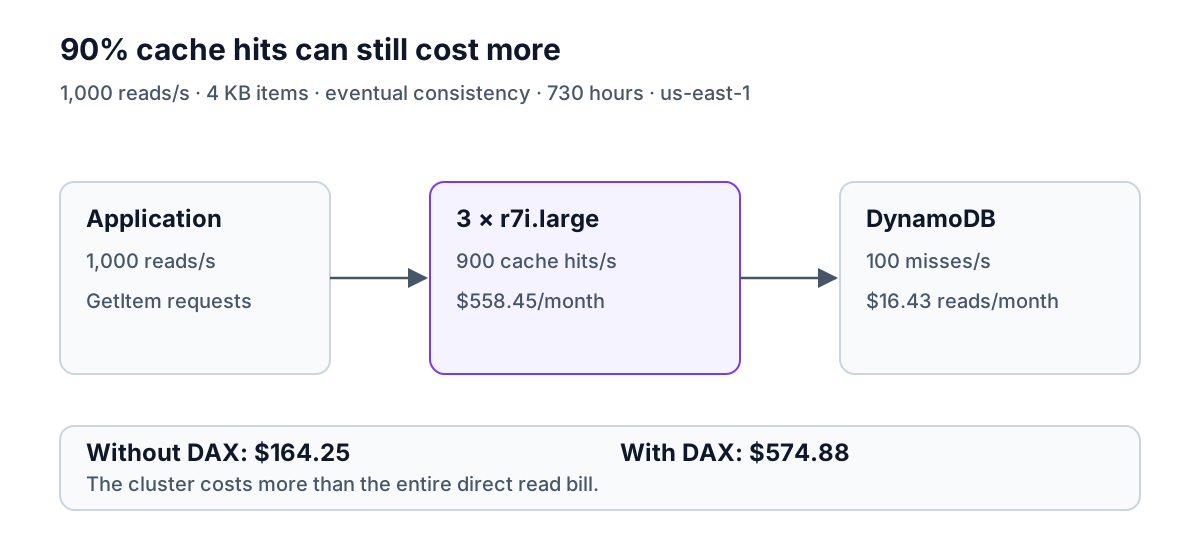
The three-node production example has one primary and two replicas. Add remaining DynamoDB reads and any transfer charges to its $558.45. With a sustained 1,000 reads/second of 4 KB items and 90% hits, that remaining read bill is $16.43, giving approximately $574.88/month for DAX plus reads.
The eleven-node example reaches the cluster's node-count limit. At 90% hits, it needs about 110,489 eventually consistent 4 KB reads per second just to offset its $16,333.02 node bill at the Standard on-demand price. That threshold is arithmetic, not a promise that this configuration handles the traffic. If the workload needs that many nodes for memory, writes or availability, assess those requirements separately from the cost threshold.
When does DAX break even against on-demand reads?
DynamoDB Standard on-demand reads in us-east-1 cost $0.125 per million read request units. One eventually consistent read of an item up to 4 KB uses half an RRU, so one million such reads cost $0.0625. AWS cut on-demand throughput prices by 50%, effective November 1, 2024; calculations using the older $0.25 per million RRUs overstate the value of cached reads by a factor of two. See the AWS price-cut announcement.
For individual reads, the model is:
- Read units per request: round item size up to a 4 KB block, then multiply by 0.5 for eventual consistency or 1 for strong consistency.
- Monthly direct read cost: reads/second × 3,600 × running hours × read units/request × price per million RRUs ÷ 1,000,000.
- Cost with DAX: cluster cost + direct read cost × (1 − cache hit rate).
- Break-even hit rate: cluster cost ÷ direct read cost, for cacheable reads. A result above 100% means the cluster cannot break even at that request rate.
Use decimal fractions in those formulas: a 90% hit rate is 0.9. The calculator accepts percentages. Item size includes DynamoDB attribute names and values, not just the returned JSON payload; the item size and capacity calculator helps estimate it.
At 1,000 reads per second, the production cluster cannot pay for itself
At 730 hours, 1,000 requests per second means 2.628 billion reads. For 4 KB eventual reads, that is 1.314 billion RRUs and $164.25/month without DAX. A three-node r7i.large cluster already costs $558.45, even before it misses once.
At 90% hits, DAX avoids $147.825 of reads but leaves $16.425. The combined bill is $574.875 before rounding, about $410.63 more per month than reading directly. Even a perfect hit rate cannot fix the gap: the required hit rate is 340%.
At 10,000 reads per second, the break-even hit rate is 34%
The same item size and consistency at ten times the traffic cost $1,642.50/month directly. Three r7i.large nodes break even at $558.45 ÷ $1,642.50 = 34% hits. At 90% hits, the combined cost is $558.45 + $164.25 = $722.70, saving $919.80/month before transfer and other excluded charges.
Six of the same nodes cost $1,116.90 and require 68% hits at that rate. Their larger fixed cost leaves less room for misses. The chart plots the avoided read bill against both cluster costs using the same formulas as the calculator.
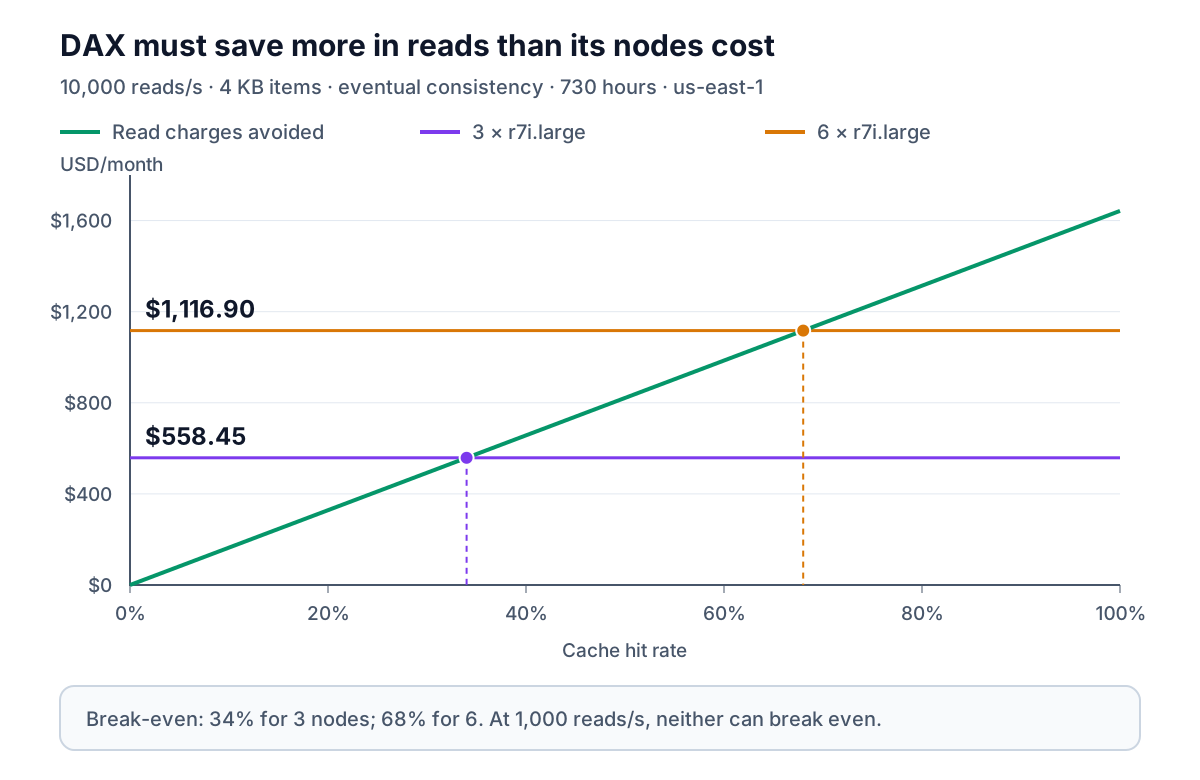
These examples show why a high hit rate alone is insufficient. You also need enough billable reads to avoid. At 90% hits, the three-node r7i.large cluster needs about 3,778 reads/second of items up to 4 KB to break even. For 8 KB items, each read uses twice the units, so the corresponding threshold is about 1,889 reads/second. Measure sizes by workload: rounding the average item size once can misprice a mixture of small and large items.
Strongly consistent reads have no cache-cost break-even
DAX passes strongly consistent reads through to DynamoDB and does not satisfy them from its cache. Selecting strong consistency in the calculator therefore uses a 0% effective hit rate, whatever hit rate was entered earlier. At the default 1,000 reads/second, the direct strong-read bill is $328.50; adding the $558.45 cluster makes it $886.95 with no read savings.
Do not compare uncached strong reads with cached eventual reads as if they offered the same semantics. That changes the application's consistency contract. AWS documents the behavior under strongly consistent and transactional reads; the read consistency guide explains the application trade-off.
When DAX saves money, and when latency is the reason
DAX can lower the combined bill when repeated, cacheable reads generate a large enough charge and the needed cluster is small enough. A small hot working set, sustained read traffic and a tolerance for cached values make that arithmetic more favorable. Larger items can increase avoided read cost, but also increase the memory and network work required of the cache.
For a modest read bill, low hit rate, mostly unique lookups, write-heavy traffic or mandatory strong reads, the calculation often rules out cost savings before you benchmark anything. You may still need DAX for lower read latency or to reduce repeated hot-key traffic. AWS positions DAX around microsecond access to eventually consistent cached data; that is a reason to measure application latency, not a guarantee for every request. Its DAX use cases describe the intended workloads.
Query and Scan need a separate cost model. Their consumption depends on evaluated data, including data rejected by filters, and a cached query result can represent many items. Do not enter one item's size and treat one Query call as one GetItem. Similarly, transaction-related background reads and writes are outside this calculator's scope.
Alternatives to paying for a DAX cluster
| Option | Cost consideration | Application work |
|---|---|---|
| DynamoDB directly | No cache node bill; pay the table's actual read usage or provisioned capacity | Existing DynamoDB client; verify latency meets requirements |
| In-process cache | Uses application memory; separate processes can have different hit rates and duplicate data | Implement expiry, size limits and invalidation suitable for the application |
| ElastiCache for Valkey | Compare the chosen node or serverless deployment, memory, request processing and transfer charges | Implement a cache-aside or other caching strategy; it is not a DynamoDB client replacement |
| DAX | Fixed per-node cost plus misses and possible extras | Use a DAX client and understand cache consistency and failure behavior |
ElastiCache pricing differs between node-based and serverless deployments. Compare complete configurations rather than headline starting rates; DynamoDB versus ElastiCache covers the different roles. An in-process cache is a reasonable experiment when a small set of repeated values is local to each application process. It is less helpful when each process sees too few repeat accesses to warm its own cache.
For predictable traffic, also compare on-demand and provisioned DynamoDB capacity before introducing caching infrastructure. A cache and a capacity-mode change solve different problems. The DynamoDB caching guide covers the broader design choices.
How to lower DAX cost without hiding the trade-offs
- Measure the direct read bill first. Use the same time period, Region, consistency and workload in both alternatives. A $100 avoidable read bill cannot fund a $558.45 cluster.
- Use observed hit rates. Separate item and query cache behavior, and include cold starts and quiet periods in the measurement. A peak-period hit rate can overstate monthly savings.
- Size for failure as well as steady state. Keep the production availability requirement when evaluating fewer replicas. A cheaper one-node cluster is a different reliability choice.
- Watch surplus CPU on T3. Compare the full T3 cost with a fixed-performance node if sustained bursting is common. The smallest hourly node rate is not necessarily the smallest invoice.
- Review the working set and expiration policy. Keeping useful items cached longer can reduce misses, but only if the application accepts that freshness window. More cached data may require larger nodes.
- Delete unused development clusters. Idle nodes keep costing money. Include creation and warm-up time when estimating a short-lived test environment.
- Recheck cost after traffic changes. A cluster justified during a launch can become more expensive than direct reads after traffic falls. Revisit the break-even threshold alongside latency requirements.
Dynobase's monitoring view exposes DynamoDB table metrics when you establish that baseline. For DAX-specific hit rates and node metrics, use the separate DAX CloudWatch metrics described in Monitoring DynamoDB Accelerator.
Frequently Asked Questions
How much does DynamoDB DAX cost?
What is the DAX t3.small price?
Is DAX cheaper than DynamoDB on-demand reads?
Which DAX node types can I price?
Does DAX charge for idle nodes or partial hours?
Can DAX reduce strongly consistent read costs?
Dynobase is a Professional GUI Client for DynamoDB
Start your 7-day free trial today